


In an era where we capture thousands of images a year, the "find" is often much harder than the "take." We've all been there: scrolling endlessly through generic filenames like IMG_4829.jpg trying to find that one specific memory or client asset.
Image tagging software is the solution to this digital chaos. By using metadata—keywords, categories, and increasingly powerful AI—these tools act as a high-tech librarian for your visual world. Whether you're a professional photographer managing a decade of work or a marketing manager organizing brand assets, the right software can save you hours of manual labor.
In this post, we're diving deep into the five best image tagging solutions in 2026, ranging from industry-standard editing suites to privacy-focused open-source powerhouses.
1. Adobe Lightroom Classic
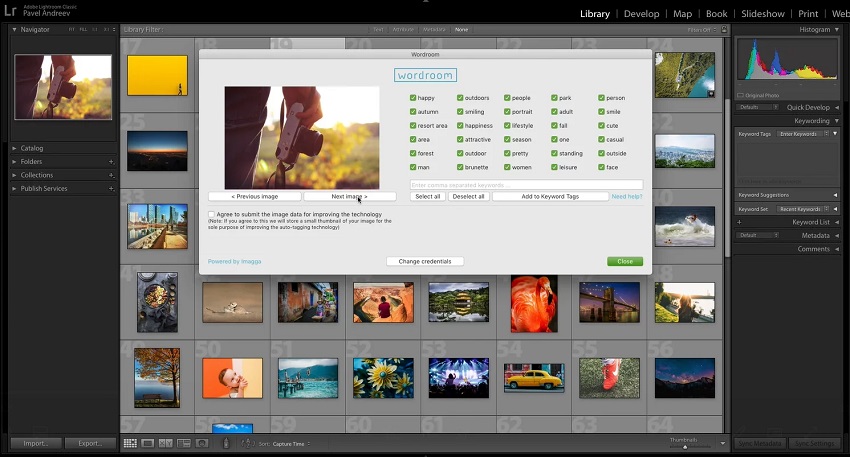
Adobe Lightroom Classic remains the definitive choice for professional photographers. While many associate it primarily with editing, its Catalog system is a sophisticated database built to manage hundreds of thousands of images across multiple hard drives.
Lightroom Classic doesn't just "tag" photos; it creates a structured environment for them. It uses a non-destructive workflow, meaning all your tags, ratings, and keywords are stored in a central catalog file or as sidecar "XMP" files, keeping your original RAW files untouched. It is designed for users who want total control over their taxonomy.
Key Features
- Hierarchical Keywording: Organize tags into "parent" and "child" categories (e.g., Vacation > 2026 > Japan). When you tag an image as "Japan," it automatically inherits the parent tags.
- AI-Powered Facial Recognition: Automatically scans your library to identify people. You can name a face once, and Lightroom will find all other instances of that person, even as they age.
- Assisted Culling (2026 Update): A new AI feature that automatically tags photos based on technical quality—flagging blurry shots or closed eyes so you can quickly filter them out.
- Smart Collections: These act like "saved searches." You can set rules (e.g., "All photos tagged 'Landscape' with a 5-star rating") and the collection will update automatically as you add more tags.
- Batch Tagging on Import: Apply copyright info, location data, and general keywords to thousands of photos simultaneously as they move from your SD card to your drive.
Pros
- Industry Standard: Compatible with almost every other pro tool and plugin.
- Deep Metadata Control: Support for EXIF, IPTC, and XMP is unmatched.
- Scalability: Easily handles libraries of 100,000+ images without breaking.
Cons
- Subscription Only: You never truly "own" the software; it requires a monthly fee.
- Hardware Intensive: Can be slow and laggy on older computers, especially during face scanning.
- Steep Learning Curve: The interface is dense and can be overwhelming for hobbyists.
2. Excire Foto
Excire Foto is a standalone AI-powered photo manager that prides itself on speed. Unlike Lightroom, which added AI features over time, Excire was built from the ground up to let artificial intelligence do the heavy lifting of organization.
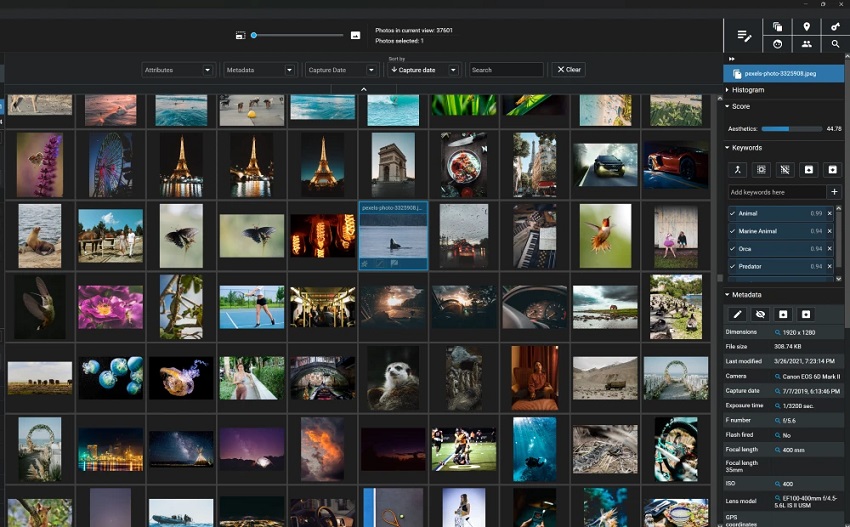
Excire Foto's philosophy is "Search, don't sort." When you import your photos, the software immediately analyzes every pixel using five different proprietary AI engines. It automatically generates keywords for objects, colors, and even moods without you lifting a finger. It operates entirely locally, meaning your photos aren't sent to a cloud for analysis, which is a massive win for privacy-conscious users.
Key Features
- X-tags AI (Auto-Tagging): Automatically applies descriptive keywords (e.g., "mountain," "vehicle," "smiling") to every image during import.
- X-prompt AI (Natural Language Search): This is the "killer feature." You can type complex phrases like "golden retriever playing in autumn leaves" or "sunset at the Eiffel Tower," and it will find the exact match even if you never tagged it.
- X-tetics AI (Aesthetic Scoring): The software assigns an "aesthetic score" to your photos, helping you automatically tag and surface your "best" shots for a portfolio.
- Advanced Face & People Search: Go beyond simple face grouping. You can search for specific attributes like "age," "gender," or even "people with eyes open/closed."
- GPS & Metadata Editor: Quickly find photos based on location and add GPS coordinates to images that lack them using a simple map interface.
Pros
- Blazing Fast AI: Can scan and tag thousands of images with high accuracy in minutes.
- Privacy First: All AI processing happens on your local machine, not in the cloud.
- One-Time Purchase: No monthly subscription fees like Adobe.
Cons
- No Editing Tools: It is strictly for organization; you'll need a separate program (like Photoshop) for editing.
- Initial "Sync" Time: The very first import of a large library takes a while as the AI "learns" your photos.
- Interface Utility: The UI is clean but can feel a bit "utilitarian" compared to modern creative apps.
3. ACDSee Photo Studio Ultimate
ACDSee Photo Studio Ultimate is designed for those who find Lightroom too restrictive and cloud-dependent. It combines Digital Asset Management (DAM) with professional-grade RAW editing and layered adjustments (similar to Photoshop), making it a comprehensive all-in-one solution.
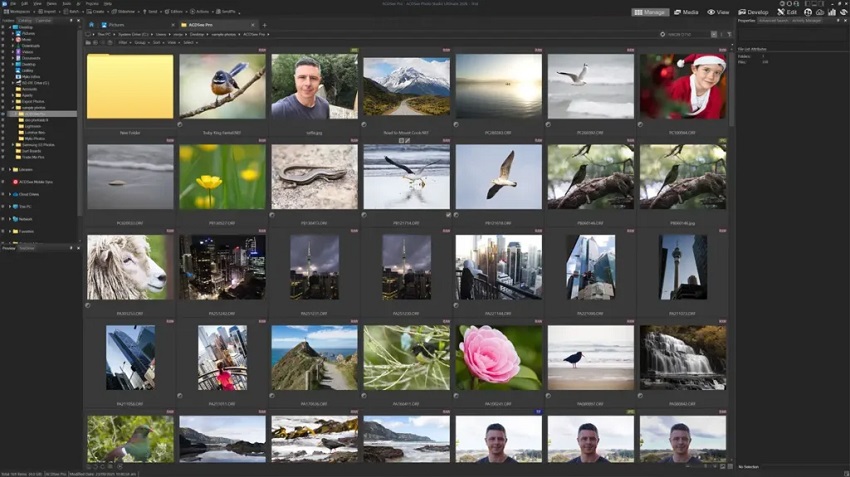
What sets ACDSee apart is its "No Import" philosophy. Unlike Lightroom, which requires you to import photos into a database, ACDSee lets you browse your computer's folders directly. The software then layers its tagging and AI tools on top of your existing folder structure, making it one of the fastest ways to start organizing a messy hard drive.
Key Features
- AI Keywords: In the 2025 version, the AI automatically scans your images to suggest keywords like "beach," "mountain," or "dog." You can accept or deny these in batches to quickly populate your metadata.
- AI-Driven People Mode: A dedicated space to manage portraits. The software detects faces and suggests names, and the 2025 update allows for even faster batch-labeling of unnamed faces.
- Advanced AND/OR Search: You can build incredibly specific searches, such as "Photos tagged 'Summer' AND 'Japan' BUT NOT 'City'."
- Activity Manager: A new background task monitor that lets you see exactly how the AI is progressing with face detection and keyword creation without slowing down your editing.
- Location Data & Geotagging: A built-in map interface allows you to drag and drop photos onto a location to instantly embed GPS coordinates.
Pros
- Complete Workflow: Handles everything from file management and RAW developing to complex layered editing.
- Blazing Speed: Navigates large folders almost instantly since it doesn't rely on a restrictive central database.
- Privacy Focused: All AI tagging and facial recognition are processed locally on your device—no cloud uploads required.
Cons
- Windows Only: There is a Mac version, but it lacks many of the advanced AI and Ultimate features found on PC.
- Busy Interface: With so many modes (Manage, Media, View, Develop, Edit), the UI can feel cluttered and intimidating.
- AI Hit-or-Miss: While fast, the AI auto-tagging isn't quite as nuanced as specialized tools like Excire Foto.
4. Canto
Canto is a leader in the DAM space, acting as a "single source of truth" for a company's visual identity. It's designed to handle everything from logos and brand videos to thousands of product photos, ensuring that everyone in a global organization is using the correct, approved version of an image.
In a corporate setting, manual tagging is the enemy of productivity. Canto solves this with embedded AI that automatically tags assets the moment they are uploaded. Its primary goal is to eliminate the "where is that file?" email by making every piece of content instantly discoverable through a highly organized, searchable cloud library.

Key Features
- AI Smart Tags & Auto-Tagging: As soon as you upload an image, Canto's AI analyzes it and applies descriptive keywords (e.g., "outdoor," "blue sky," "business meeting").
- AI Visual Search: A 2026 standout feature that allows users to find assets using natural language queries (e.g., "man wearing a red hat in a park") even if those specific words weren't manually tagged.
- Facial Recognition: Perfect for organizations that need to track talent or staff photos. It can identify individuals across thousands of files, which is a huge time-saver for HR and PR departments.
- Custom Metadata Schemas: Unlike consumer apps, Canto lets you create custom fields specific to your business (e.g., "SKU Number," "Campaign Year," or "License Expiration Date").
- OCR (Optical Character Recognition): The AI can "read" text inside images or PDFs, making documents and graphics searchable by the words they contain.
Pros
- Effortless Collaboration: Branded "Portals" make it easy to share specific sets of tagged images with external vendors or the press.
- Superior AI Discovery: Features like AI Visual Search significantly reduce the time spent on manual metadata entry.
- Robust Permissions: Admins have granular control over who can see, tag, or download specific assets.
Cons
- High Cost: This is enterprise software; it's significantly more expensive than consumer tools and uses quote-based pricing.
- Steep Setup: To get the most out of it, you need a clear organizational strategy from the start, which can be time-consuming.
- Performance Lag: Some users report occasional slowness when browsing or uploading massive libraries of high-res files.
5. Digikam
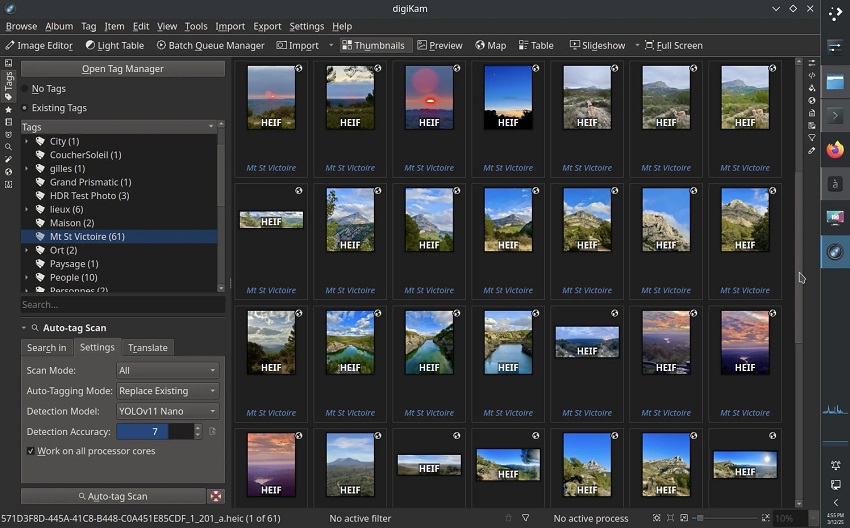
digiKam is a professional, free, and open-source photo management suite that runs natively on Linux, Windows, and macOS. It is built by photographers, for photographers, with a focus on managing massive collections (often exceeding 100,000+ images) without ever needing a cloud connection or a subscription.
digiKam treats metadata as sacred. It offers one of the most robust tagging systems in existence, allowing you to write your tags directly into the image files (EXIF, IPTC, XMP) or into "sidecar" files. This ensures your organization survives even if you switch to different software later. With the 2026 updates, it has integrated sophisticated Deep Learning models for those who want AI speed without sacrificing the open-source ethos.
Key Features
- AI Auto-Tags (New in v9.0): Uses advanced neural networks (like YOLOv11) to scan your library and automatically suggest keywords for objects, scenes, and animals.
- Advanced Face Management: Features a rewritten AI pipeline that is 25-50% faster than previous versions. It uses "Face Image Quality Assessment" (FIQA) to ignore blurry or pixelated faces, making its recognition much more accurate.
- Hierarchical Tagging & Tag Manager: Create complex trees of tags and use the dedicated "Tag Manager" to import or export entire keyword vocabularies (supporting the Controlled Vocabulary format).
- Aesthetic Detection: The AI assesses your photos and assigns "Pick Labels" based on image quality, helping you tag your best shots automatically.
- Maintenance Tool: A background processing engine that can handle face detection, auto-tagging, and metadata syncing across your entire library while you work on other tasks.
- OCR Text Converter: It can "read" text within your images (like signs or documents) and convert it into searchable metadata tags.
Pros
- Completely Free: No subscriptions, no hidden fees, and no "pro" versions.
- Ultimate Privacy: All AI models run locally on your computer; no data is ever sent to the cloud.
- Universal Metadata: Offers the most granular control over metadata standards (XMP/IPTC) of any software on this list.
Cons
- Steep Learning Curve: The interface is incredibly dense with features, which can be overwhelming for beginners.
- "Utilitarian" Design: The UI looks more like a technical tool than a modern creative app.
- No Official Mobile App: Unlike Lightroom or Google Photos, there is no companion app for tagging on the go.
Bonus: Aiarty Image Enhancer (The "AI Prep" Tool)
Before you can tag your photos, they need to be clear enough for the AI to 'see.' If you're working with old or low-quality files, here is the best tool to prep them for your new library.
Aiarty Image Enhancer isn't a library manager—it's the specialized AI post-processing engine you use before you start tagging. If you're dealing with grainy night shots, blurry travel photos, or tiny web archives, Aiarty reconstructs those images so your tagging software can identify them with 100% accuracy.
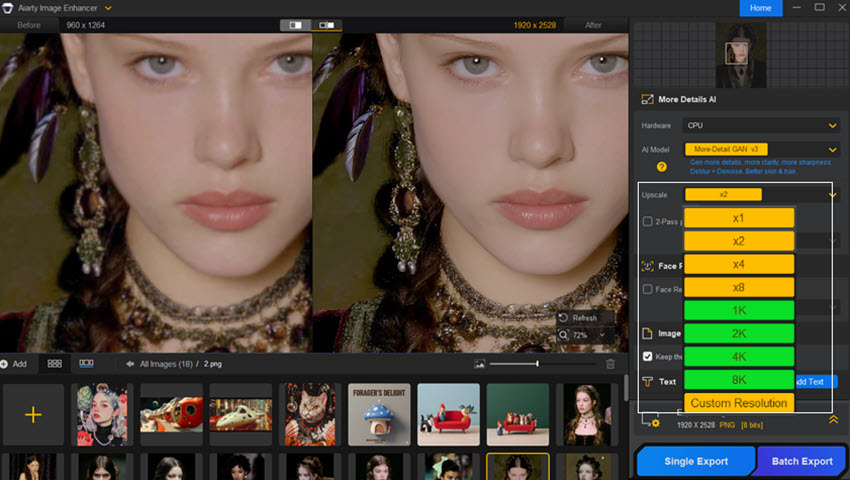
Aiarty is a generative AI software focused on denoising, deblurring, and upscaling. Using deep learning models trained on millions of images, it doesn't just "sharpen" pixels—it intelligently reconstructs missing details. It's perfect for digital archivists or photographers who need to "rescue" low-quality files before adding them to their permanent, searchable database.
Key Features
- More-Detail GAN Model: Specifically designed to reconstruct textures like hair, fur, and skin, making it ideal for portraits where facial recognition might otherwise fail.
- 32K Super-Resolution: You can upscale images up to 8x (or a massive 32,768 pixels), turning a small thumbnail into a print-ready masterpiece.
- AI Face Restoration: Automatically detects and repairs facial features in old or pixelated group shots, ensuring every person in your library can be tagged.
- SDR to HDR Conversion (2026 Update): Intelligently upgrades standard 8-bit images into vibrant 10-bit HDR output, reviving muted tones and colors.
- AI Eraser: A specialized brush tool to remove "photobombers" or distracting signs before you finalize and categorize your photo.
Conclusion: Reclaiming Your Time
Managing a growing photo library doesn't have to be a full-time job. The shift toward AI-powered tagging in 2026 has made it possible to organize years of memories in a single afternoon. Whether you choose the professional depth of Adobe Lightroom, the automated speed of Excire Foto, or the privacy of digiKam, the best software is ultimately the one that fits into your existing workflow without feeling like a chore.
Stop digging through folders and start enjoying your photos again. Pick a tool, run your first scan, and let the software do the heavy lifting.
You May Also Like


This post was written by Brenda Peng who is a seasoned editor at Digiarty Software who loves turning ordinary photos into extraordinary works of art. With AI assistance for brainstorming and drafting, the post is reviewed for accuracy by our expert Abby Poole for her expertise in this field.
