


Photoshop Elements and Photoshop are both Adobe photo editors, but they are not built for the same type of user. Photoshop Elements is easier to learn and better for quick personal photo edits, while Photoshop is the more powerful choice for professional retouching, compositing, design, and AI-assisted creative work.
If you are deciding between Photoshop Elements vs Photoshop in 2026, the real question is not simply which app has more features. It is whether you need a simple photo editor for everyday images, or a professional editing platform with advanced layers, masks, RAW workflows, generative AI, and Creative Cloud integration. This guide compares their features, AI tools, pricing, limitations, and best use cases so you can choose the right one without overpaying for tools you may not use.
Quick Verdict: Photoshop Elements or Photoshop?
Choose Photoshop Elements if you are a beginner, hobbyist, family photo editor, or casual creator who wants guided edits, simple photo organization, and a lower-commitment purchase. Choose Photoshop if you need advanced retouching, professional compositing, precise masking, full creative control, and the latest AI-powered editing tools.
What Is Adobe Photoshop?
Adobe Photoshop is Adobe's flagship image editing software and one of the most widely used tools in professional photography, design, digital art, and visual content production. It is built for users who need detailed control over every part of an image, from skin retouching and object removal to advanced compositing, color correction, and commercial design work.
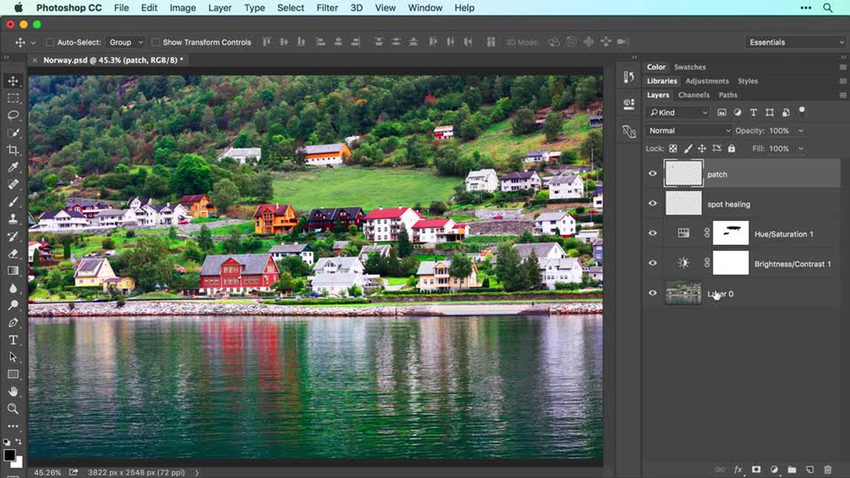
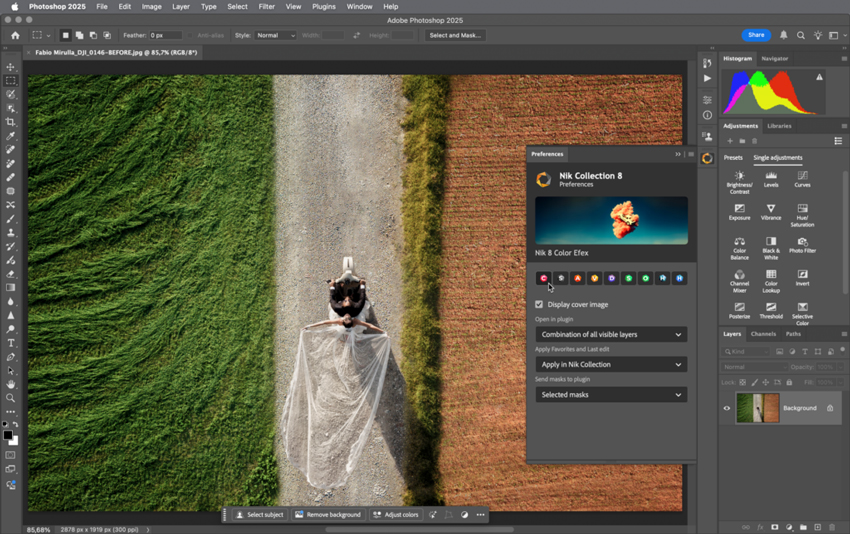
Photoshop includes advanced layers, masks, selections, smart objects, blend modes, brushes, filters, RAW editing through Adobe Camera Raw, and a growing set of AI-powered tools such as Generative Fill, Generative Expand, Generate Image, Harmonize, and Generative Upscale. It also integrates with Lightroom, Illustrator, Adobe Express, and other Creative Cloud apps, which makes it better for professional workflows that involve multiple tools.
The tradeoff is complexity. Photoshop has a steeper learning curve, requires a subscription, and can feel overwhelming if all you want is to brighten photos, remove small distractions, or make quick social media edits.
What Is Photoshop Elements?
Photoshop Elements is Adobe's simplified photo editing software for beginners, hobbyists, and everyday users. It keeps many useful editing features from the Photoshop family but presents them in a more approachable way through Quick, Guided, and Advanced editing modes.
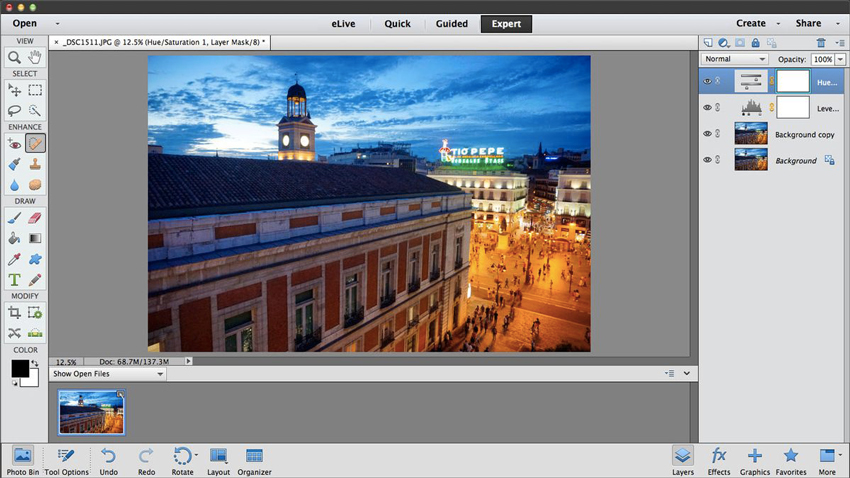
Instead of asking users to learn complex masks, channels, and professional workflows right away, Photoshop Elements focuses on guided corrections, one-click effects, automatic selections, photo organization, templates, and creative projects. It is especially useful for family photos, travel images, simple portraits, social media posts, scrapbooks, cards, and quick cleanups.
Photoshop Elements is no longer best described as a lifetime perpetual license. Adobe currently positions it as a one-time purchase with no recurring subscription fee, but the license lasts for a 3-year term. That still makes it more predictable than a monthly Photoshop subscription, but it is important to understand before buying.
Photoshop Elements vs Photoshop: Feature Comparison
The easiest way to understand the difference is this: Photoshop Elements simplifies common editing tasks, while Photoshop gives you deeper control for professional and creative work. Here is how they compare in the areas that matter most.
1. Ease of Use & Learning Curve
Photoshop Elements is much easier for beginners. Its Quick and Guided modes walk users through common edits such as cropping, color correction, background cleanup, object removal, and creative effects. You can get usable results without understanding every technical editing concept.
Photoshop is more powerful but also more demanding. New users have to learn layers, masks, selections, panels, adjustment layers, blend modes, smart objects, and more. It is worth learning for serious editing, but it is not the fastest route for simple photo fixes.
2. Editing Power and Creative Control
Photoshop is the stronger tool for advanced editing. It gives professionals precise control over layers, masks, channels, selections, color adjustments, brush behavior, typography, compositing, and non-destructive workflows. This matters for beauty retouching, product photography, poster design, digital art, advertising, and complex image manipulation.
Photoshop Elements covers everyday editing well, but it is not designed for complex professional workflows. It can handle common corrections, effects, selections, and guided edits, but it lacks the depth and flexibility of full Photoshop.
💡 Improve Image Quality Before or After Editing with Aiarty Image Enhancer
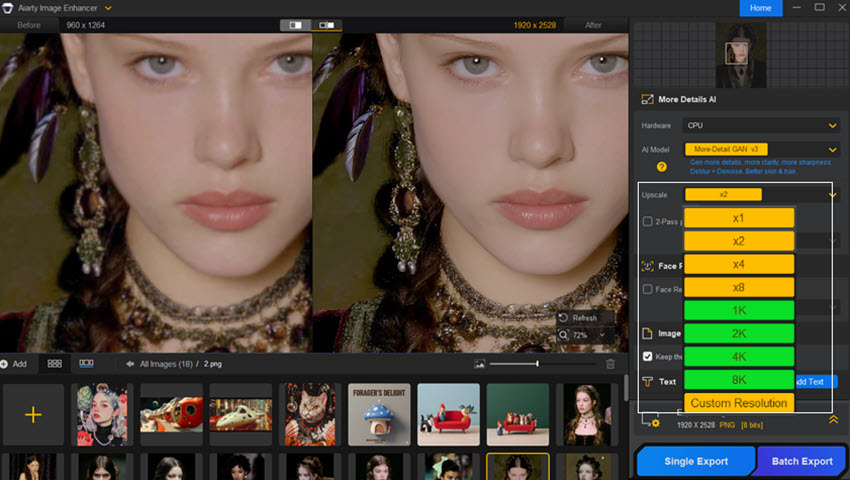
Photoshop and Photoshop Elements can both improve photos, but image quality problems such as blur, noise, compression artifacts, and low resolution often need a more dedicated workflow. If you want to enlarge photos, recover finer textures, or clean up soft images before editing, a specialized AI image enhancer can help. Aiarty Image Enhancer is useful as a companion tool for both Photoshop and Photoshop Elements because it focuses on AI upscaling, denoising, deblurring, and detail enhancement with minimal manual work.
3. Layers, Masks, and Selections
Photoshop is better for advanced layer-based editing. It supports more flexible masking, smart objects, advanced selections, adjustment layers, blend modes, and non-destructive edits. This is one of the biggest reasons professionals choose Photoshop over Elements.
Photoshop Elements includes layers and selection tools, but the workflow is simplified. It is enough for basic composites and creative projects, but not ideal for high-end masking, complex retouching, or production design.
4. RAW Editing and File Support
Photoshop works with Adobe Camera Raw for detailed RAW processing, lens correction, color adjustments, and professional photography workflows. It also supports a wider range of advanced formats and color management needs.
Photoshop Elements can open and edit RAW files, but its RAW controls are more limited. It is fine for casual photographers, but serious RAW shooters may prefer Photoshop together with Lightroom. You can also compare Lightroom vs Photoshop if photo management and RAW editing are your main priorities.
5. Photo Organization
Photoshop Elements has a built-in Organizer for tagging, sorting, searching, and managing photo collections. This is convenient if you want one app for basic editing and simple photo management.
Photoshop does not include the same type of built-in consumer photo organizer. Professional users usually pair it with Lightroom or Bridge for cataloging, metadata, ratings, and large photo libraries.

6. Performance and System Requirements
Photoshop benefits from stronger hardware, especially for large files, high-resolution composites, AI features, heavy filters, and multi-layer projects. A faster CPU, enough RAM, and a capable GPU can make a noticeable difference.
Photoshop Elements is generally lighter and more beginner-friendly. It is better suited for users with standard home computers who do not work with huge files or demanding commercial projects.
7. Adobe App Integration
Photoshop integrates more deeply with the Adobe ecosystem, including Lightroom, Illustrator, Adobe Express, After Effects, and Creative Cloud storage. This is valuable for designers, photographers, marketers, and production teams.
Photoshop Elements is more standalone. It is simpler, but it does not offer the same professional cross-app workflow.
Photoshop Elements vs Photoshop for AI Editing
AI is now one of the biggest differences between Photoshop and Photoshop Elements. Both apps include AI-powered features, but they use them in different ways. Photoshop focuses on advanced creative control, while Photoshop Elements focuses on simpler automation and guided results.
In short: Photoshop is better if you want AI tools that fit into a professional editing workflow. Photoshop Elements is better if you want easy AI-assisted edits without learning a complex interface.
What Photoshop Elements Cannot Do
Photoshop Elements is easier and more affordable, but it is not a full replacement for Photoshop. Before choosing it, make sure you are comfortable with these limitations.
- It does not offer the same advanced masking, smart object, and non-destructive editing workflows as Photoshop.
- It is not ideal for professional compositing, advertising design, or high-end retouching.
- It has more limited RAW editing controls than Photoshop with Adobe Camera Raw.
- It does not integrate with Creative Cloud apps as deeply as Photoshop.
- It is less suitable for commercial print workflows, complex color management, and multi-app production pipelines.
- Its AI tools are easier to use, but they do not provide the same level of professional control as Photoshop's AI features.
If these limits sound important to your work, Photoshop is probably the safer choice. If they do not matter to you, Photoshop Elements may be enough.
Photoshop Elements vs Photoshop: Pros and Cons
Adobe Photoshop
- Industry-standard tool for professional photo editing and design
- Advanced layers, masks, selections, smart objects, and adjustment workflows
- Stronger AI tools for generative editing, image expansion, object blending, and creative production
- Better for RAW workflows, high-end retouching, compositing, and commercial projects
- Deep integration with Adobe Creative Cloud apps
- Subscription pricing can become expensive over time
- Steeper learning curve for beginners
- More demanding system requirements
- Can feel excessive for simple photo edits
Photoshop Elements
- Much easier for beginners and casual users
- Quick, Guided, and Advanced modes make editing more approachable
- Built-in Organizer for simple photo management
- Useful AI and guided edits for everyday photos
- One-time purchase model with no monthly subscription fee
- Current license is a 3-year term license, not lifetime ownership
- Less powerful than Photoshop for advanced editing
- Limited professional RAW, masking, and compositing workflows
- Weaker Creative Cloud integration
- Not ideal for professional designers, retouchers, or production teams
Photoshop Elements vs Photoshop: Pricing
Pricing is one of the biggest reasons people compare Photoshop Elements vs Photoshop. Photoshop uses a subscription model, while Photoshop Elements is sold as a one-time purchase with a 3-year term license.
If you only edit photos occasionally, Photoshop Elements is usually the more budget-friendly choice. If you edit photos professionally or need Photoshop's full feature set, the subscription can be justified because you get the latest tools and updates.
Photoshop Elements vs Photoshop: Which One Should You Choose?
Choosing between Photoshop and Photoshop Elements comes down to your editing level, workflow, and budget.
Choose Adobe Photoshop if you:
- Do professional photo retouching, graphic design, digital art, or commercial image editing.
- Need advanced layers, masks, selections, smart objects, and non-destructive workflows.
- Work with RAW files, high-resolution images, or complex composites.
- Want the strongest Adobe AI tools, including Generative Fill and Generative Expand.
- Use Lightroom, Illustrator, Adobe Express, or other Creative Cloud apps.
Choose Photoshop Elements if you:
- Are a beginner or casual user who wants a simple photo editor.
- Mainly edit family photos, travel photos, portraits, social media images, or hobby projects.
- Prefer guided edits and automatic tools over manual professional controls.
- Want built-in photo organization without using Lightroom.
- Prefer a one-time purchase instead of a monthly subscription.
Final recommendation: Photoshop Elements is the better choice for most casual users. Photoshop is the better choice for professionals, advanced creators, and anyone who needs full control over detailed image editing.
Best Alternatives to Photoshop and Photoshop Elements
If neither Adobe option feels right, you may also want to compare other image editors. Some are better for design, some are better for simple online edits, and some are better for AI enhancement.
 FAQs
FAQs
Yes. Photoshop Elements is enough for most casual users who want to crop, retouch, adjust colors, remove simple distractions, organize photos, and create quick projects. Photoshop is only necessary if you need professional-level control.
Photoshop Elements can replace Photoshop for basic and intermediate photo editing, but not for advanced professional work. It lacks the full depth of Photoshop's masking, smart object, compositing, RAW, and Creative Cloud workflows.
Yes, Photoshop Elements supports layers, but its layer workflow is more limited than Photoshop. For simple edits and creative projects, it is usually enough. For complex composites and professional retouching, Photoshop is better.
Photoshop Elements can open many PSD files, but files that use advanced Photoshop-only features may not behave exactly the same. If you regularly exchange complex PSD files with designers or clients, Photoshop is the safer choice.
Photoshop Elements 2026 includes generative AI features such as Generate Image and Insert Object, but it does not offer the same full professional Generative Fill workflow as Photoshop. Photoshop remains stronger for advanced AI-assisted editing.
Yes, Photoshop Elements is sold as a one-time purchase with no monthly subscription fee. However, the current Adobe license is a 3-year term license, so it should not be described as lifetime access.
Photoshop Elements is better for beginners because it has a simpler interface, Guided Edits, automatic tools, and built-in photo organization. Photoshop is better once you need advanced editing control.
Photoshop is better for professional photo editing. It offers more advanced tools for retouching, masking, compositing, RAW workflows, color control, AI editing, and file preparation.
You May Also Like


This post was written by Brenda Peng who is a seasoned editor at Digiarty Software who loves turning ordinary photos into extraordinary works of art. With AI assistance for brainstorming and drafting, the post is reviewed for accuracy by our expert Abby Poole for her expertise in this field.
