


Facebook Reels have become one of the most powerful ways to reach new audiences, drive engagement, and grow your brand visibility. But even the most creative video can fail if it doesn’t meet Facebook’s official Reels size, format, and resolution requirements.
Using the correct Facebook Reel size and dimensions ensures your content looks sharp, fills the screen properly, and gets prioritized by the algorithm. In this guide, we’ll cover everything from the ideal Facebook Reels size to upload limits, and show you how to optimize your videos for the best results in 2026.
To make your videos display properly and look sharp on Facebook Reels, follow these recommended specs:
- Aspect Ratio: 9:16 recommended, minimum 4:5.
- Resolution: 1080 × 1920 px recommended, minimum 720 × 1280 px.
- Frame Rate: 30 fps or higher.
- Format: MP4 or MOV. Use H.264 codec preferred.
- Reel Length: 15–60 sec performs best.
- File Size: Recommended ≤ 4 GB. Larger files may fail to upload
Using the correct Facebook Reel size helps prevent black bars, awkward cropping, and low-quality playback. However, many creators still notice their Reels becoming blurry or softer after upload — even when using the correct dimensions.

Why Your Facebook Reels Still Look Blurry After Upload
One of the biggest frustrations for creators is that Facebook often compresses uploaded videos automatically. Even if your Reel uses the correct 1080×1920 resolution and 9:16 aspect ratio, compression can still reduce sharpness and introduce visible artifacts. This happens especially with low-light footage, mobile phone recordings, previously compressed clips, exported social media videos, and fast-motion scenes.
As a result, your Reel may end up looking:
- softer than the original
- noisy or grainy
- lacking fine detail
- blurry during motion
- over-compressed after upload
To reduce quality loss before uploading, many creators now pre-enhance their videos using AI tools like Aiarty Video Enhancer. It can sharpen soft footage, reduce compression artifacts, improve low-light clarity, and export videos directly in Facebook Reel size (1080×1920, 9:16).
This helps your videos stay cleaner and more detailed even after Facebook applies its own compression during upload. With Aiarty Video Enhancer, you can improve Reel clarity and reduce quality loss before uploading.
Facebook Reels Size and Dimensions (Official Specs)
To make your videos truly stand out on the Reels feed, it’s essential to follow Facebook’s official Reels specifications and dimensions. Meeting these requirements ensures your content displays correctly, looks sharp, and engages viewers without awkward cropping or blurry visuals.
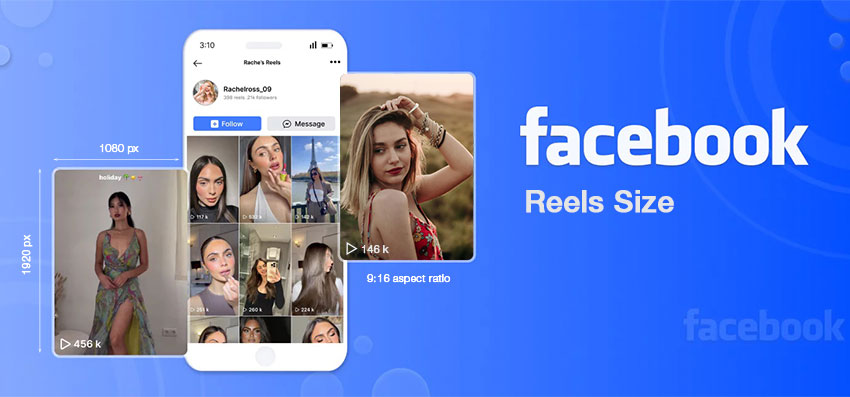
Here’s a detailed breakdown of Facebook reels dimension:
By following these official Facebook video size and dimensions, you ensure your content is optimized for both quality and engagement. Proper sizing not only prevents cropping and pixelation but also helps your Reels perform better in the algorithm, giving your content a professional edge.
Hot search: 2026 latest TikTok video size requirements
Facebook Reels Requirements for Ads and Branded Content
If you’re planning to run ads, sponsored posts, or branded partnerships on Facebook Reels, the technical requirements remain largely identical to regular Reels—but the expectations for quality are much higher. Advertisers need to ensure every frame looks polished, since Reels are often viewed full-screen and any flaw becomes noticeable immediately.
Below are the essential specs you should follow:
- Aspect ratio: 9:16 vertical format
- Recommended length: 15 seconds or less for higher retention
- File type: MP4 or MOV using the H.264 codec
- Resolution: 1080 × 1920 px for professional clarity

To keep your branding consistent, make sure your logos, captions, and any on-screen text stay within the center-safe area. Elements placed too close to the edges may be cut off on certain devices or hidden behind interface elements like buttons and overlays.
Facebook Reels Format and Resolution Tips for 2026
Video quality expectations continue rising in 2026, as users scroll through an endless stream of content and instantly skip anything blurry, low-resolution, or poorly edited. To make your Reels stand out, focus on maintaining high visual clarity and smooth motion during both shooting and export.
Follow these best-practice tips to stay ahead:
- Export resolution: 1080p or higher (MP4, H.264 codec)
- Frame rate: 30 fps or 60 fps for smoother motion
- Editing tip: Avoid heavy filters that reduce detail. Also, fix brightness, exposure, and color balance before uploading
Even when exporting in the correct Facebook Reel size and resolution, many creators still notice their videos looking softer after upload. This happens because Facebook automatically compresses uploaded videos to improve playback performance across devices and network conditions.
Compression can especially affect low-light footage, fast-motion scenes, highly detailed backgrounds, mobile-shot videos, and previously compressed clips
As a result, some Reels may appear blurrier or less detailed than the original export, even when using the recommended 1080×1920 format.
Starting with cleaner source footage, proper export settings, and reduced noise before upload can help preserve more detail after Facebook processing. Some creators also enhance videos before export to improve sharpness and texture retention during compression.
How to Prevent Facebook Reels From Losing Quality After Upload
Facebook automatically compresses uploaded videos, which can soften details and introduce visible artifacts — especially in low-light or mobile-shot footage.
To reduce quality loss, many creators now optimize videos before uploading by:
- exporting in H.264 MP4
- using 1080×1920 resolution
- avoiding excessive bitrate compression
- sharpening footage before export
- reducing noise and blur before upload
One effective way to do this is using Aiarty Video Enhancer, which can upscale, sharpen, denoise, and export videos directly in Facebook Reel format before upload compression occurs.
Why Aiarty Video Enhancer Is Useful for Facebook Reels
- AI Upscaling for Facebook Reels: Enhance lower-resolution videos to sharper 1080p or even 4K while preserving detail before Facebook compression.
- Recover Clarity After Compression: Restore edges and fine textures often softened after uploading Facebook.
- Reduce Noise in Mobile Footage: Clean up grain, low-light noise, and compression artifacts commonly seen in phone-shot Reels.
- Improve Reel Color and Contrast: Enhance brightness, contrast, and color depth to make Facebook Reels look more vibrant and cinematic.
- Crop Videos to Facebook Reel Size: Easily convert videos to the recommended 9:16 Facebook Reel aspect ratio, as well as other formats like 1:1 or 16:9.
- Fast AI Processing with GPU Acceleration: Optimized for NVIDIA, AMD, and Apple M-series hardware for smoother and faster Reel enhancement workflows.
How to Make Facebook Reels Look Sharper with Aiarty Video Enhancer
Step 1. Open the Facebook video enhancer
Launch Aiarty Video Enhancer app. Then drag and drop the videos that are not in the Facebook reel dimensions into the software. If you haven't installed it, feel free to grab it and install on your PC or Mac.
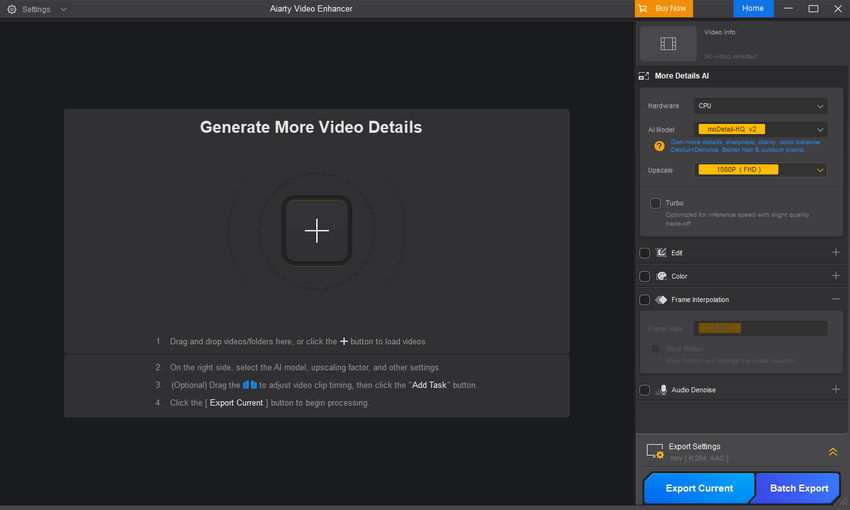
Step 2. Adjust video dimensions for Facebook
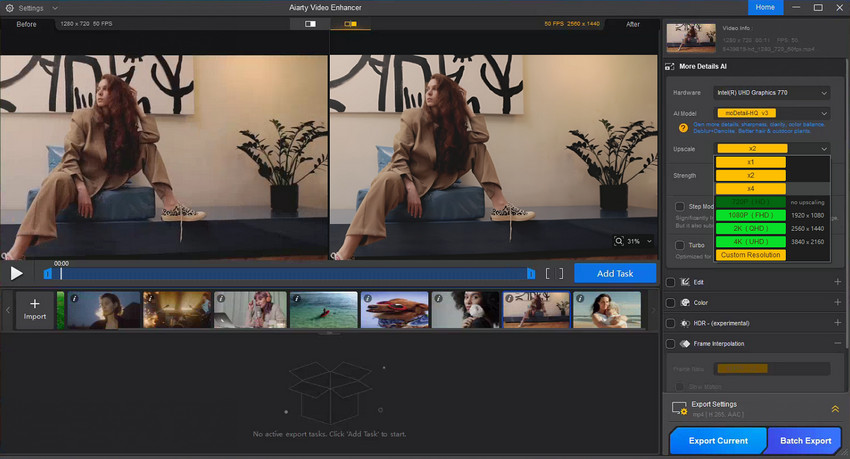
On the right panel, open the Upscale drop-down menu. If your video’s resolution is below Facebook’s recommended HD (for example, 720p or SD footage), you can boost it by selecting 2x or 4x upscaling, or set a specific target resolution such as 1920×1080 for 1080p or 3840×2160 for 4K. This ensures your video meets Facebook’s quality standards.
For videos that are already high-resolution (like 1080p or 4K) but need sharper detail or reduced noise, choose the 1x Enhance option to improve clarity without altering the video size.
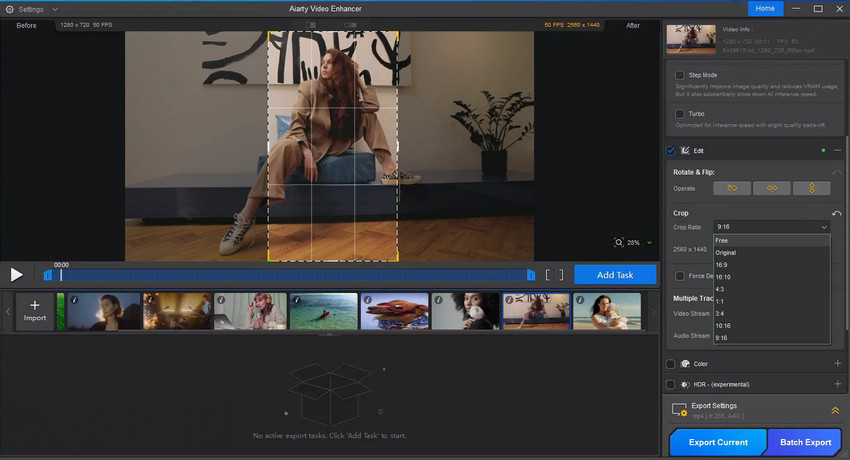
Step 3. Change the Facebook video size ratio
Next, move to the Edit section. Check the box and click on Adjust Crop. This allows you to set the exact Facebook video aspect ratio for your content, namely 9:16 for Reels. You can also drag the bounding box directly on the video preview to create a custom ratio that perfectly fits your needs.
Step 4. Cut the video length
If your video exceeds Facebook’s length limits for a particular placement, or if you want to feature the most engaging part, use the intuitive progress bar below the video. Simply set your preferred start and end points to trim the video to the ideal length.

Step 5. Fine-tune color
If you're not satisfy with your video colors, you can tick on the Color option, and adjust temperature, tint, contrast, saturation, exposure etc. for better brightness and visual.
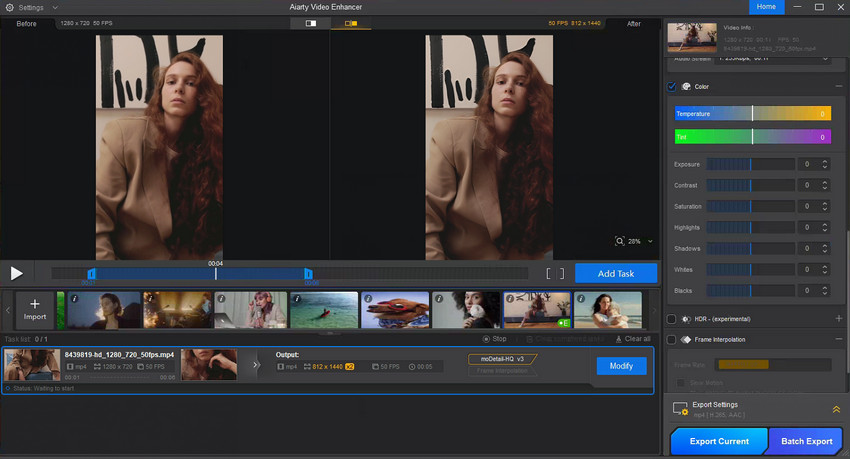
Step 6. Export video
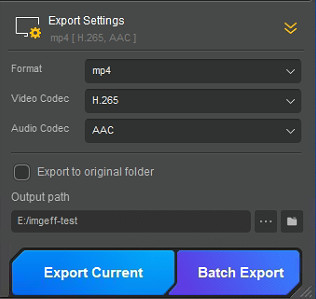
Finally, go to Export Settings and select either MOV or MP4, both of which are compatible with Facebook. Then click Export Current to save a single video, or Export Batch to process multiple videos at once.
Learn More: Alternative methods to adjust Facebook video size without losing quality >>
Conclusion
Following the correct Facebook Reel dimensions, format, and resolution helps your content display beautifully and perform better in the algorithm. And when you want your Reels to look even sharper, smoother, and more vibrant, Aiarty Video Enhancer is the perfect partner.
Enhance, sharpen, and perfect your Facebook videos with Aiarty Video Enhancer — try it today!
 FAQs
FAQs
The recommended resolution is 1080 × 1920 pixels with a 9:16 aspect ratio. This vertical format fills the screen perfectly for Reels and Stories.
Yes, you can upload 4K videos, but Facebook will automatically compress them. Using Aiarty Video Enhancer beforehand can upscale and optimize your video to preserve clarity and detail.
Facebook applies compression which can reduce video quality. Enhancing your video before uploading ensures sharper, clearer results.
Most users can upload Reels up to 90 seconds, though some accounts have the ability to post videos up to 3 minutes long.
You May Also Like


This post was written by Brenda Peng who is a seasoned editor at Digiarty Software who loves turning ordinary photos into extraordinary works of art. With AI assistance for brainstorming and drafting, the post is reviewed for accuracy by our expert Abby Poole for her expertise in this field.
