
How to Take Night Sky Photos: Camera Settings, Gear & Tips

Updated on
Night sky photography requires a different approach from daytime shooting. With limited light, camera settings, focusing, stability, and shooting conditions all affect how clearly stars appear in the final image. A few basic adjustments can give you a solid starting point without requiring specialized astrophotography equipment.
Quick Answer: How to Take Night Sky Photos
Use Manual mode with a sturdy tripod, a wide aperture around f/1.8–f/2.8, a shutter speed of about 10–20 seconds, and ISO 1600–6400 as a starting point. Shoot in RAW and focus manually on a bright star or distant light. Turn off image stabilization when using a tripod, and use a timer or remote shutter to reduce camera shake. For cleaner results, shoot on a clear night with little moonlight and as little light pollution as possible.
These settings are a starting point rather than fixed rules. The ideal exposure changes with your focal length, camera, sky conditions, and subject. Milky Way photography, star trails, meteor showers, aurora, and Moon photography each call for different approaches.
What Gear Do You Need for Night Sky Photography?
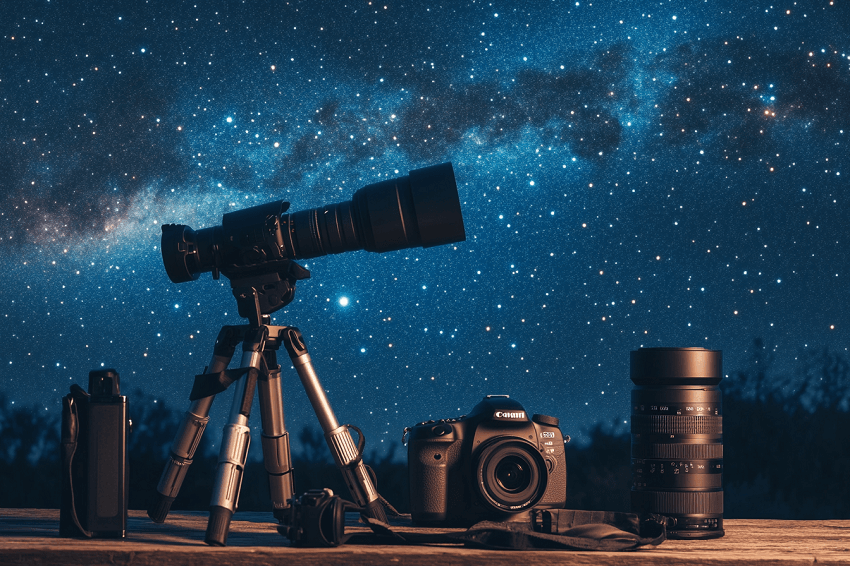
You do not need specialized astrophotography equipment to start photographing the night sky. A camera with manual controls, a fast wide-angle lens, and a stable tripod are enough for most beginner night sky shots. A few additional accessories can make longer shooting sessions easier and help reduce camera movement.
Camera
A DSLR or mirrorless camera with manual exposure and manual focus gives you better control over night sky shots. A full-frame camera can offer advantages in low-light performance and high-ISO noise, but it is not essential. Modern APS-C and Micro Four Thirds cameras can also produce good results when paired with a suitable lens and used in a dark location.
Wide-Angle Lens
A wide-angle lens lets you capture more of the sky while keeping the exposure relatively short. Look for a lens with a wide maximum aperture, ideally around f/2.8 or wider. Wider focal lengths are useful for including foreground elements such as mountains, trees, or buildings in a night sky composition.
Tripod
A sturdy tripod is essential for keeping the camera still during long exposures. Choose one that can support your camera and lens securely without being overly heavy or difficult to carry to your shooting location.
Remote Shutter or Camera Timer
Pressing the shutter button can introduce small movements that make stars look less sharp. A remote shutter release, wireless trigger, or the camera's built-in timer can help avoid this problem.
Headlamp or Flashlight
A small headlamp makes it easier to set up your camera and move around in the dark. A red-light mode is useful because it is less disruptive to your night vision and to other photographers nearby.
Spare Batteries and Memory Cards
Long exposures, cold temperatures, and frequent use of the LCD screen can drain a battery faster than normal. Bring a spare battery and make sure your memory card has enough space, especially if you plan to shoot multiple exposures for star trails or panoramas.
Camera Settings for Night Sky Photography
Once your camera is mounted on a tripod, switch to Manual mode and adjust each setting based on the amount of available light and the look you want. The settings below provide a starting point for photographing stars and the Milky Way. You may need to fine-tune them for your camera, lens, focal length, and sky conditions.
Aperture: Use a Wide Opening
Set the lens to its widest practical aperture, often around f/1.8–f/2.8. A wider aperture lets more light reach the sensor, which is important when photographing faint stars.
If your lens produces noticeable coma, softness, or other optical problems at its widest setting, stopping down by one stop can produce cleaner stars. For example, an f/1.8 lens may perform better at f/2 or f/2.2.
Shutter Speed: Keep Stars Sharp
Start with a shutter speed of around 10–20 seconds for a wide-angle lens. Longer exposures capture more light but can cause stars to appear as short trails because of Earth's rotation.
The 500 Rule can provide a rough starting point:
Shutter speed ≈ 500 ÷ focal length
For example, a 20mm lens gives a starting point of about 25 seconds. However, this is only a guideline. High-resolution cameras can reveal star movement more easily, so check your images at 100% and shorten the exposure if the stars begin to stretch.
ISO: Start Higher, Then Adjust
ISO 1600–6400 is a reasonable starting range for many night sky scenes. The right value depends heavily on your camera's low-light performance and the brightness of the sky.
If the stars are too faint, increase ISO or adjust the exposure if there is enough room to do so. If the image contains excessive noise or the sky becomes too bright, lower the ISO. Avoid relying on extremely high ISO to compensate for insufficient exposure when you can improve the exposure through aperture or shooting conditions.
Focus: Use Manual Focus
Autofocus often struggles in very dark conditions, so switch to manual focus. Before shooting, use Live View or your camera's electronic viewfinder to magnify a bright star or distant light source, then adjust the focus until it appears as a small, sharp point.
Take a test shot and check the stars at 100% magnification. Small focus errors can be difficult to notice on the camera's normal preview but become obvious in the final image.
White Balance: Start Around 3500–4500K
A white balance around 3500–4500K can provide a useful starting point for night sky photography. Lower values can produce a cooler blue appearance, while higher values create warmer tones.
If you shoot in RAW, white balance can be adjusted later during editing, so it is less critical to get it perfect in camera.
Shoot in RAW
RAW files retain more image data than JPEG files, giving you greater flexibility when adjusting exposure, shadows, color, and noise during post-processing. This is particularly useful for night sky images because the scene often contains both very dark skies and small, bright stars.
Turn Off Image Stabilization on a Tripod
If your lens or camera has optical or sensor-shift image stabilization, turn it off when the camera is securely mounted on a tripod, unless your equipment specifically recommends otherwise. Stabilization can sometimes introduce unwanted movement when there is no camera shake to correct.
Use a Timer or Remote Shutter
Set a 2-second timer or use a remote shutter release to avoid moving the camera when pressing the shutter button. This is especially useful with long exposures and when the camera is mounted on a lightweight tripod.
Night Sky Photography Settings by Subject
The best camera settings depend on what you want to capture. A Milky Way landscape needs enough exposure to reveal faint stars, while the Moon is bright enough to require much faster shutter speeds. Use the settings below as starting points, then adjust them for your camera, lens, and shooting conditions.
Milky Way
For Milky Way landscapes, use a wide-angle lens with a wide aperture, such as f/1.8–f/2.8. Start around 10–20 seconds at ISO 1600–6400, then adjust the exposure based on the brightness of the sky.
Keep the shutter speed short enough to prevent noticeable star trails. A dark location makes a bigger difference than simply increasing ISO.
Starting point: f/1.8–f/2.8 · 10–20 sec · ISO 1600–6400
Star Trails
Star trail photography usually requires a different approach from a single long exposure. Instead of keeping the shutter open for a very long time, take a sequence of exposures and combine them during post-processing.
Start with exposures of roughly 15–30 seconds and leave as little gap as possible between frames. The exact exposure and number of frames depend on the desired trail length, ambient light, and camera settings.
Starting point: f/2.8–f/4 · 15–30 sec per frame · ISO 400–1600
Meteor Showers
Meteor showers are best photographed with a wide-angle lens and repeated exposures because you cannot predict exactly when or where a meteor will appear. Use a wide aperture and a relatively short exposure to keep stars sharp.
Set the camera to continuous or interval shooting and capture a series of frames throughout the active period of the shower.
Starting point: f/1.8–f/2.8 · 10–20 sec · ISO 1600–6400
Aurora
The aurora changes constantly, so shutter speed is particularly important. For brighter or faster-moving auroras, shorter exposures can preserve more detail and movement. A longer exposure can work when the aurora is faint or relatively still.
Start with a wide aperture and adjust shutter speed according to the aurora's brightness and movement rather than relying on a fixed exposure.
Starting point: f/1.8–f/2.8 · 1–10 sec · ISO 800–6400
Moon
The Moon is much brighter than stars, so the settings used for Milky Way photography are not suitable here. Start with a relatively low ISO, a narrower aperture, and a fast enough shutter speed to prevent motion blur.
For detailed Moon photography, a longer focal length is generally more useful than a wide-angle lens. Use Live View and magnification to fine-tune focus on the lunar surface.
Starting point: f/5.6–f/11 · 1/60–1/250 sec · ISO 100–400
Deep-Sky Objects
Deep-sky photography of galaxies, nebulae, and other faint objects typically requires more specialized equipment than basic night sky photography. A tracking mount allows the camera to follow the Earth's rotation, making much longer exposures possible without turning stars into trails.
Multiple exposures are usually captured and stacked to improve signal and reduce noise. Dedicated astrophotography cameras and longer focal-length lenses or telescopes may also be used depending on the target.
Typical approach: Tracking mount · multiple long exposures · image stacking
How to Plan a Night Sky Photography Shoot
Good night sky photos depend on more than camera settings. Moonlight, light pollution, clouds, and the position of celestial objects can all affect what your camera can capture. Planning these conditions in advance gives you a better chance of finding a dark, clear sky and a strong composition.
Check the Moon Phase
A bright Moon can wash out faint stars and reduce the visibility of the Milky Way. For photographing a dense field of stars or the Milky Way, plan around a new Moon or a period when the Moon is below the horizon.
Moonlight is not always a disadvantage, though. A partially illuminated Moon can help reveal foreground details in a night landscape, so choose the timing based on the look you want.
Find a Dark Location
Light pollution can make faint stars difficult to capture, even with a wide aperture and high ISO. Look for locations away from cities, streetlights, and other strong sources of artificial light.
Dark-sky maps can help you compare potential locations before a trip. When possible, scout the area during daylight so you can identify a safe shooting position and suitable foreground elements.
Check the Weather
Clear skies are essential for photographing stars. Check the cloud cover, visibility, humidity, and wind forecast before leaving. Thin clouds may not always be obvious from a general weather forecast but can significantly reduce the clarity of the stars.
For longer exposures and multi-frame sequences, calm conditions are also helpful because strong wind can introduce camera movement.
Check the Position of the Milky Way and Other Subjects
If you are photographing the Milky Way, aurora, a meteor shower, or another specific celestial event, check when and where it will appear before your shoot. Astronomy and night-sky planning apps can show the position and timing of celestial objects for a specific location.
This also helps you decide where to place the subject within the frame instead of searching for it after dark.
Plan Your Composition Before Dark
Foreground elements can give a night sky photo a stronger sense of depth and scale. Mountains, trees, buildings, rocks, and other landscape features can all work as compositional elements.
Visit the location before sunset when possible. Decide where to place the horizon, foreground, and main celestial subject while you can still see the surroundings clearly.
Arrive Early and Set Up Before Full Darkness
Give yourself enough time to reach the location, set up the tripod, choose the composition, and prepare the camera before the sky becomes completely dark. Once you're set up, take a few test shots and check focus, exposure, and star sharpness at 100% magnification.
How to Focus on Stars at Night
Focusing at night can be more difficult than exposure because autofocus may struggle to find a subject in very low light. For sharp stars, switch to manual focus and fine-tune the focus using a magnified Live View or electronic viewfinder.
1. Switch to Manual Focus
Set the lens to MF before shooting. If autofocus works while there is still enough light, you can use it to focus on a distant subject first, then switch to manual focus so the camera does not refocus when you take the shot.
2. Magnify a Bright Star
Use Live View or your camera's electronic viewfinder and magnify the scene as much as possible. Find a bright star or another distant point of light, then slowly adjust the focus ring until the point appears as small and sharp as possible.
Do not assume that turning the focus ring all the way to infinity will always produce the sharpest stars. The exact infinity position can vary between lenses.
3. Take a Test Shot
Capture a short test exposure and check the stars at 100% magnification. If they look soft, oversized, or slightly stretched, make small adjustments to the focus and take another test shot.
4. Lock the Focus
Once you find a sharp focus point, avoid touching the focus ring for the rest of the shoot. If you change lenses, zoom significantly, or move the camera, check focus again before continuing.
Tip: Recheck Focus During a Long Shoot
Temperature changes, accidental contact, or moving the camera can cause focus to shift. For long sessions or multi-frame sequences, check a test image periodically rather than assuming the original focus is still perfect.
Common Night Sky Photography Problems
Even with the right settings, night sky photos can turn out too dark, noisy, soft, or blurred. Most problems can be traced back to focus, exposure, camera movement, or shooting conditions. Use the following fixes to identify and correct common issues.
| Problem | Possible Cause | What to Try |
| Stars look like trails | The shutter speed is too long for the focal length | Shorten the exposure and check the stars at 100% magnification. |
| Stars look soft or blurry | Focus is slightly off or the camera moved during exposure | Refocus manually on a bright star and use a tripod with a timer or remote shutter. |
| The photo is very noisy | High ISO, underexposure, or a warm sensor | Improve exposure when possible, lower ISO if conditions allow, and apply noise reduction during editing. |
| The sky is too bright or orange | Strong light pollution or excessive exposure | Move to a darker location, avoid direct artificial light, or reduce exposure. |
| The stars are barely visible | The sky is too bright or the exposure is insufficient | Find darker skies, open the aperture, increase ISO, or use a longer exposure if star movement allows. |
| The foreground is completely dark | The sky is much brighter than the landscape | Capture a separate foreground exposure and blend the images during post-processing. |
| The image looks sharp on the camera but soft later | The camera preview hides small focus or motion problems | Review the image at 100% and check star shapes before continuing the shoot. |
| Long-exposure frames have gaps | The camera takes too long between consecutive exposures | Use an intervalometer or suitable interval-shooting settings for continuous sequences. |
| The stars have strange shapes near the edges | Lens distortion, coma, or shooting wide open | Stop down slightly or correct lens issues during editing if needed. |
A Quick Check Before You Leave
Take one test shot and check three things at 100% magnification: star shape, focus, and noise. If the stars are sharp and round, the exposure looks appropriate, and the camera has remained stable, you can continue with the rest of the shoot.
Advanced Night Sky Photography Techniques
Once you are comfortable with basic exposure and focusing, a few advanced techniques can help you capture longer star trails, balance a bright sky with a dark foreground, or fit more of the night sky into a single frame.
Star Trail Stacking
Instead of taking one extremely long exposure, capture a series of shorter exposures and combine them with stacking software. This approach can produce long, continuous star trails while reducing some of the noise and exposure-related problems associated with a single very long exposure.
Keep the camera fixed on the tripod throughout the sequence and use an intervalometer or interval-shooting mode to minimize gaps between frames.
Exposure Blending for Night Landscapes
A single exposure may not capture both the stars and the foreground with the desired level of detail. You can take separate exposures for the sky and foreground, then blend them during post-processing.
For example, a shorter exposure can preserve sharp stars while a longer or brighter exposure can reveal landscape details. Keep the camera and composition unchanged between exposures to make blending easier.
Night Sky Panoramas
A panorama can capture a wider view of the Milky Way or night landscape than a single frame. Shoot a series of overlapping vertical or horizontal images while keeping the camera position stable.
Use a consistent focus, aperture, ISO, and white balance across the sequence. Overlap adjacent frames sufficiently so panorama software can align them accurately during post-processing.
Trackers for Longer Exposures
For advanced astrophotography, a star tracker can compensate for the Earth's rotation by following the apparent movement of the stars. This allows longer exposures without the same degree of star trailing.
Tracking does add another layer of setup, and the foreground may require a separate exposure if you want both the landscape and tracked sky to remain sharp.
How to Edit Night Sky Photos
Night sky photos often need some post-processing to bring out faint stars, control high-ISO noise, and balance the sky with the foreground. Start with basic RAW adjustments before applying stronger noise reduction or detail enhancement.
1. Correct Exposure and Contrast
Adjust exposure, highlights, shadows, and contrast to bring out the stars without making the sky excessively bright. Avoid pushing shadows too far, as this can make noise more noticeable in dark areas.
2. Adjust White Balance and Color
Night skies can look too warm because of light pollution or too cool after aggressive white balance adjustments. Fine-tune the temperature and tint until the sky and foreground look natural. RAW files give you more flexibility for these adjustments.
3. Reduce High-ISO Noise
Noise is common in night sky photography, especially when using high ISO or lifting shadows during editing. Apply luminance and color noise reduction carefully. Excessive noise reduction can remove small stars and fine landscape details along with unwanted noise.
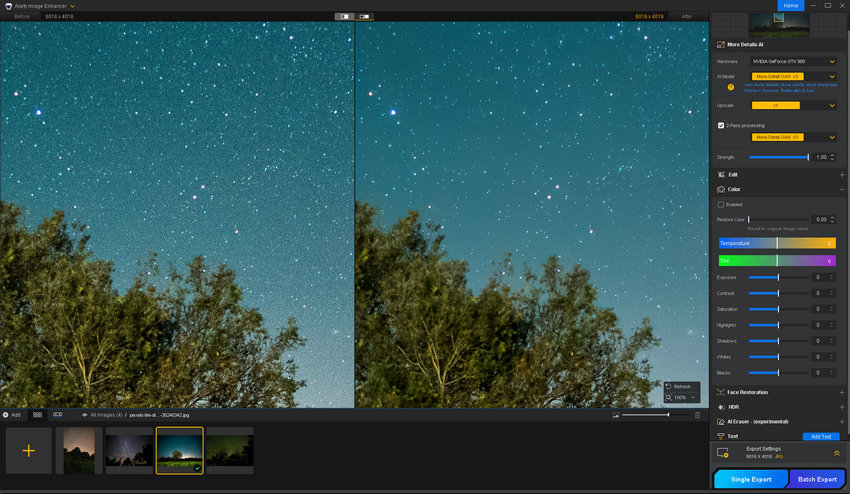
For particularly noisy images, dedicated AI enhancement tools (such as Aiarty Image Enhancer) can provide another step of noise reduction while attempting to preserve fine detail.
4. Restore Fine Details
After noise reduction, some textures and small details may look softer than in the original image. Selective sharpening can help restore definition, but avoid sharpening the entire image too aggressively, as this can make noise and halos more visible around stars.
5. Enhance and Upscale When Needed
If the original photo has enough information but needs a larger output size, upscaling can increase its resolution for prints, wallpapers, or other large-format uses. For images affected by high-ISO noise or softness, an AI image enhancer can combine noise reduction, detail enhancement, and upscaling in a separate processing step.
For example, you can first make basic color and exposure adjustments to the RAW file in your usual photo editor, then use Aiarty Image Enhancer to reduce remaining noise, restore detail, or upscale the image. This keeps enhancement separate from the initial RAW development and gives you more control over the final result.
Free download Aiarty Image Enhancer to have a try!
 FAQ about Night Sky Photography
No. A full-frame camera can offer advantages in low-light performance and high-ISO image quality, but APS-C and Micro Four Thirds cameras can also produce good night sky photos. A fast lens, stable tripod, dark location, and accurate focus often have a bigger impact on the result.
A bright full moon can wash out faint stars and reduce the visibility of the Milky Way. For the most detailed Milky Way shots, plan around a new Moon or a period when the Moon is below the horizon. Moonlight can still be useful for lighting foreground scenery in some night landscapes.
Noise is common in night photography because scenes are dark and often require high ISO or long exposures. Underexposure can make it more noticeable when shadows are brightened later. Start with a properly exposed image, use the lowest practical ISO, and apply moderate noise reduction during editing to avoid removing faint stars and fine details.
Use a shorter shutter speed and check the stars at 100% magnification after taking a test shot. The usable exposure time depends on focal length, sensor resolution, and how much star movement you can accept. The 500 Rule can provide a rough starting point, but it should not be treated as a fixed limit.
Yes. A kit lens can work for basic night sky photography, especially when paired with a tripod and a dark location. However, a wide-angle lens with a wider maximum aperture can collect more light and make it easier to capture faint stars. If your lens is slower, you may need to increase ISO or use a longer exposure.
Yes. AI enhancement can help reduce remaining noise, restore fine details, and upscale night sky images after basic RAW processing. It works best as a later step rather than a replacement for exposure, white balance, and other initial adjustments. For example, Aiarty Image Enhancer can be used after RAW development when a photo still needs additional noise reduction, detail enhancement, or upscaling.
You May Also Like


Brenda Peng is a seasoned editor at Digiarty Software who loves turning ordinary photos into extraordinary works of art. With years of experience behind the lens and in front of the computer, Brenda shares her passion for photography, image enhancement, and editing through easy-to-follow tutorials.
