


A well-designed cover photo can make your WhatsApp Business profile look more professional and help your brand stand out. However, many users upload images that appear cropped, stretched, or blurry because they don’t use the correct size.
In this guide, we’ll explain the WhatsApp Business cover photo size, recommended dimensions, aspect ratio, and tips for creating a clear and professional cover image.
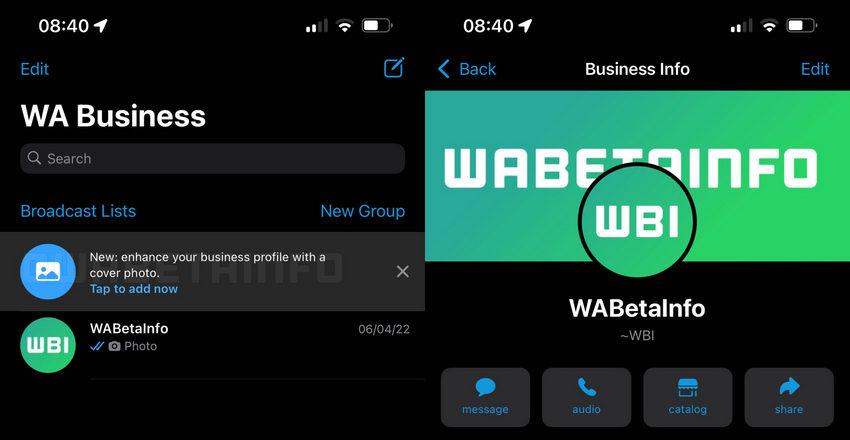
WhatsApp Business Cover Photo Size
The recommended WhatsApp Business cover photo size is 1211 × 681 pixels.
This size ensures the image displays properly across most devices without unwanted cropping or distortion. Using the correct WhatsApp Business cover photo dimensions also helps maintain image clarity and keeps important design elements visible in your business profile.
Below are the commonly used measurement formats for the WhatsApp Business cover photo size, including pixels, inches, and centimeters, since users often search for the size in different units.
If you're creating the image in tools like design software or online editors, using the 1211 × 681 px resolution is the most reliable option. Pixels are the standard unit used by most graphic design platforms.
Key Details
- Aspect ratio: 16:9
- Recommended format: JPG or PNG
- Maximum file size: 5 MB
- Recommended resolution: 1211 × 681 pixels or higher with the same 16:9 ratio
Using a high-resolution image with the correct WhatsApp Business cover photo resolution helps prevent blurriness caused by image compression.
If your image looks slightly soft or low quality, you can enhance it before uploading. Tools like Aiarty Image Enhancer can help improve image clarity, upscale resolution, and sharpen details, making your WhatsApp Business cover photo appear cleaner and more professional.
Important Design Tips
To make sure your WhatsApp Business cover photo looks clean and professional, consider the following tips.
Center your content
Like many social media banners, WhatsApp may slightly crop the edges depending on screen size. Keep your logo, brand name, or key message within the center safe zone to avoid losing important elements.
Be aware of profile picture overlap
Your circular profile photo (recommended size 640 × 640 pixels) may partially overlap the lower area of the cover image in profile view. Avoid placing critical text or graphics in that area.
Keep image quality high
Always export your design in high resolution. Low-quality images may appear blurry after upload due to WhatsApp’s compression.
Feature availability
The cover photo option is available only for WhatsApp Business accounts. Standard personal WhatsApp accounts do not support cover photos.
Why the Right WhatsApp Business Cover Photo Size Matters
Using the correct WhatsApp Business cover photo size is important for both visual quality and user experience. If the image dimensions or resolution are incorrect, the cover photo may appear blurry, cropped, or distorted when displayed on different devices.
Here are a few reasons why using the proper WhatsApp Business cover photo dimensions matters.
Displays properly on different screen sizes
WhatsApp Business profiles can be viewed on a wide range of smartphones with different screen resolutions. Using the recommended 1211 × 681 pixel cover photo size helps ensure your banner displays correctly across most devices.
Avoids automatic cropping
When the aspect ratio does not match WhatsApp’s recommended 16:9 format, the platform may automatically crop parts of your image. This can cut off important elements such as text, logos, or product visuals.
Maintains image clarity
Low-resolution images often become blurry after being uploaded because of compression. Using the correct WhatsApp Business cover photo resolution helps preserve sharp details and keeps the image looking professional.
Improves your business profile’s visual appeal
A properly sized cover image makes your profile look more polished and trustworthy. For businesses, a clear and well-designed banner can help reinforce branding and make a stronger first impression on potential customers.
How to Create a WhatsApp Business Cover Photo
Creating a WhatsApp Business cover photo is simple once you know the correct size and layout. You can design your banner using common graphic design tools or online editors.
Some popular tools include:
- Canva – beginner-friendly with ready-made templates
- Photoshop – suitable for advanced image editing and custom designs
- AI image generators – useful for creating unique backgrounds or graphics
Steps to Create a WhatsApp Business Cover Photo
1. Create a canvas with the correct size
Start by setting your canvas to the recommended WhatsApp Business cover photo size of 1211 × 681 pixels. This ensures the final image matches the required 16:9 aspect ratio.
2. Add your brand elements
Insert your business logo, brand name, slogan, or product visuals. Keep the design simple so that it remains clear even on smaller screens.
3. Keep important elements centered
Avoid placing key content near the edges of the image because WhatsApp may crop the sides slightly depending on the device. Place logos and text in the middle safe area.
4. Export the image in the correct format
Save the final design as JPG or PNG and make sure the file size is under 5 MB. Using high-resolution images will help maintain better visual quality after uploading.
Once exported, you can upload the image directly to your WhatsApp Business profile as your cover photo.
WhatsApp Business Cover Photo Tips
Designing a clean and professional WhatsApp Business cover photo can help your profile look more trustworthy and visually appealing. While using the correct WhatsApp Business cover photo size is important, good design choices also make a big difference in how your banner looks.
Here are some practical tips to help you create a better cover image.
Use simple backgrounds
Avoid overly busy or cluttered backgrounds. Simple textures, soft gradients, or clean product images usually work best for a WhatsApp Business cover photo because they keep the focus on your brand.
Keep text minimal
A cover photo should be visually clear at a glance. Use short phrases, a tagline, or your brand name rather than long sentences. Too much text can look crowded, especially on smaller phone screens.
Use consistent brand colors
Incorporating your brand colors helps create a more recognizable and consistent business identity. This is especially useful if your WhatsApp Business profile is connected to other platforms such as your website or social media pages.
Avoid placing text near the edges
Because WhatsApp may crop the edges slightly depending on the device, avoid placing important elements close to the borders. Keeping text and logos within the center safe area helps ensure everything remains visible.
Use high-resolution images
Low-quality images can appear blurry after upload. When designing your banner, always start with a high-resolution image that matches the recommended WhatsApp Business cover photo resolution.
 FAQs
FAQs
The recommended WhatsApp Business cover photo size is 1211 × 681 pixels with a 16:9 aspect ratio.
Your image may look blurry because:
- The resolution is too low
- The aspect ratio is incorrect
- WhatsApp compressed the image
Using a high-resolution image can help maintain clarity.
You May Also Like


This post was written by Brenda Peng who is a seasoned editor at Digiarty Software who loves turning ordinary photos into extraordinary works of art. With AI assistance for brainstorming and drafting, the post is reviewed for accuracy by our expert Abby Poole for her expertise in this field.
