



Reblum Review 2026: Is This AI Skin Retouching Tool Worth It?



If you shoot portraits for a living, you already know the drill.
You spend hours dialing in the lighting, guiding expression, perfecting composition and then you sit down to retouch. What should be a creative finishing touch often turns into the most time-consuming part of the entire workflow. Cleaning up skin, evening out tone, softening distractions without turning your subject into plastic — it’s meticulous, repetitive, and mentally draining.
Over the past few years, AI retouching tools have promised to fix that. Most of them, however, fall into one of two categories: either they over-smooth skin until it looks artificial, or they require so much tweaking that you might as well have stayed in Photoshop.
That’s where Reblum comes in.
Unlike all-in-one AI editors that try to do everything, Reblum focuses on one specific task: natural, professional-grade skin retouching. It’s designed to fit directly into a photographer’s workflow — not replace it — and claims to deliver fast, realistic results without sacrificing texture or character.
So the real question is:
Can Reblum actually speed up your workflow while maintaining high-end retouching standards? Or is it just another AI shortcut that looks good at first glance but falls apart under scrutiny?
In this review, we’ll take a close look at how Reblum performs in real-world portrait work — its strengths, its limitations, pricing, and whether it’s worth adding to a professional toolkit.
What Is Reblum?
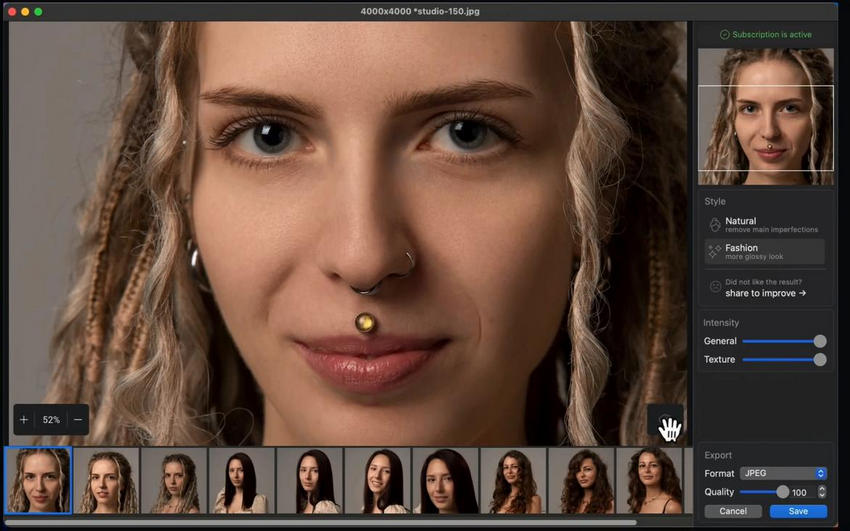
At its core, Reblum is an AI-powered skin retouching tool built specifically for portrait photographers. It’s not a full photo editor. It’s not a one-click “beauty filter” app. And it doesn’t try to replace Photoshop.
Instead, it focuses on one thing: delivering fast, natural-looking skin refinement while preserving texture and realism.
Reblum works as both a standalone application and a plugin that integrates into professional workflows. You can use it alongside industry-standard tools like Adobe Photoshop, Adobe Lightroom Classic, and Capture One, making it easy to slot into an existing post-production process without disruption.
A Focused Approach to Retouching
What makes Reblum different from many AI retouching tools is its narrow specialization.
Rather than attempting to handle background cleanup, facial reshaping, eye enhancement, or color grading, Reblum concentrates on skin:
- Reducing blemishes and temporary imperfections
- Smoothing uneven tone
- Softening wrinkles without erasing character
- Maintaining natural skin texture
This focused approach is intentional. By limiting its scope, Reblum aims to deliver higher-quality results in the area that consumes the most time for portrait photographers: skin work.
Two Retouching Styles
Reblum offers two primary processing modes:
- Natural – Designed to maintain texture and realism. Ideal for editorial, corporate, and personality-driven portraits.
- Fashion – A more polished finish, suitable for beauty, commercial, and high-end portrait work.
Importantly, neither mode applies heavy-handed blur or plastic-like smoothing. The goal is refinement, not reconstruction.
Desktop-Based & Privacy-Friendly
Another notable aspect is that Reblum runs locally on your machine. Images are processed offline, which means:
- No cloud uploads
- No subscription-based rendering credits
- No client privacy concerns
For commercial photographers working with sensitive material, this can be a significant advantage.
In short, Reblum positions itself as a specialized, workflow-friendly AI assistant. Not a gimmicky shortcut, but a time-saving step between RAW development and final polish.
Next, let’s break down its key features in more detail and see how it performs in real-world use.
Key Features Explained
On paper, Reblum sounds straightforward: upload your image, choose a style, and let the AI handle the skin retouching. But what actually happens under the hood and how much control do you really get?
Let’s break down the core features that matter most in real-world portrait work.
1. Intelligent Skin Detection
One of Reblum’s strongest selling points is how accurately it identifies skin areas.
Instead of applying global blur or smoothing, the software isolates skin regions while avoiding:
- Eyes
- Lips
- Hair
- Clothing
- Background elements
In most test cases, the detection is impressively precise. The AI understands facial structure well enough to avoid the classic “soft eyelashes” or “muddy eyebrows” problem common in basic smoothing tools.
That alone saves a significant amount of masking time.
2. Texture-Preserving Retouching
This is where Reblum distinguishes itself from older retouching shortcuts.
Rather than flattening detail, it attempts to:
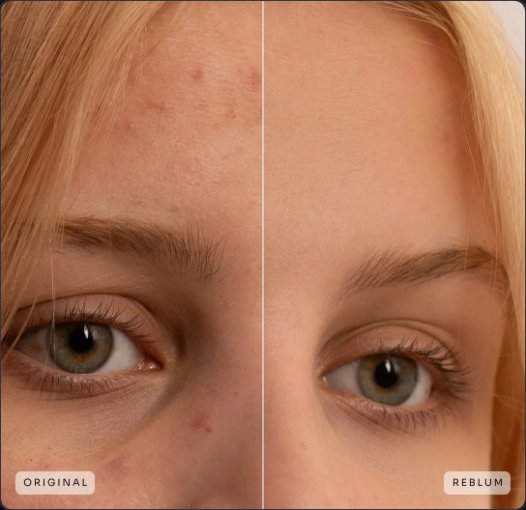
- Reduce temporary blemishes
- Even out blotchy skin
- Soften harsh transitions
- Maintain pores and natural texture
The result feels closer to frequency separation done well but without the manual layer work inside Photoshop.
Importantly, it doesn’t completely erase wrinkles or defining features. Skin still looks like skin.
3. Natural vs. Fashion Modes
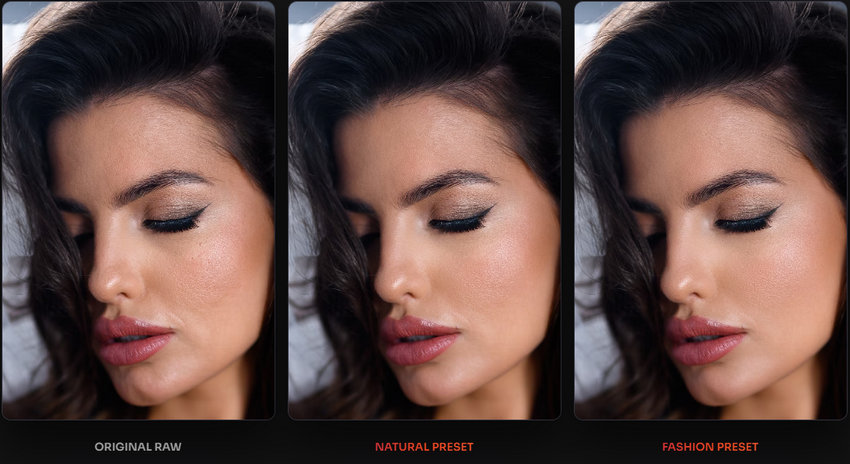
Reblum offers two primary processing styles:
Natural Mode
- Subtle refinement
- Texture retention prioritized
- Ideal for corporate, lifestyle, and editorial portraits
Fashion Mode
- Cleaner, more polished finish
- Slightly stronger smoothing
- Suitable for beauty and commercial work
The difference between the two isn’t extreme, but it’s noticeable. Fashion mode leans more toward a magazine-ready aesthetic, while Natural mode feels safer for everyday professional portraits.
4. Batch Processing for High Volume Work
For wedding and event photographers, this is a major feature.
Reblum allows batch processing, meaning you can apply consistent skin refinement across a full set of images without handling them one by one.
When dealing with:
- 200+ bridal portraits
- Corporate headshot sessions
- Model test shoots
This can cut hours from your post-production time.
5. Seamless Workflow Integration
Because Reblum works as both a standalone app and plugin, it fits neatly into an existing editing pipeline.
A common workflow might look like this:
- Develop RAW files in Lightroom or Capture One
- Send selected images to Reblum
- Apply skin refinement
- Return to Photoshop for final micro-adjustments
It doesn’t try to replace your editing ecosystem. It acts as a specialized middle step.
Overall, Reblum’s feature set is deliberately focused rather than expansive. It’s not a do-everything retouching suite. It’s a tool built to solve one of the most repetitive parts of portrait editing efficiently.
Next, let’s move beyond features and look at what really counts: how well does it perform in actual portrait scenarios?
6.Fast Processing Speed
In practical terms, processing time is fast. Individual images are typically completed in seconds on modern hardware.
The real benefit isn’t just speed — it’s mental energy saved.
Instead of zooming in and manually correcting dozens of small imperfections, you start with an already polished base. From there, your time goes toward creative adjustments rather than repetitive cleanup.
For high-volume photographers, that shift alone can be transformative.
Where Reblum Struggles
No tool is perfect, and Reblum is no exception. While it excels at fast, natural-looking skin retouching, there are a few limitations worth noting.
- Limited Scope – Reblum focuses exclusively on skin. It doesn’t have dedicated tools for eyes, hair, teeth, or background cleanup. If you’re looking for an all-in-one AI retouching suite, this isn’t it (at least not yet).
- No Manual Masking – Currently, you can’t manually restrict the effect to certain areas. The AI applies retouching to all detected skin, which isn’t always ideal. A common workaround is to export the retouched image and blend it back in Photoshop using masks. Still faster than retouching from scratch, but it adds an extra step.
- Occasional Face Detection Issues – Reblum can struggle with faces that are partially obscured, tightly cropped, or turned away from the camera. There’s no manual option to “tag” a face, which can limit precision in close-ups. That said, in most cases, its detection is surprisingly reliable compared to some other AI tools.
- Batch Editing Is One-Size-Fits-All – When processing multiple images at once, Reblum applies the same settings across the board. If different images in the batch require slightly different adjustments, you’ll need to tweak them individually, which reduces some of the time-saving benefits.
- Limited Raw File Support – Reblum only opens JPG, TIFF, HEIC, and PNG files directly. Raw files from Nikon, Canon, Sony, Fuji, and other cameras must first be processed in Lightroom, Capture One, or a similar app. It’s not a dealbreaker, but worth noting for photographers who like to work natively in RAW.
In short, Reblum is fantastic at what it does — fast, natural skin retouching — but it isn’t a complete retouching suite. It’s a specialized tool best used as part of a larger workflow rather than a total replacement for manual editing.
Overall Performance Impression
Reblum doesn’t feel like a gimmick. It feels like a strong first pass — one that dramatically reduces workload without compromising realism.
It won’t replace expert-level retouching skills. But it can eliminate a large percentage of repetitive skin cleanup. And for many working photographers, that’s exactly the point.
Next, let’s talk about pricing and whether the cost aligns with the value it delivers.
Pricing & Licensing: Is Reblum Worth the Cost?
When you’re evaluating a new tool, price matters, especially for professional photographers whose budgets must make sense against workflow gains. So let’s break down Reblum’s pricing in plain terms and see where it fits.
Reblum Pricing Options (2026)
Reblum offers three main ways to buy:
- Monthly Subscription — $24.90/month
- No long-term commitment
- Good if you just want to try it out
- Annual Subscription — 11.95/month (billed yearly)
- Best balance of cost vs. value
- Much cheaper than monthly if you plan to use it long-term
- Lifetime License — $249 one-time
- Best value for ongoing professional use
- Includes updates without recurring monthly fees
Is the Price Justified?
The answer depends on how you work:
For Casual Photographers: If you shoot occasionally or don’t do a lot of portrait retouching, the monthly plan can be a low-risk way to test the software. But if you only open it a few times, you might not get full value out of it.
For Frequent Shooters & Pros: If you edit portraits regularly, the annual plan quickly becomes the most economical choice. It’s far cheaper than spending hours manually retouching each image, especially for high-volume sessions like brand work or weddings.
For Professional Studios: The lifetime license often becomes the best investment.
Who Should Use Reblum and Who Probably Shouldn’t?
No software is universal. Reblum is powerful, but it’s built with a specific type of photographer in mind.
Let’s clarify where it truly makes sense and where it might not.
Reblum Is a Great Fit For…
1. Portrait Photographers
If you regularly shoot:
- Corporate headshots
- Lifestyle portraits
- Branding sessions
- Model tests
Reblum can dramatically reduce your retouching time while keeping results natural. It handles the repetitive skin cleanup so you can focus on creative finishing touches.
2. Wedding & Event Photographers
High volume + consistent lighting + limited retouching time = ideal scenario.
When delivering:
- 50–200+ final portraits
- Bridal close-ups
- Family group shots
Batch processing becomes a serious advantage. Instead of manually cleaning every image, you start from a polished baseline.
3. Commercial & Studio Shooters
If you work on:
- Catalog work
- Corporate campaigns
- Agency projects
Reblum helps standardize skin refinement across large image sets. It ensures consistency — especially useful when clients expect clean but realistic results.
4. Photographers Who Value Efficiency
Some professionals enjoy detailed pixel-level retouching.
Others would rather:
- Spend more time shooting
- Deliver faster
- Reduce burnout from repetitive tasks
If efficiency matters to you, Reblum aligns well with that mindset.
Reblum Might Not Be Ideal For…
1. High-End Beauty Retouchers
If you specialize in magazine-level beauty work where:
- Every pore is controlled manually
- Dodge & burn is sculpted at micro-level
- You build texture from scratch
Reblum may feel too automated. It works best as a base pass — not a full replacement for advanced techniques.
2. Retouchers Who Want Full Manual Masking Control
Reblum doesn’t currently offer deep manual masking or layered opacity blending inside the app. If you prefer total control over every adjustment, you’ll still rely heavily on Photoshop refinement afterward.
The Bottom Line on Fit
Reblum isn’t trying to be flashy. It’s designed for working photographers who needs consistent, natural skin refinement, handles volume, and wants to reduce repetitive retouching.
If that sounds like your workflow, it makes sense.
If you love spending 30 minutes perfecting every face manually, you may not feel the same urgency.
You May Also Like


This post was written by Brenda Peng who is a seasoned editor at Digiarty Software who loves turning ordinary photos into extraordinary works of art. With AI assistance for brainstorming and drafting, the post is reviewed for accuracy by our expert Abby Poole for her expertise in this field.
