


In today's digital age, preserving memories is easier than ever, but what about those cherished slides from decades ago? Whether they capture family vacations, childhood milestones, or important life events, old slides hold priceless memories that could fade or be lost over time. Converting slides to digital format offers an ideal solution, allowing these memories to be preserved and enjoyed for years to come.
So, how do you convert slides to digital without compromising image quality? Should you use a slide scanner, a dedicated conversion machine, or opt for a professional service? In this guide, we'll show you the best ways to digitize slides - offering methods from DIY scanning to professional services. By the end, you'll know how to transfer slides to digital with minimal hassle, ensuring those precious moments are turned into digital photos you can enjoy anywhere.
Different Methods for Converting Slides to Digital
When it comes to converting slides to digital, there are several methods available, each offering its own advantages. The best approach depends on the number of slides you need to convert, your budget, and the level of image quality you desire. Let's explore the most popular methods for how to digitize slides.
1. DIY Scanning with a Flatbed Scanner
One of the simplest ways to convert slides to digital is by using a flatbed scanner. Many scanners come with a transparency adapter that allows you to scan slides directly. While this method works well for a small number of slides, it can be slow and labor-intensive if you have a large collection.
- Pros: Affordable, no need for special equipment.
- Cons: Slow process, limited image quality, requires manual handling for each slide.
If you're only converting a few slides, a flatbed scanner can be an easy and budget-friendly solution. However, it may not be the most efficient for larger quantities, and you'll need to manually adjust settings for optimal results.
2. Using a Dedicated Slide Scanner
For those with a larger batch of slides, a dedicated slide scanner is a better option. These specialized devices are designed for high-quality slide scanning, typically offering higher resolution and better color reproduction compared to flatbed scanners. A slide scanner allows you to scan slides in bulk, making the process faster and more efficient.
- Pros: High-resolution scans, automatic slide handling, fast for large batches.
- Cons: More expensive, takes up more space.
Popular models, like the Plustek OpticFilm or Epson Perfection, are perfect for scanning slides to digital in a way that captures every detail, from the sharpness of the image to the subtle color nuances.
3. Using a Digital Converter Machine
Another excellent option for converting slides to digital is using a dedicated digital converter machine. These devices are designed specifically for transferring slides to digital formats with ease. Many of these machines work by automatically scanning slides and converting them to digital photos in just a few seconds. Some even offer features like automatic color correction and dust removal, which can save you time in post-processing.
- Pros: Fast, user-friendly, automatic features for color and resolution adjustments.
- Cons: Can be expensive, quality may vary between models.
Devices like the Kodak Slide N Scan and Wolverine Titan offer quick, high-quality conversions, making them ideal for those with a large volume of slides to process. These machines also allow you to preview slides on a screen before scanning, giving you more control over the final result.
4. Professional Slide Conversion Services
If you have a large number of slides but lack the time, equipment, or expertise to convert slides to digital, you might consider using a professional slide conversion service. Companies like ScanCafe and DigMyPics specialize in transferring slides to digital, ensuring high-quality results and providing additional services like photo restoration.
- Pros: High-quality conversion, restoration services available.
- Cons: More expensive, you must send in your slides, which could take time.
Professional services are a good option if you're looking for top-notch results but don't want to deal with the hassle of scanning slides yourself. They also offer services like color correction and image enhancement, which can breathe new life into old, faded slides.
Want to bring out the best in your digitized slides? Aiarty Image Enhancer is the perfect solution for enhancing your scanned images. Whether you've used a digital converter machine or a dedicated slide scanner, Aiarty uses cutting-edge AI technology to upscale resolution, restore lost details, and enhance color accuracy, ensuring your images look their absolute best.
- Sharpen and Upscale: Turn blurry or low-resolution scans into crisp, high-quality images.
- Enhance Details: Recover fine details that your scanner might have missed.
- Improve Color Accuracy: Correct color imbalances for vivid, lifelike results.
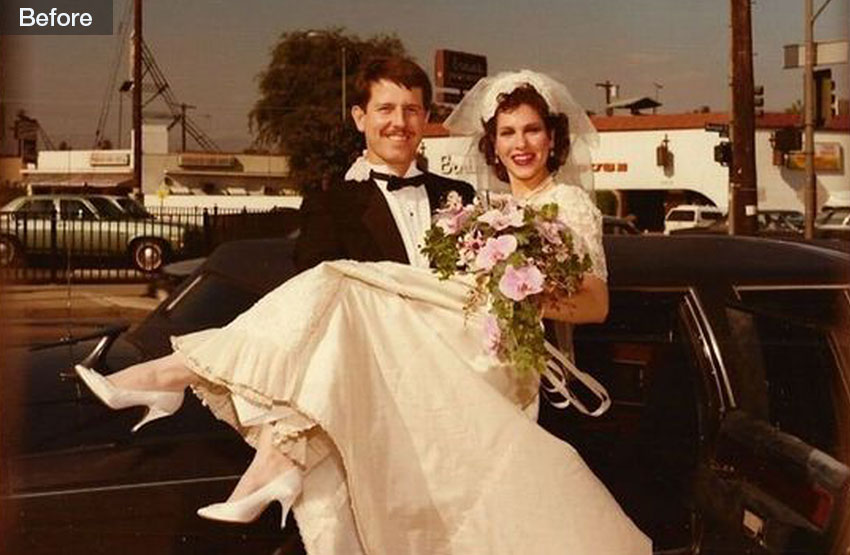


Perfect for anyone who wants to add a professional touch to their slides—whether you're digitizing family memories, working on a personal project, or preserving historical photos. Aiarty Image Enhancer is simple, fast, and delivers stunning results with just a few clicks.
Best 8 Slide-to-Digital Converters
When it comes to converting slides to digital format, the quality of the converter can make all the difference. Whether you're a casual user or a professional, choosing the right slide-to-digital converter ensures that your precious memories are preserved with clarity and detail. Below is a review of the top 8 slide-to-digital converters, including their features, pros, cons, and a rating to help you make an informed choice.
1. Kodak Slide N Scan (Best Overall)
Rating: 
 4.1/5
4.1/5
Ideal for: Casual users looking for a simple, cost-effective solution.
The Kodak Slide N Scan is an excellent choice for casual users who want an easy-to-use, affordable slide converter. It's designed for those looking for a fast and straightforward way to digitize slides without complex setup or additional software. With its simple, one-touch operation, the Kodak Slide N Scan provides a convenient option for people with small to medium slide collections.
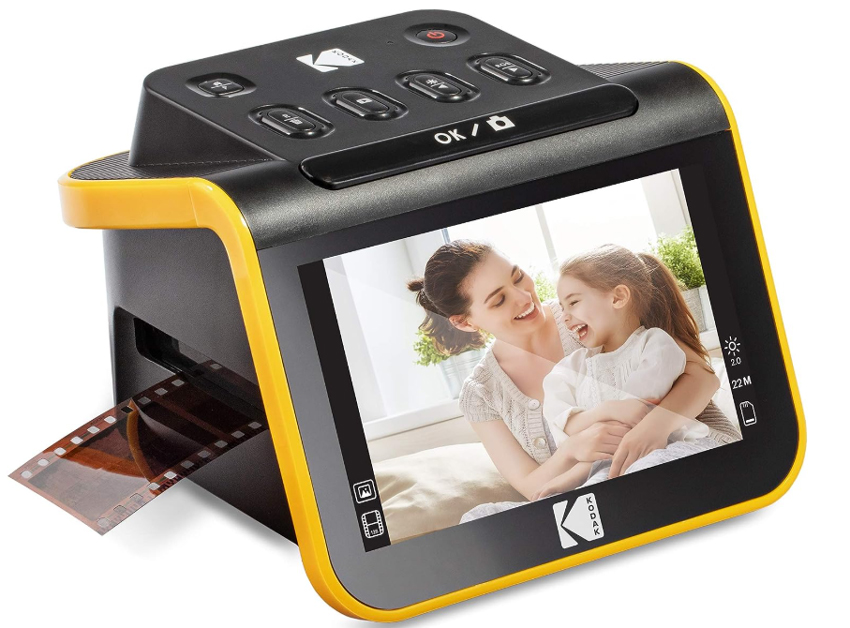
Features:
- 5-megapixel sensor for decent resolution.
- 7-inch color LCD screen for previewing slides.
- No computer required for operation—just save directly to an SD card.
- Compatible with 35mm, 126, and 110 slides and negatives.
- Quick, simple process—perfect for beginners.
- Portable and doesn't require a computer.
- Affordable compared to professional-grade models.
- Limited resolution (5MP) for high-detail scans.
- Lacks advanced features like color correction or dust removal.
2. Wolverine Titan (Best for High-Resolution Scans)
Rating:  4.5/5
4.5/5
Ideal for: Users who need high-resolution scans and a fast scanning process for larger collections.
The Wolverine Titan is a popular choice among users who want fast, high-quality slides conversion. With its 20-megapixel resolution, it's one of the best tools for users who need clear, detailed scans. It's designed for converting slides to digital in bulk, offering a rapid scanning process and a 7-inch LCD screen for easy slide preview.
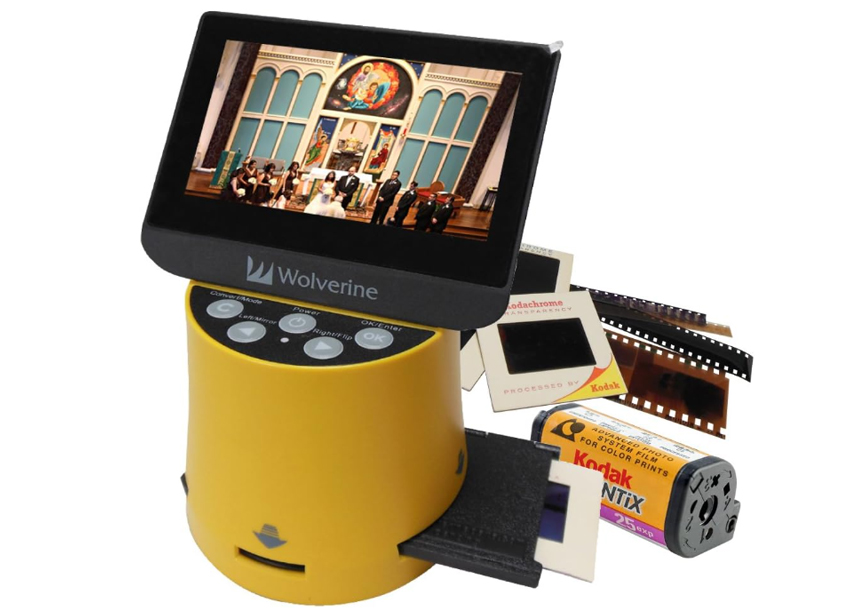
Features:
- 20-megapixel resolution for ultra-high-definition scans.
- 7-inch color LCD screen for previewing slides.
- Supports 35mm, 110 slides, and negatives.
- Saves scans directly to SD cards or USB drives.
- High-resolution scans ideal for printing or detailed work.
- Quick scanning process - 2-3 seconds per slide.
- Includes color correction features for improved results.
- Larger and bulkier compared to other models.
- More expensive than entry-level converters.
3. Plustek OpticFilm 8200i AI (Best for Professional Use)
Rating: 4.8/5
Ideal for: Professionals or those looking for the highest quality in slide digitization.
The Plustek OpticFilm 8200i AI is a top-tier scanner designed for professionals and serious hobbyists. This high-end scanner offers a massive 7200 x 7200 dpi resolution, delivering incredibly detailed scans that are ideal for archival purposes or large-scale prints. It's equipped with advanced image processing software (SilverFast) and built-in infrared dust and scratch removal, making it perfect for users who demand the highest quality.
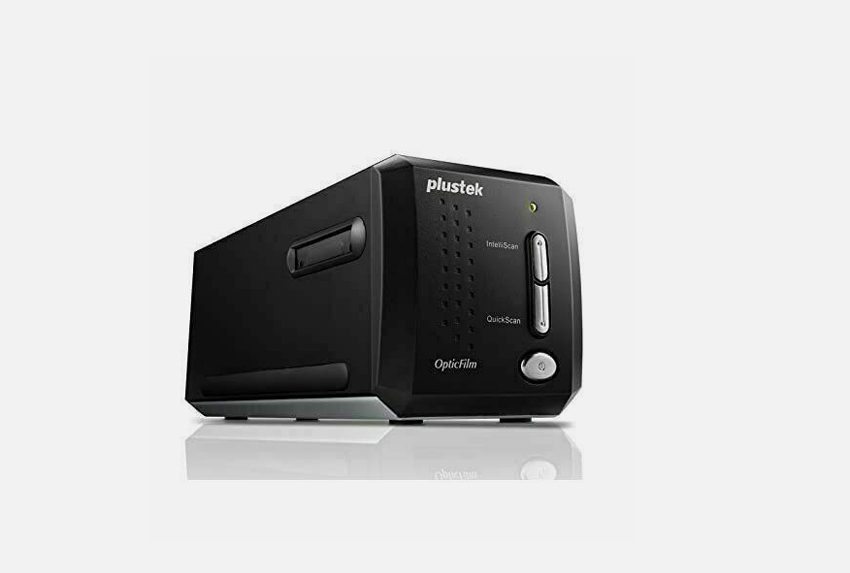
Features:
- 7200 x 7200 dpi resolution for ultra-high-definition scans.
- SilverFast software for advanced image processing.
- Built-in infrared dust and scratch removal.
- Supports batch scanning with film holders for easy slide management.
- Professional-grade image quality with high resolution.
- Excellent dust and scratch removal for clean scans.
- Ideal for archival work or users needing the highest quality.
- Expensive, especially for home users.
- Slower scanning speed - can take a minute or more per slide.
4. Epson Perfection V600 (Best Flatbed Scanner)
Rating: 4.5/5
Ideal for: Users who need a versatile scanner that can handle slides, photos, and documents.
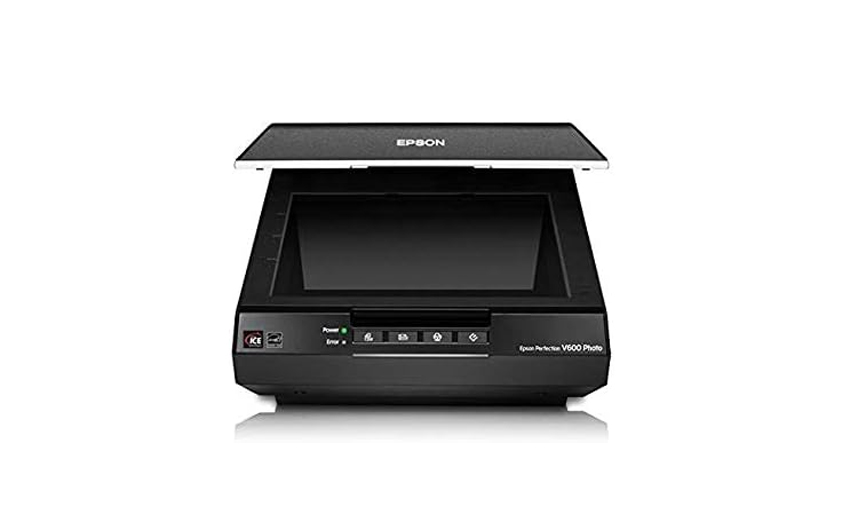
The Epson Perfection V600 is a highly versatile flatbed scanner that excels in converting slides, negatives, and photos to digital. Unlike dedicated slide converters, this model is a multifunctional scanner that offers impressive resolution and image enhancement options, making it perfect for users who need a scanner for multiple types of media.
Features:
- 6400 x 9600 dpi resolution for high-quality scans.
- Digital ICE Technology for dust and scratch removal.
- Comes with software for automatic photo corrections and enhancements.
- Scans slides, negatives, and documents.
- High resolution and excellent color reproduction.
- Multifunctional - scans photos, documents, and slides.
- Digital ICE Technology cleans up images during scanning.
- Slower scanning time than dedicated slide converters.
- Larger and heavier than most standalone slide scanners.
5. Pacific Image PrimeFilm XA (Best for Color Accuracy)
Rating: 4.5/5
Ideal for: Photographers or those working with color-critical slides.
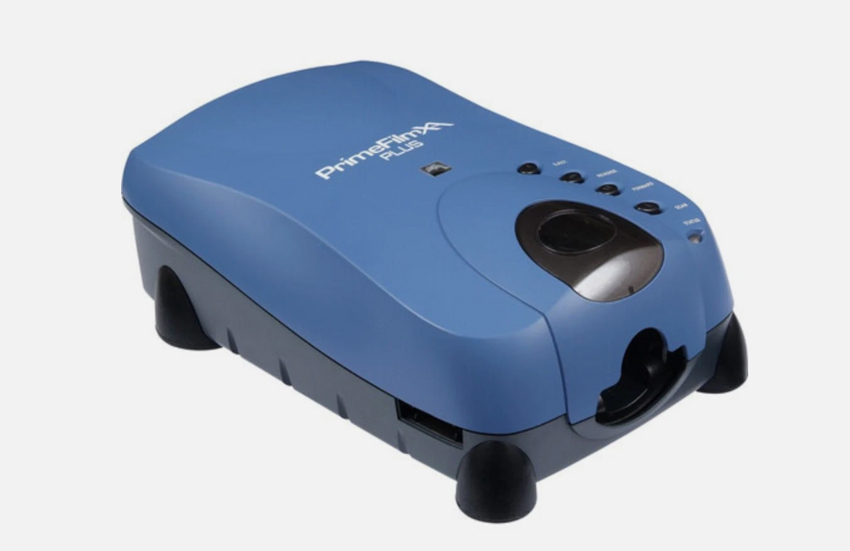
The Pacific Image PrimeFilm XA is known for its exceptional color accuracy, making it the ideal choice for users who need to preserve the true colors of their slides. With a 7200 x 7200 dpi resolution, it offers sharp scans that retain the full detail and vibrancy of the original slides.
Features:
- 7200 x 7200 dpi resolution for detailed scans.
- Automatic color correction and dust removal.
- Compatible with 35mm slides, negatives, and film types.
- Includes film holders for easy slide management.
- Excellent color accuracy for preserving slide integrity.
- High resolution for detailed, sharp scans.
- Automatic color correction for enhanced results.
- Expensive compared to budget models.
- Slower scanning speed than some other models.
6. Reflecta DigitDia 6000 (Best for Speed)
Rating: 4/5
Ideal for: Users with large collections who need a fast and efficient scanning solution.
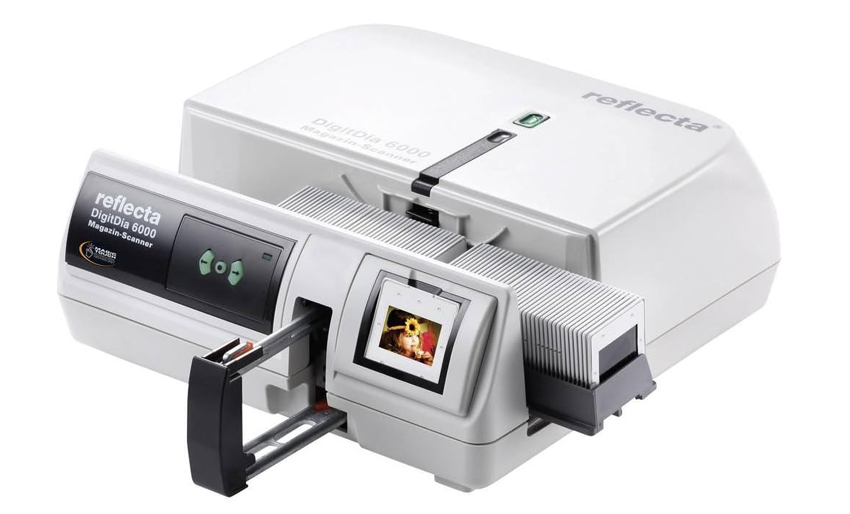
The Reflecta DigitDia 6000 is built for speed. It can handle bulk scanning with its automatic 50-slide feeder, making it the perfect choice for users with large slide collections who need a fast, efficient solution for digitizing slides. It offers 6000 x 6000 dpi resolution, striking a good balance between speed and quality.
Features:
- 6000 x 6000 dpi resolution for sharp scans.
- 50-slide automatic feeder for bulk scanning.
- USB 2.0 interface for easy file transfer to a computer.
- Fast scanning process with the automatic feeder - perfect for large batches.
- Decent resolution for most scanning needs.
- Quick and efficient for those with a lot of slides to digitize.
- Larger and bulkier than most models.
- Expensive.
7. Canon CanoScan 9000F Mark II (Best for Versatility)
Rating: 4/5
Ideal for: Users who need a scanner that works for slides, photos, and documents.
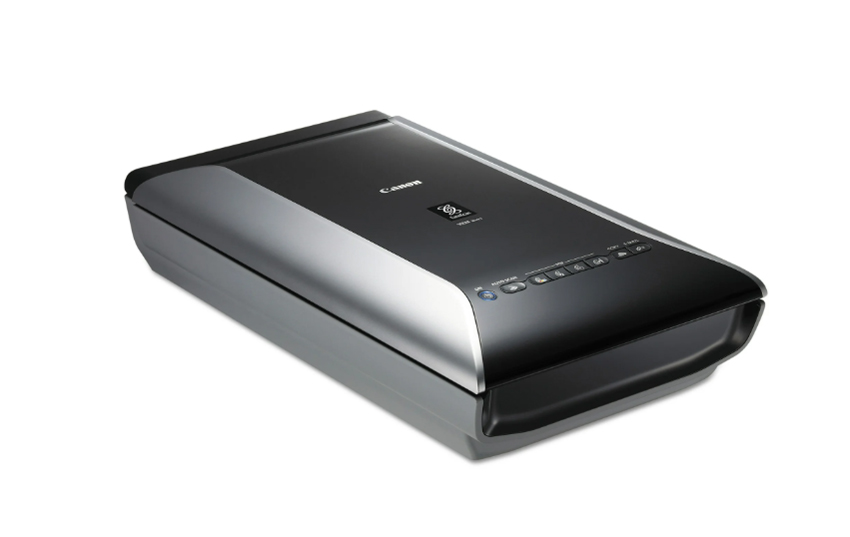
The Canon CanoScan 9000F Mark II is a versatile flatbed scanner that can handle 35mm slides, photos, and documents. It offers a high resolution of 9600 x 9600 dpi, making it an excellent choice for users who need detailed scans of both slides and other media types.
Features:
- 9600 x 9600 dpi resolution for high-quality scans.
- Supports 35mm slides, negatives, photos, and documents.
- Comes with software for automatic photo enhancement and corrections.
- Excellent resolution for detailed scans.
- Multifunctional scanner - ideal for various types of media.
- High-quality scanning software included.
- Slower scanning time compared to dedicated slide scanners.
- Larger footprint.
8. KODAK Scanza (Best for Budget)
Rating: 4.1/5
Ideal for: Budget-conscious users who need a quick and easy solution for slide digitization.
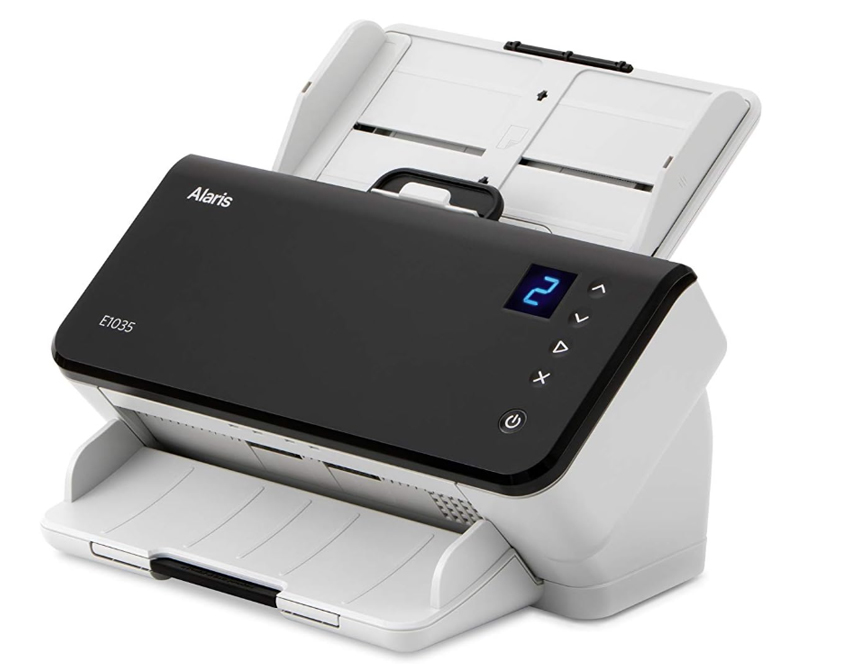
The Kodak Scanza is an affordable, user-friendly slide converter that offers a simple solution for casual users. It's perfect for those who need a no-fuss, budget-friendly option for converting slides to digital photos without sacrificing too much quality.
Features:
- 14-megapixel resolution for decent-quality scans.
- 3.5-inch color LCD screen for easy viewing and navigation.
- Supports 35mm, 110, 126, and other formats.
- No computer needed for operation.
- Budget-friendly, great for home users.
- Simple to use, no technical expertise required.
- Fast scanning process.
- Lower resolution compared to higher-end models.
- Limited features for more advanced users.
Professional Slides to Digital Conversion Services: A Convenient Alternative
While DIY slide scanners and digital converters are excellent options for many users, professional slide conversion services offer a high-end, hassle-free alternative. These services are perfect for individuals with large collections of slides, or for those who want the best possible results without having to worry about equipment setup or operation.
What Are Professional Slide Conversion Services?
Professional slide conversion services, such as ScanCafe and DigMyPics, specialize in transferring slides to digital formats with high precision. They typically offer additional services like color restoration, dust and scratch removal, and even image enhancement to ensure the final product is of the highest quality. Once your slides are digitized, the digital images are often provided in multiple formats (JPEG, TIFF, etc.), making them easy to store, share, or print.
Features:
- High-resolution scans for accurate reproduction.
- Color restoration and enhancement services.
- Optional film and slide restoration for old or damaged slides.
- Scans delivered on DVDs, USB drives, or through online access.
Pros:
- Hassle-free – no need to buy or learn how to use a scanner.
- Professional-quality scans with color correction and restoration.
- Great for large batches or fragile slides that require delicate handling.
Cons:
- Expensive – service fees can add up quickly, especially for large volumes.
- Waiting time for delivery (shipping your slides and waiting for processing).
Recommended Services:
- ScanCafe: Known for its high-quality scans and excellent customer service, ScanCafe offers a range of slide-to-digital conversion options with various pricing tiers. They provide restoration services to improve the quality of old, damaged slides.
- DigMyPics: Another reputable service offering slide-to-digital conversion. They offer options for color correction and restoration, making them a top choice for users who need their slides enhanced before conversion.
How to Choose the Right Slide-to-Digital Converter for Your Needs
Choosing the right slide-to-digital converter depends on several factors including the size of your slide collection, your desired image quality, your budget, and how much time you're willing to spend on the conversion process. Here's a guide to help you choose the right tool based on your specific needs.
Choosing the right slide-to-digital converter depends on several factors including the size of your slide collection, your desired image quality, your budget, and how much time you're willing to spend on the conversion process. Here's a guide to help you choose the right tool based on your specific needs—and when you should consider professional slide conversion services instead.
1. Determine the Resolution You Need
Resolution is one of the most important factors when choosing a slide converter. The higher the resolution, the sharper and more detailed your final digital image will be, especially if you plan on enlarging or printing the images.
- For casual use (e.g., personal projects, sharing online): A resolution of 5-14 megapixels (MP) is often sufficient. Digital converter machines like the Kodak Slide N Scan or KODAK Scanza offer these resolutions and are perfect for users who don't need ultra-high-quality scans.
- For high-quality prints or archival purposes: If you need the highest possible image quality, look for a dedicated slide scanner with a resolution of 4000–7200 dpi, such as the Plustek OpticFilm 8200i AI or Pacific Image PrimeFilm XA. These scanners will provide detailed scans suitable for large prints or professional use.
- For large prints and professional projects: Opt for the Plustek OpticFilm 8200i AI or Pacific Image PrimeFilm XA, which have 7200 x 7200 dpi for maximum resolution. These will capture every fine detail and color gradient in your slides.
2. Consider the Size of Your Slide Collection
If you're dealing with a large number of slides, the time it takes to scan each one can become a significant factor.
- For smaller collections: A digital converter machine like the Kodak Slide N Scan or KODAK Scanza may be ideal. These devices are fast, easy to use, and don't require a computer. If you have fewer than 500 slides to digitize, these devices can offer a simple solution.
- For larger collections: A dedicated slide scanner such as the Reflecta DigitDia 6000, which has an automatic feeder for up to 50 slides, or Wolverine Titan, can quickly scan multiple slides in batches. These models are designed to make bulk scanning more efficient and less time-consuming.
- For mass scanning (500+ slides): If you're scanning large collections, a dedicated slide scanner with automatic feeding capabilities is the best choice. The Reflecta DigitDia 6000 can handle bulk scanning with ease, saving you hours of manual work.
- When to Go for Professional Services: If you have hundreds or thousands of slides, or if you don't have the time to spend on scanning, professional slide conversion services are an excellent option. Services like ScanCafe or DigMyPics handle large batches with high-quality results. They also offer extra services like color restoration, dust removal, and image enhancement, which may be worth the additional cost if your slides are old or damaged. If you need the highest quality scans without worrying about the logistics, a professional service can save you a lot of time and effort.
3. Think About Your Budget
The price of slide-to-digital converters can vary significantly depending on features, resolution, and brand.
- For budget-friendly options: Digital converters like the Kodak Slide N Scan or KODAK Scanza offer great value for the price. They're perfect for casual users who need a simple, affordable solution for converting slides to digital format. The Kodak Slide N Scan is particularly affordable and does not compromise much on ease of use.
- For a balance of quality and price: If you're willing to invest a little more for faster scanning and better quality, the Wolverine Titan offers a great compromise with 20 MP resolution and an efficient scanning process. The Epson Perfection V600 is another solid choice for users who need good quality but don't want to break the bank.
- For high-end quality and features: The Plustek OpticFilm 8200i AI and Pacific Image PrimeFilm XA are premium options that provide professional-level results but come at a higher price. These are suited for photographers, studios, or anyone who demands the absolute best in terms of resolution and color accuracy.
- When to Go for Professional Services: If you have a limited budget but still want high-quality scans, professional services might be a cost-effective option. Services like ScanCafe and DigMyPics can provide you with great quality for a lower overall cost compared to purchasing a high-end dedicated slide scanner. They also take the hassle out of the process, handling everything from scanning to enhancements for a fixed fee.
4. Think About Speed and Convenience
If you're scanning a large collection of slides, you'll want to consider how quickly the device can work.
- For quick scanning: Digital converter machines like the Kodak Slide N Scan and Wolverine Titan are built for speed. They can convert slides in just a few seconds and don't require a computer. These devices are great for users with time constraints or those who want a simple, fast solution without complicated setup.
- For bulk scanning: Look for dedicated slide scanners with automatic feeders, like the Reflecta DigitDia 6000, which can handle multiple slides in one go. With these, you can load up a batch of slides, and the scanner will take care of the rest. This feature dramatically improves efficiency, especially for large collections.
- For professional quality with slower speed: If you prioritize quality over speed, consider dedicated slide scanners such as the Plustek OpticFilm 8200i AI or Pacific Image PrimeFilm XA. While they may take longer to scan each slide (especially with high resolution), they produce exceptional results.
- When to Go for Professional Services: If you're not willing to wait for the time it takes to scan each slide, or if you need fast turnaround time, professional services are a great choice. Professional conversion services can handle large batches quickly and return your digital files in as little as a few days. They also offer options like rush services for urgent needs, which is a significant time-saver.
5. Look for Additional Features
Different tools come with varying features that can enhance your slide conversion experience.
- For image enhancement: Consider dedicated slide scanners like the Plustek OpticFilm 8200i AI or Pacific Image PrimeFilm XA, which include advanced software for color correction, dust and scratch removal, and even infrared cleaning for damaged slides.
- ForFor ease of use: Digital converter machines are the easiest to use, especially for beginners. Machines like the Kodak Slide N Scan don't require technical knowledge and are plug-and-play, making them perfect for users who just want to get the job done with minimal hassle.
- ForFor multiple formats: If you have different types of film (35mm, 110, 126), choose a digital converter like the Wolverine Titan or Kodak Slide N Scan that supports multiple film formats. Many dedicated slide scanners also offer multiple film options, but you may need to purchase additional adapters.
- ForWhen to Go for Professional Services: If you need specialized services such as color restoration, damage repair, or advanced enhancement (especially for old or faded slides), professional services are the way to go. Many services include these options in their packages, ensuring the best possible quality for slides that have deteriorated over time.
6. Choose Based on Your Technical Comfort Level
Lastly, it's important to consider how comfortable you are with technology.
- For beginners or those who prefer simplicity: Digital converter machines like the Kodak Slide N Scan or KODAK Scanza are perfect for users who want an easy, straightforward solution with minimal setup. They're designed for users with limited technical experience.
- For advanced users or professionals: Dedicated slide scanners like the Plustek OpticFilm 8200i AI and Pacific Image PrimeFilm XA are ideal for users who are familiar with scanning software and want more control over image quality and color accuracy.
- When to Go for Professional Services: If you want to skip the technical learning curve entirely, professional services are your best bet. You won't need to worry about selecting the right equipment or learning complex software. You simply ship your slides, and the service takes care of the rest.
 FAQs
FAQs
The best method depends on your needs. If you're looking for speed and convenience, digital converter machines like the Kodak Slide N Scan or Wolverine Titan are great options. For higher-quality scans, especially for professional work or large prints, a dedicated slide scanner such as the Plustek OpticFilm 8200i AI offers superior resolution and image quality. For occasional use or small collections, flatbed scanners like the Epson Perfection V600 are a versatile and affordable solution.
Yes, flatbed scanners with transparency adapters can scan slides. However, they generally produce lower resolution scans compared to dedicated slide scanners. While flatbed scanners are affordable and versatile, they are slower and may not provide the same level of detail and color accuracy, especially for larger slide collections or professional-quality needs.
Digital converter machines like the Kodak Slide N Scan are designed for simplicity and speed. They are great for casual users and small collections, offering decent resolution and ease of use. However, they have lower resolution and fewer features compared to dedicated slide scanners, which offer higher resolution (up to 7200 dpi) and advanced image enhancements. Dedicated slide scanners are ideal for users who need top-tier image quality, especially for large prints or professional projects.
The time it takes to convert slides depends on the method you use:
- Digital converter machines: These can scan each slide in about 1-2 minutes, making them the fastest option.
- Dedicated slide scanners: These may take 2-5 minutes per slide depending on the resolution and quality settings.
- Flatbed scanners: Typically take 3-5 minutes per slide and require manual adjustments.
If you have a large collection (hundreds or thousands of slides), professional slide conversion services can handle bulk scanning quickly, with turnaround times ranging from a few days to a week, depending on the service.
To get the best quality scans, consider the following:
- Use a high-resolution scanner: Dedicated slide scanners offer the best resolution (e.g., 4000–7200 dpi).
- Adjust the color and exposure: Some scanners offer software for color correction and exposure adjustments.
- Clean your slides: Dust and dirt on slides can affect scan quality. Use a soft brush or blower to clean them before scanning.
- Consider professional services: If your slides are old or damaged, professional services often include advanced restoration features like color correction, dust removal, and noise reduction.
- Enhance Your Scans with Aiarty Image Enhancer: After converting your slides, you can use Aiarty Image Enhancer to further enhance the quality of your scans. This AI-powered software can upscale resolution, sharpen details, and restore color accuracy, bringing out the best in your digitized images. Whether you're working with imperfect scans or just want to take your images to the next level, Aiarty ensures your slides look crisp, clear, and vibrant.
Yes, you can convert 35mm slides to digital using any of the methods discussed, including digital converter machines, dedicated slide scanners, or flatbed scanners. Most of these tools support 35mm film slides, and you just need to insert them properly into the scanner or converter. However, make sure that the tool you choose supports 35mm slides if you have different formats like 110 or 126 film.
Yes, several professional services like ScanCafe, DigMyPics, and Legacybox specialize in converting slides to digital format. These services are perfect if you have a large collection of slides or want high-quality, enhanced scans. Professional services offer advantages like image restoration, color correction, and high-resolution scans. Prices vary depending on the service and the volume of slides, but it can be a good option if you want a hassle-free process with excellent results.
The cost of converting slides to digital depends on the method and the number of slides:
- DIY Methods:
- Digital Converter Machines: Typically range from $100 to $300.
- Dedicated Slide Scanners: Prices range from $200 to $600, with high-end models reaching $1000+.
- Flatbed Scanners: Usually cost between $100 to $300.
- Professional Services:
- Price per slide varies from $0.30 to $1.50 per slide depending on the quality, quantity, and service provider. Some services offer bulk pricing or packages based on the number of slides being converted.

This post was written by Brenda Peng who is a seasoned editor at Digiarty Software who loves turning ordinary photos into extraordinary works of art. With AI assistance for brainstorming and drafting, the post is reviewed for accuracy by our expert Abby Poole for her expertise in this field.
