


You know the feeling, right? You've got this absolutely stunning still photo, or maybe a short video clip that's perfectly composed, but it just needs... more. It needs that kinetic energy, that striking style that transforms "nice" into "viral masterpiece."
For years, achieving that level of dynamic, stylized animation required serious skill, expensive software, and hours of tedious work. That's why I'm so excited to introduce you to DomoAI. This isn't just another flavor-of-the-month filter. It's a powerful, comprehensive AI platform specializing in taking your images and videos and giving them a massive, artistic overhaul.
As a seasoned editor at Aiarty, I love turning ordinary photos into extraordinary works of art. DomoAI promises to be the kind of tool that smashes through traditional creative barriers, putting professional-grade animation and style transfer directly into our hands.
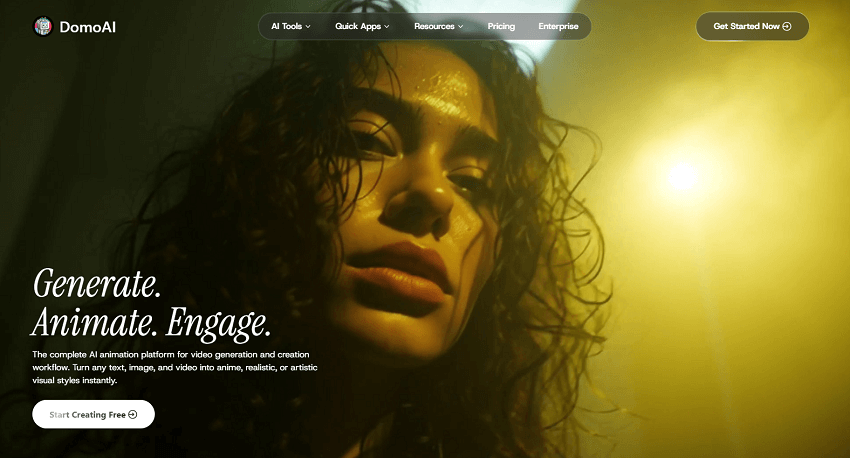
What We're Here to Find Out
Who exactly is this platform designed for? If you're a content creator, an artist trying out new digital mediums, a savvy marketer, or a social media influencer fighting for attention in a crowded feed, DomoAI is talking directly to you.
It presents itself as the ultimate creative powerhouse, but the big question remains: Does it deliver?
Our goal with this review is simple: we're going to put DomoAI through its paces, dissecting every feature, from its speed to its cost-efficiency. We are here to provide a complete, reliable, and engaging breakdown that answers the central question that matters to every creator: How effective and valuable is DomoAI for bringing your unique creative visions to life? Let's figure out if this tool deserves a permanent spot in your digital toolkit.
What is DomoAI
Let's clear up a major point of confusion right out of the gate. If you hear the name "Domo," you might think of the well-known enterprise Business Intelligence (BI) platform that deals with data, dashboards, and predicting corporate trends. DomoAI is entirely different.
This "DomoAI" we're talking about is a creative AI generator, focused purely on visual media transformation. It's an all-in-one AI toolkit for transforming text, images, and videos into spectacular stylized animations and visuals. It has nothing to do with processing your sales reports.
At its core, DomoAI is a comprehensive suite built for modern visual storytelling. It's designed to strip away the technical barriers of professional editing, making high-quality animation accessible to everyone.
How do you get started? DomoAI is brilliantly accessible, offering two primary access points:
1. The Official App/Website: A traditional, sleek web interface for direct, dedicated work.
2. The Dedicated Discord Server: A common, community-driven workflow for many AI tools, where you interact directly with the bot using commands like /video or /generate.
Key Features of DomoAI
So, what exactly can this tool do for your content? DomoAI provides four major avenues for creative expression, each designed to inject dynamic movement and stunning style into your media.
1. Image-to-Video Transformation (I2V)
This is where you bring your static visuals to life. Got a portrait, a landscape, or even an abstract piece of art? DomoAI can animate it.
It turns a still photo into a moving, animated clip by adding subtle, smooth, simulated motion. Think of it as giving your photos a captivating cinematic push.
2. Video-to-Video Style Transfer (V2V)
This is perhaps the most famous—and most fun—feature. V2V takes your existing video footage and completely redraws it in a new artistic style while maintaining the original movement.
It can instantly transform live-action footage into popular Japanese anime styles, offering impressive results, such as the widely praised Japanese anime 3.0 model. This is the go-to tool if you want to turn your holiday reel into a Studio Ghibli short.
It doesn't stop at anime. You can apply stunning, dramatic styles like cyberpunk, cubism, or claymation to any existing video, providing unparalleled artistic flexibility.
3. Text-to-Video Generation (T2V)
If you're starting from scratch, this is your entry point. You simply type in a text prompt—for example, "A golden retriever surfing at sunset in a vibrant oil painting style"—and the AI generates a dynamic video clip based on your words.
4. Character Animation and Avatars
Need a character to perform a specific action? DomoAI can handle it.
You can upload a still image of a character and feed the system a motion reference video (say, a dance routine) to animate the static character realistically.
This tool is perfect for narration, creating lifelike avatars with automated, high-quality lip-syncing capability for reading a provided script.
These four pillars make DomoAI a genuinely versatile tool, capable of delivering results that traditionally required specialist animators and significant time investment.
Step-by-Step Tutorial of DomoAI
Alright, let's stop talking theory and start talking action. You might be wondering how complicated it is to actually get started. The good news? It's incredibly straightforward.
First, signing up is a breeze. Like many modern AI tools, DomoAI offers a limited free access tier. This is your perfect sandbox—a way to test the core features and see the magic happen before you commit any cash. Remember, though, that limited access is just that; it's a taste!
Now, how do you work with it? You have two main routes: the official web interface or their dedicated Discord server. While the web app is intuitive and visually cleaner, the Discord workflow is often preferred by power users. For instance, creating a video simply requires typing the concise command, like /video or /animate, followed by your image upload and prompt.
Workflow Example: The I2V Transformation
For my first official test, I wanted to take a beautiful, static portrait and inject it with some dramatic animation. Let's walk through the Image-to-Anime Video process—a key feature where DomoAI truly shines.
Step 1. Find the Tool. Go to its workspace, find AI Video feature, and click it.
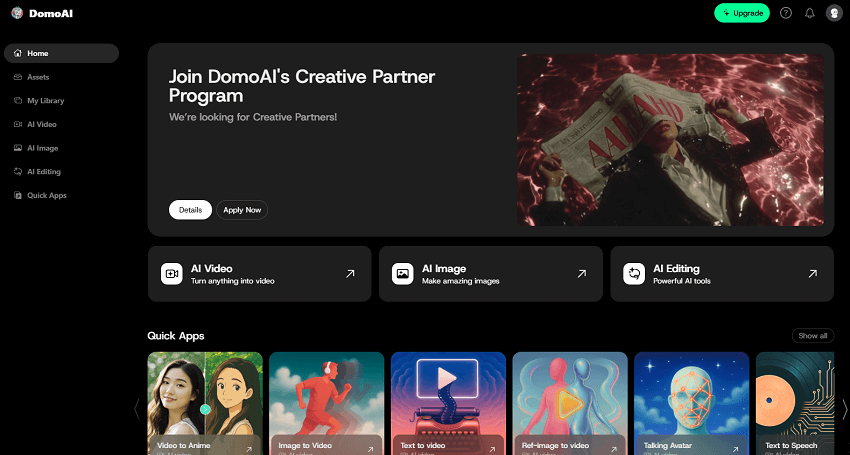
Step 2: Uploading the Base Media. In the new window, choose Image to Video, and this is where I upload my ordinary photo. Simple drag-and-drop, and you're in the system. And then double-click it, after uploading finishes.
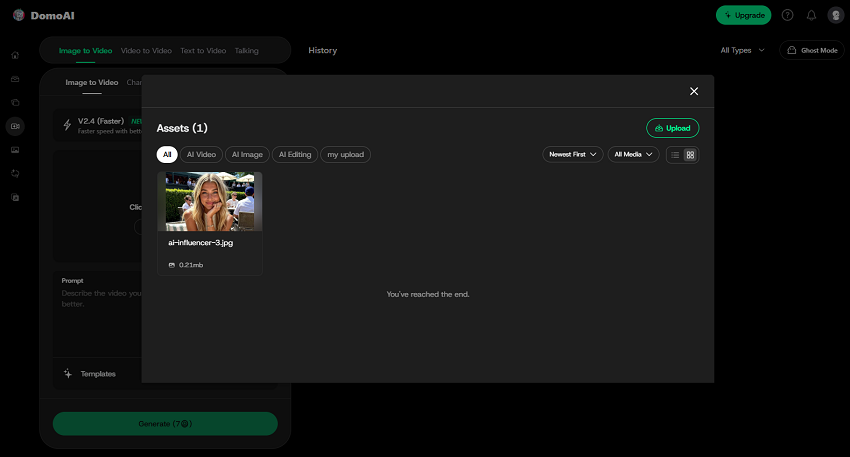
Step 3: Selecting the AI Model/Style. This is the crucial creative pivot point. You're transforming your image into extraordinary art. There are several models you can choose. I go for the popular V 2.4 (Fast).
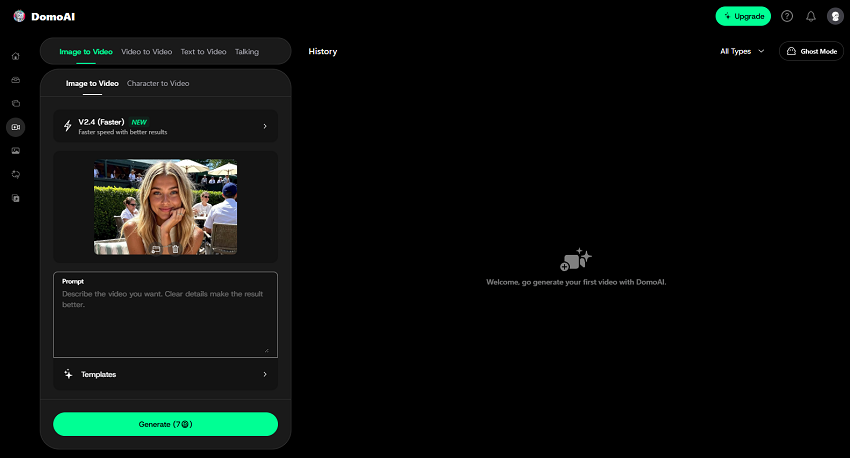
Step 4: Customizing the Parameters. First finish the prompt words where you can describe the video result you want. And the the duration and aspect ratio paramters. These are where DomoAI gives you genuine creative control, right down to the pixels.
- Duration: By default, you're usually looking at a 5s or 10s clip. However, if you're on a Pro Plan, you can push this duration up to 30 seconds—a huge benefit for creating longer, standalone social content.
- Aspect Ratio: This is critical for social media optimization. Always select the right ratio (e.g., 9:16 for TikTok/Reels) to avoid ugly crops later.
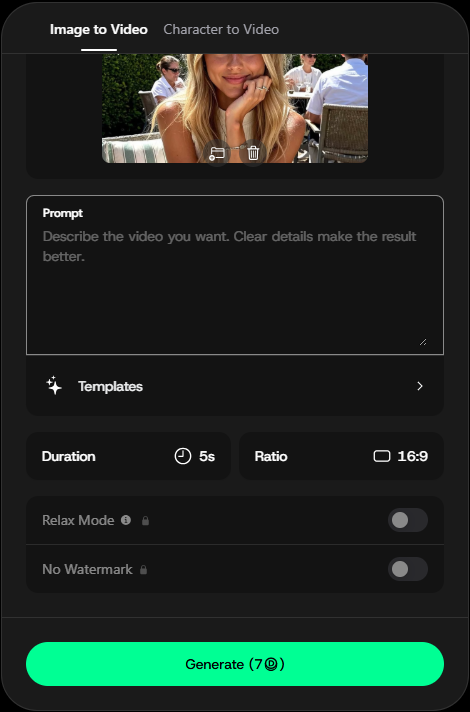
Step 5: Generation and Review. Finally, hit generate. You'll choose between Fast vs. Relaxed Mode. Fast Mode burns credits quickly but gets you results now. Relaxed Mode is slower but more credit-friendly—a great option if you're on a Pro plan with unlimited Relaxed generations.
Advanced Smart Editing Features
For those of us who demand professional-level control, DomoAI has some smart features that really elevate the output:
Video Upscaler: If you're taking those generated clips to a professional editor like Premiere Pro, you'll want the best quality. The Upscaler is designed to enhance the final resolution, making it ready for high-definition projects without significant loss of fidelity.
Screen Keying / Subject Only: This is a major control point. If you want to transform a character into, say, a striking cyberpunk cartoon but keep the background realistic (like a live-action city street), this feature lets you isolate the subject. Only the character is transformed by the AI style, giving you an unparalleled degree of mix-and-match visual fidelity. It's truly a game-changer for integrated storytelling.
Pricing, Plans, and Value Proposition of DomoAI
Let's talk money. DomoAI, like most AI services, operates on a subscription model, and which tier you choose will dramatically affect your experience.

- Free Plan: This is your "try before you buy" sandbox. You get a small, one-time allotment of credits to test the waters. It's perfect for seeing if you even like the styles, but you will burn through these starter credits in a single afternoon.
- Basic Plan ($9.99/month or $6.99/month yearly) and Standard Plan ($27.99/month or $19.59/month yearly) : This is the entry-level paid tiers. You get a monthly drop of "Fast" credits, which are consumed with each generation. This is a solid choice for the hobbyist who wants to create a few cool clips a week.
- Pro Plan (approx. $69.99/month or $48.99/month yearly): This is the game-changer for serious creators, and frankly, the tier I'd recommend. Why? You get a much larger bucket of Fast credits, but the real treasure is unlimited Relaxed Mode generations. This means you can create an endless amount of video content without worrying about credits, as long as you're not in a hurry.
The Credit System: How Much Does "Art" Cost?
This is where things get a bit... complex. The AI world loves credit systems. Basically, everything you do costs something.
Generating a 3-second video in Fast Mode might cost 10 credits. Extending it to 10 seconds might cost 30 credits. Upscaling that video could cost another 15.
The costs can add up quickly, which makes the Fast vs. Relaxed Mode choice so critical. If you're on the Standard plan, you will find yourself anxiously counting credits. If you're on the Pro plan, you'll just default to Relaxed Mode and let your creative machine run in the background all day.
You can also purchase additional "Top-Up" credits, but these are a-la-carte and feel more expensive than the monthly subscription bundles. My advice? Pick the plan that matches your volume, not your project.
My Verdict on Value: Is DomoAI Worth the Investment?
So, is it worth the cash? As someone who lives and breathes digital art, my answer is a resounding yes, for the right person.
Let's put the $50/month Pro Plan in perspective. How much would it cost to hire a freelance animator to create a single 10-second stylized clip? Hundreds, if not thousands, of dollars. How long would it take me to try and replicate this in Adobe After Effects? Hours, maybe days, for a single, complex style.
With the Pro Plan's unlimited Relaxed generations, I can create a massive library of unique, stylized B-roll, test dozens of creative ideas, and produce content at a scale that was previously impossible.
For the Hobbyist: The Standard plan is a fun, affordable entry point. For the Serious Creator/Marketer: The Pro plan isn't a cost; it's an investment in high-volume, high-quality, unique visual content. The value here is exceptional.
DomoAI is betting that speed, quality, and creative control are worth the subscription, and from my professional viewpoint, it's a bet they've won.
DomoAI vs. The Competition
The AI video landscape is quickly becoming a crowded field. To truly understand DomoAI's value, we need to compare it against the big players like Runway, Pika Labs, etc. They might offer similar core services, but they target slightly different creative needs.
1. The Realism vs. Artistry Divide
The biggest difference lies in the end goal of the generated content:
Runway Gen-2: This tool often wins when your goal is cinematic realism. If you are looking to generate an original scene with stable camera movement, a realistic texture, and a high degree of fidelity to a real-world setting, Runway is the current gold standard.
DomoAI: This platform is the undisputed champion of stylized artistry. DomoAI's specialized models (like the beloved Japanese Anime 3.0 or the various 3D Cartoon styles) deliver a style transfer quality that is exceptionally high and consistent across frames. If your primary goal is to turn existing footage into a specific, non-realistic art form, DomoAI has the edge.
2. Control and Consistency in V2V
While all competitors offer Video-to-Video (V2V) transformation, DomoAI excels in two critical areas:
Style Consistency: DomoAI maintains remarkable consistency throughout a video clip, which is vital for preventing the "flickering" or style breakup that plagues lesser models. It ensures your anime character stays true to the art style for the duration of the shot.
Advanced Masking (Subject Only): This is a feature currently not as robust or user-friendly in many competitor models. DomoAI's ability to selectively apply a style to only the foreground subject (while keeping the background untouched or applying a different style) is an essential professional tool for compositing and integrated video effects.
3. Ease of Use and Platform Accessibility
Pika Labs: Pika often wins on pure simplicity and is incredibly easy to jump into, often within a Discord interface. Its controls for motion and camera are very intuitive.
DomoAI: While the core commands are simple, the complexity of its style and motion sliders, plus the dual platform (Web App and Discord), makes it slightly more geared toward the power user who wants granular control. For those who need mass output and the best stylized fidelity, DomoAI's controls are worth the slight learning curve.
4. Generative vs. Utility: The Need for Professional Polish
It's crucial to distinguish between tools that create (Generative) and tools that perfect (Utility). Generative AI, by its nature, can sometimes introduce minor artifacts, soften details, or output lower-resolution video to save rendering time.
While DomoAI is peerless in creating stunning, hyper-stylized content, true professionals know that the creative process isn't finished until the quality meets broadcast standards. This is precisely why a dedicated utility like Aiarty Video Enhancer is indispensable for any serious DomoAI user.
Aiarty Video Enhancer is specifically built to address the quality gap, serving as the essential final step. It takes your beautifully styled DomoAI output and refines it, offering lossless upscaling to 4K or 8K, intelligent artifact reduction, and stabilization that surpasses basic built-in tools.
The Workflow: You can use DomoAI to create the magnificent style (e.g., a 1080p Anime clip), and then run it through Aiarty to ensure the texture is flawless, the resolution is maximized, and the video is ready for high-end platforms like streaming or television. It shifts the final conversation from "How do I make it look cool?" to "How do I make it look flawless?"
If your brand or creative project is rooted in highly specific, non-realistic aesthetics, DomoAI is the superior, specialized choice. However, remember that maximizing the quality of that stunning aesthetic requires pairing it with professional enhancement tools like Aiarty Video Enhancer.
Pros & Cons of DomoAI
Having tested DomoAI across multiple projects, utilizing its various styles, and pushing its limits on V2V and I2V conversion, my final analysis comes down to a clear set of benefits and drawbacks.
What Users Love (Pros)
- Blazing Speed and Iteration: For a professional, time is money. DomoAI allows for rapid iteration, meaning you can test ten different styles on the same clip in the time it takes to render two attempts on a slower platform. The Fast Mode delivers near-instant results, which is incredible for quick content creation.
- Unrivaled Stylization Quality: Hands down, the quality of the style transfer, especially the Japanese Anime 3.0 model, is DomoAI's strongest selling point. The output is consistent, detailed, and ready for professional use. It simply nails the aesthetic it promises better than any other model currently available.
- Beginner Accessibility: While the Pro features are complex, the basic workflow (upload, select style, generate) is intuitive. Creators don't need to be experts in prompt engineering or video editing to produce stunning, dynamic clips.
Areas for Improvement (Cons)
- High Cost for Credit-Heavy Projects: If you stick to the Standard Plan and rely solely on Fast Mode, the credit consumption can become alarmingly expensive. For users handling large, complex, or high-volume projects who need speed, the price tag is steep.
- Output Duration is Limiting: For lower-tier users, the typical output video length (5-10 seconds) means creating a full sequence requires complex video stitching and editing outside of the DomoAI platform. This adds extra steps that a true all-in-one solution should minimize.
- Latency with Large Source Files: When uploading large, high-resolution source videos for V2V transformation, there can be noticeable latency and wait times before the generation even begins, even in Fast Mode. This can interrupt workflow for users dealing with cinema-quality source footage.
Conclusion
DomoAI is more than just a novelty; it is a transformative piece of software. It lowers the barrier to entry for professional-grade animation, making complex stylistic transformations available to content creators, marketers, and artists who previously couldn't afford the time or skill investment.
For anyone focused on creating visually distinct, high-volume social media content, animated marketing materials, or simply indulging in high-fidelity artistic experimentation, DomoAI is an essential addition to your creative toolkit. It truly delivers on the promise of turning ordinary clips into extraordinary, viral masterpieces.
You May Also Like


This post was written by Brenda Peng who is a seasoned editor at Digiarty Software who loves turning ordinary photos into extraordinary works of art. With AI assistance from DeepSeek for brainstorming and drafting, the post is reviewed for accuracy by our expert Abby Poole for her expertise in this field.
