


Removing a photo background should be quick, clean, and painless. Yet, even with all the AI tools, most "auto background removers" still leave jagged outlines or missing details around hair, glass, and fabric.
That's where Aiarty Image Matting comes in. It's a dedicated AI image background remover built to precisely isolate subjects in bulk, remove and replace backgrounds for all kinds of scenarios. It processes everything offline to ensure privacy and speed.
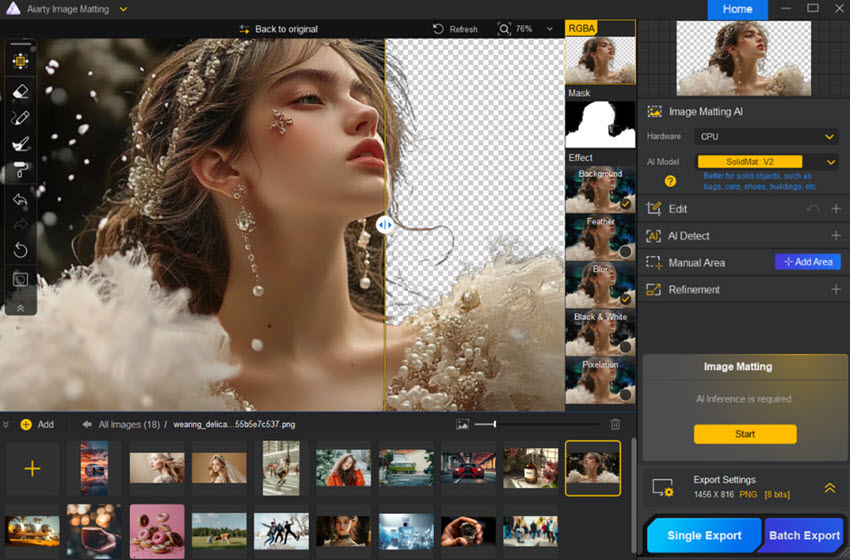
After testing Aiarty for across product photos, portraits, furry animals, architecture shots, and many different themes, here's my honest take on how it performs and where it fits among the best matting tools out there.
You can also access the free resources here to get images for test, featuring tricky scenarios such as complex backgrounds, multiple objects, semi-transparent objects, logos, fuzzy fur and hair, etc.
Download Aiarty Image Matting to remove image backgrounds precisely:
Why AI-Powered Background Removal Matters
Most background removers only perform well on simple shapes. The moment hair, lace, or translucent fabric enters the frame, they leave rough outlines or awkward halos.
Aiarty Image Matting takes a different approach. Its AI models can automatically detect one or multiple subjects based on your needs, making it easy to remove or replace backgrounds in a non-destructive way.
Instead of flat cutouts, it produces an alpha matte, a layered transparency map that preserves soft edges and depth. The result looks natural, even on complex or low-contrast photos, and makes it easy if you also want to replace image background.

Drag the line on the image above to compare the results before and after background removal.
For those handling hundreds of images, Aiarty's bulk image background remover can process up to 3,000 shots in one go, delivering consistently clean results that save hours of repetitive work.
Setup and First Impressions
Aiarty keeps things simple. The installation is quick, and once you open the software, there's no clutter — just a clean interface with clear buttons to import, preview, and export. There are no ads, no pop-ups, and no mandatory logins. Everything runs offline, which also means no risk of private images being uploaded to servers.
It supports standard formats (.heic, .jpg, .jpeg, .bmp, .png, .webp and more). The workflow is intuitive: drag in your images, click "Start," and the AI handles the rest. Within seconds, the background is gone, replaced with a transparent alpha layer you can refine or export as is.
Performance and Accuracy
The matting quality is leagues ahead of most image background remover tools.
In my tests, portraits came out with clean outlines and perfect hair separation. The AI recognized fine hair strands without cutting into the subject. Transparent objects, like glass cups and water bottles, retained their natural transparency variations instead of being flattened or lost.
Even low-contrast photos, such as gray sweaters on gray backgrounds were separated cleanly with minimal artifacts.
Speed is another plus. Aiarty processed 20 high-resolution images in under a minute on a midrange laptop. There's no lag, no cloud upload delay, and no quality loss during export. It's fast, stable, and consistent — exactly what you'd expect from a professional-grade AI image background remover.
Test 1. Isolate the Subject from Complex Background
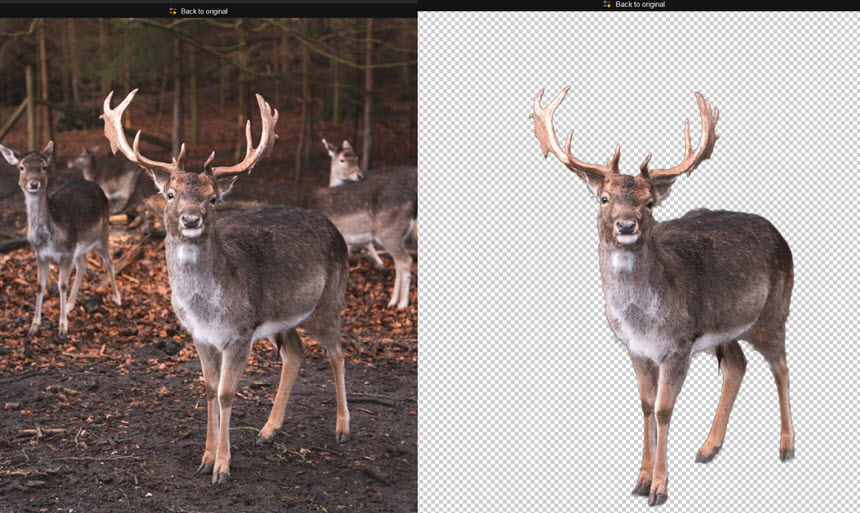
For this test, I used the deers photo from a forest of Højbjerg, Denmark. The background as multiple deers and fall leaves has similar color to the main deer. Low contrast of background and subject as such posing challenges for image background removers.
Aiarty Image Matting supports manually refine area, masking out one or multiple subjects. Since I only need the central deer, after framing it out and hit the Start button for image matting, the result is clean and sharp, as shown below.

It supports export the transparent PNG, remove or replace background. For creative projects, we can use the deer cutout in image editing tools for creative posters, banners, stickers, etc.
Test 2. Remove Image Background from Portrait Photos
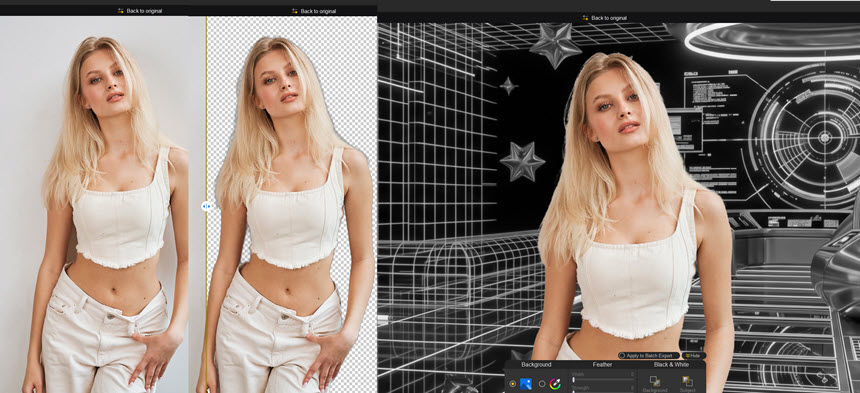
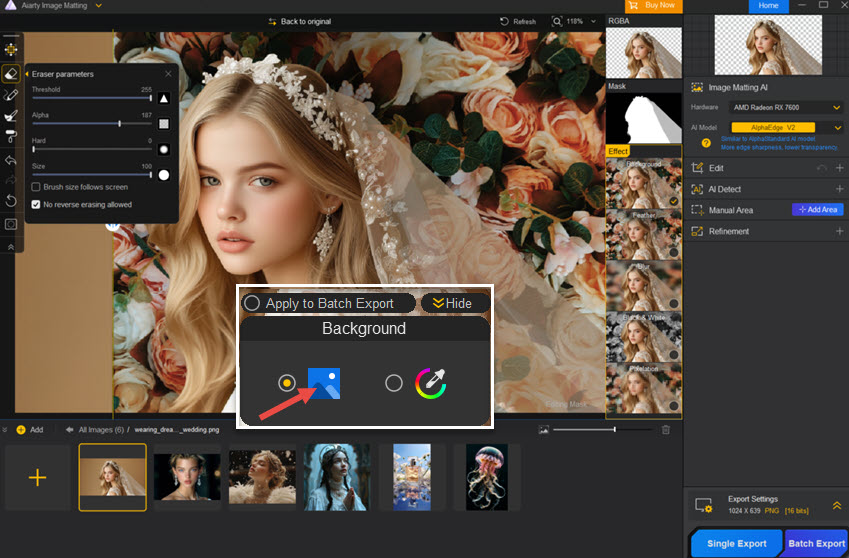
For portrait photos, this background remover helps separating the person from the background, with natural and clear edges. I want to replace the white wall in the original photo with a y2k vibe, and the Effect Panel is easy to add a new background.
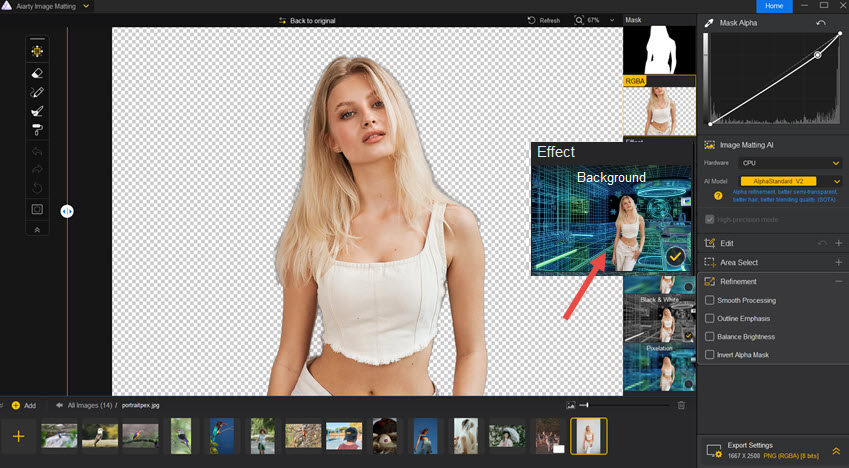
After switching with the custom background, it also offers visual effects such as Black & White, feather, and background blur.

Test 3. Create White Background Product Photos
For e-commerce sellers, white-background photos are generally required by many platforms alongside lifestyle or scenario-based images.
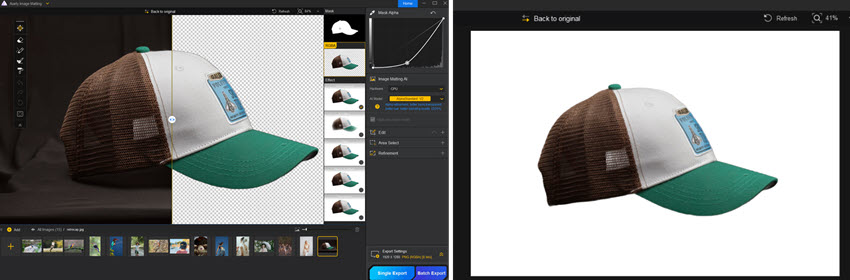
I tested Aiarty on apparel and accessories, and it successfully removed backgrounds in batches and replaced them with white. The results were clean and professional, making it easier for sellers to prepare product assets at scale.
More Use Cases
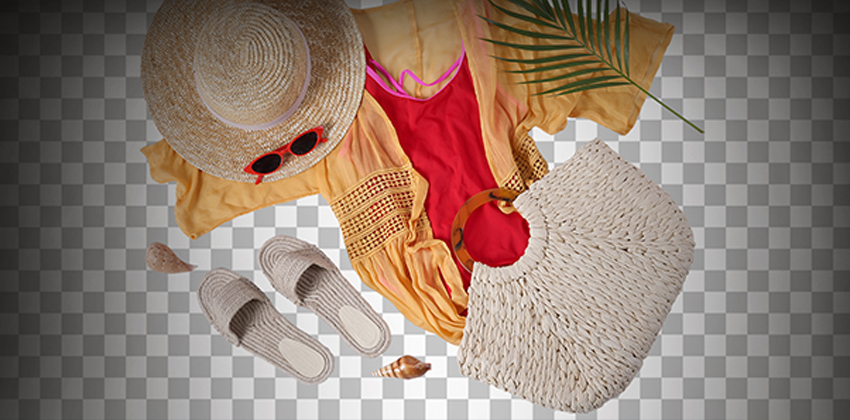
E-commerce: If you're handling hundreds of product shots for Ebay, Etsy, Amazon listings, Aiarty's bulk image background remover is a massive time-saver. You can import entire folders, remove all backgrounds in one click, and export clean cutouts and mattes.

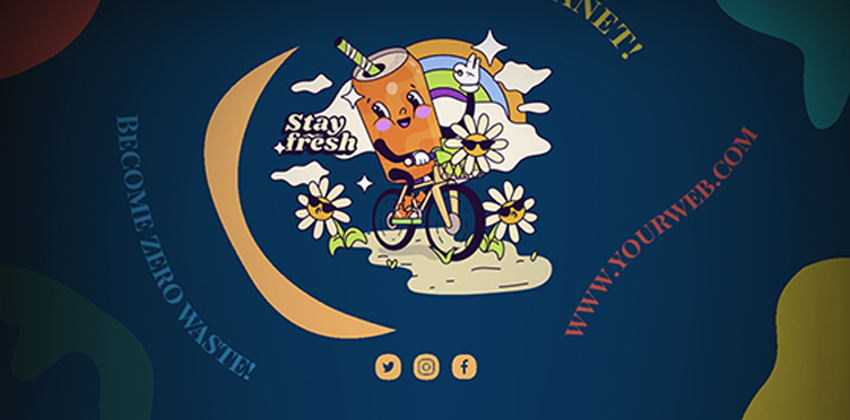
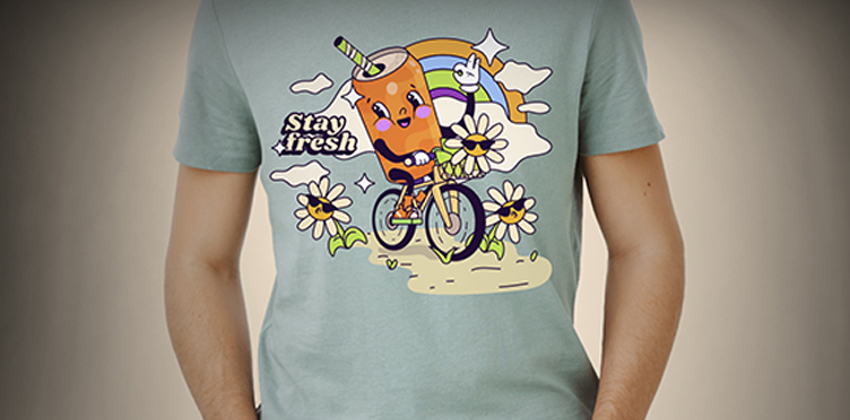
You can even start a T-shirt business, and use Aiarty Image Matting to batch creating transparent stickers for POD sidehustles.
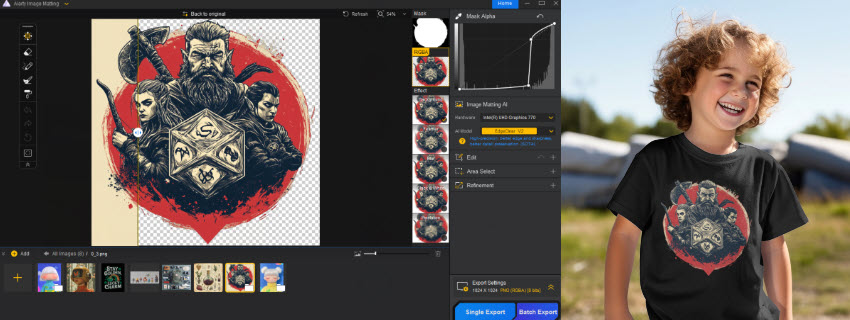
Content creation: YouTubers and designers can quickly isolate subjects for stickers, thumbnails, banners, and social posts, without spending extra time refining edges.
Photography & retouching: Wedding and portrait photographers will appreciate the way Aiarty handles fine fabrics and flowing hair, which pose challenges for other tools.
AI art & compositing: If you create using Stable Diffusion or Midjourney, Aiarty's matting gives you clean layers to blend AI-generated elements naturally.
In short, it's a tool that fits right into both professional and creative workflows.
Features That Stand Out
Aiarty isn't overloaded with gimmicks, just practical features that improve results where it counts.
- Four specialized AI models: Each tuned for different scenes — portraits, solid backgrounds, edge-heavy subjects, and complex environments.
- Manual refinement: Optional brushes for small touch-ups when needed.
- AI enhancement tools: Built-in denoise and upscaling for improving image clarity post-matting.0
- Batch processing: Process thousands of images in one go.
- Offline privacy: All processing happens locally, protecting sensitive work files.
- High-quality exports: Supports 4K and PNG-16bit outputs with preserved alpha transparency.
Where Aiarty Excels Over Other Tools
Let's compare Aiarty to the competition for a moment.
Against traditional editors:
Manual masking is still the gold standard for precision — but it's slow, repetitive, and not feasible for bulk work. Aiarty matches professional-level cutouts but automates the process entirely. What would take an hour in Photoshop or GIMP takes seconds here.
Against online AI removers:
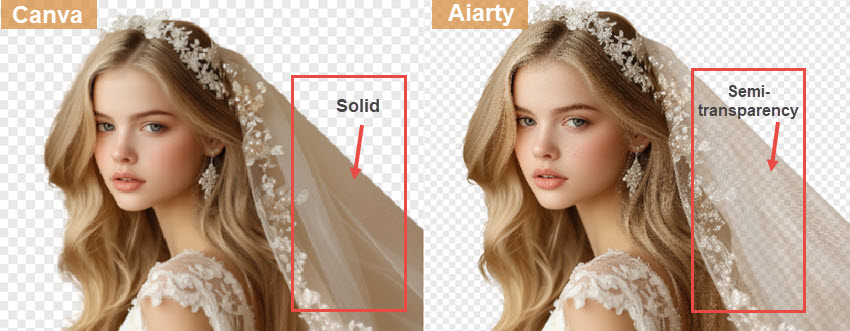
Most online background removers are fine for social use, but they compress images, flatten transparency, and struggle with semi-transparent or fuzzy textures. Aiarty avoids all of that. It works offline, keeps the original resolution, and maintains soft transparency for a more natural edge.
For more details, compare Canva removing backgrounds with Aiarty.
Against generative tools:
AI tools such as like Grok AI or Nano Banana are suitable for colorizing and expanding, but they're not made for consistent background removal, as these tools can create or alter images, and won't support batch processing. Aiarty Image Matting focuses entirely on accurate isolation, making it better suited for workflows that need precision and efficiency.
Ease of Use and Workflow Integration
Despite its advanced tech, Aiarty is surprisingly beginner-friendly. You don't need to understand "alpha channels" or "masking techniques" to get clean results. The default auto mode works great for most images, while pros can fine-tune edge sensitivity or brightness balancing for trickier ones.
Aiarty also integrates smoothly into a broader workflow. The cutouts can be dropped directly into Photoshop, Canva, Figma, or video editors like Premiere Pro without compatibility issues. For teams or freelancers working on multiple platforms, that's a big plus.
Pricing
Aiarty is available as a one-time purchase (Lifetime License) or annual plan. The Lifetime License sits at $75, which is fair given its accuracy, offline capability, and batch processing.
For freelancers and teams handling visual production regularly, it pays for itself quickly in saved hours.
Final Thoughts
Aiarty Image Matting bridges the gap between professional photo editing and AI-powered efficiency. It delivers the kind of precision you'd normally expect from hand-drawn masks but at AI speed and without compromising natural detail.
Whether you're cutting out one portrait or cleaning up a thousand product photos, Aiarty proves that an AI image background remover can finally be both smart and trustworthy. It's fast, accurate, private, and scalable, and it just might be the background remover that finally gets it right.
You May Also Like


This post was written by Brenda Peng who is a seasoned editor at Digiarty Software who loves turning ordinary photos into extraordinary works of art. With AI assistance for brainstorming and drafting, the post is reviewed for accuracy by our expert Abby Poole for her expertise in this field.
