


As an editor who's spent years turning ordinary photos into extraordinary art, trust me when I say the AI image generation landscape moves faster than a toddler hopped up on sugar. Midjourney has reigned supreme for a long period, the undisputed champion of the digital art world, consistently spitting out stunning, cinematic visuals that look like they belong in a museum. But now, there's a new name on the block that's changing the game: the Nano Banana.
You're probably asking, "What is a Nano Banana?" It sounds like a secret menu item at a Google cafeteria. But this quirky moniker is actually the viral community nickname for Google's powerful new image generation engine: the Gemini 2.5 Flash Image model. And yes, it already has an upgraded Pro version, the Gemini 3.0 Pro Image.
This isn't just another text-to-image tool; it's a social media sensation. You've undoubtedly seen its work. Remember those hyper-realistic "1880s to 2025 Time Travel" grids that exploded across Instagram and X? That's Nano Banana. Or the infamous—and frankly, slightly terrifying—case study where an employee used the tool to create a hyper-realistic "Fake Injury" photo so convincing that HR approved paid leave? That's the photorealism and editing power we're talking about.
So, how do these two titans of visual creation stack up? It all comes down to their core purpose:
- Midjourney: The Artistic Visionary. If you want a fantasy book cover, stunning concept art, or a beautifully textured, painterly image, Midjourney remains your go-to. It thrives on complex prompts and artistic nuance, giving you that rich, high-fidelity look every time.
- Nano Banana: The Speed King & Editor. If Midjourney is the oil painter, Nano Banana is the hyper-efficient digital darkroom. It focuses relentlessly on speed, photorealism, and conversational editing. Its main party trick is its ability to maintain consistent subject identity while allowing you to "talk" your image edits into existence.
The core question for you, the savvy creator, is this: Which tool fits your workflow? Do you need the artistic powerhouse for complex creative projects, or the smart, consistent editor for fast iterations, e-commerce, and viral social media content? Let's dive into the key differences to help you decide.
At a Glance: Key Differences Between Nano Banana and Midjourney
Now that we've established the players, let's get down to the brass tacks: the technical and access differences that immediately impact your daily workflow. This is where the editor in me gets excited, because the how often dictates the what you can create.
1. Performance and Speed
This is arguably Nano Banana's biggest selling point, and why it earned the "Flash" designation.
- Nano Banana (Gemini 2.5 Flash Image): This tool is built for velocity. It generates stunning images in mere seconds, often under 3 seconds for many requests. If you are iterating rapidly or need high throughput (think processing hundreds of social media posts), this speed is a massive advantage. It's the AI equivalent of an instantaneous shutter release.
- Midjourney: Midjourney prioritizes fidelity. It takes its time, often resulting in generation speeds between 10 to 60 seconds per image, depending on the complexity of your prompt and the server load. You're waiting longer, but you're usually getting a deeply detailed result. Think of it like slow-cooked vs. fast-food realism.
2. The Final Vibe: Realism vs. Artistry
I find that each model has a distinct 'signature look.' You can almost tell them apart without looking at the metadata.
- Midjourney's Look: It's inherently an artist. The outputs are often cinematic, highly textured, and full of unprompted artistic flair. It leans toward creative interpretation, often giving you dramatic lighting and painterly details even in simple scenes.
- Nano Banana's Look: It's inherently a photographer. The results lean heavily toward clean, commercial, stock-photo realism. It excels at literal interpretation of prompts. This makes it perfect for product visualization or when you need minimal stylistic interference.
3. Access and User Interface
How you actually use the tool is a huge factor, especially for beginners.
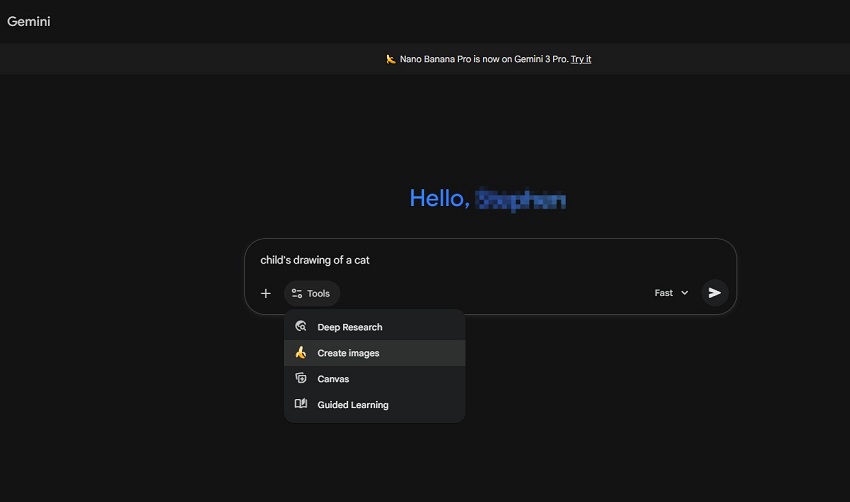
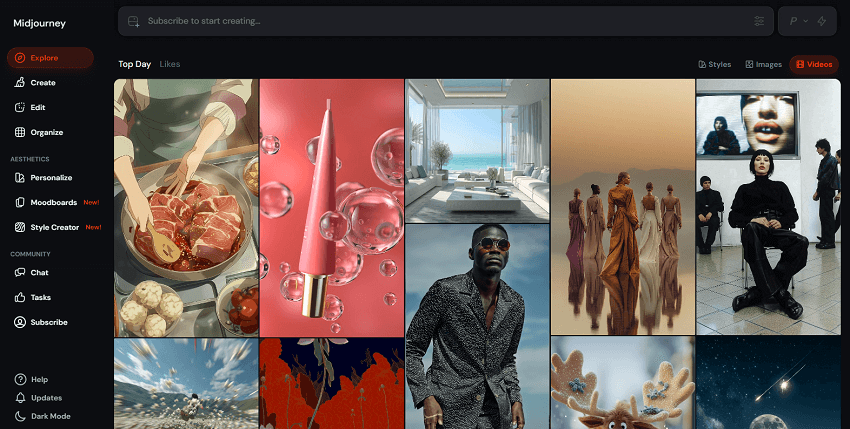
While Midjourney is working on a dedicated web client, the majority of its user base still interacts through Discord. Nano Banana, on the other hand, is integrated directly into the broader Gemini ecosystem, making it immediately accessible and much more intuitive for anyone familiar with a chat interface.
Feature Showdown: Where the Real Battle Happens
1. Character Consistency & Editing
This is the most crucial test for anyone trying to build a story, a mascot, or a cohesive product line. It answers the question: Can the AI keep the same face when you change the outfit?
Nano Banana wins for identity preservation in iterative workflows. Because the model is natively multimodal and understands conversational context, you can upload a base image and then issue text commands like, "Keep the same person, but change her expression to serious," or "Put him on a futuristic spaceship." The character's core features are remarkably consistent through these multi-turn edits. This is a game-changer for quick commercial mockups, multi-panel comics, and narrative storytelling.
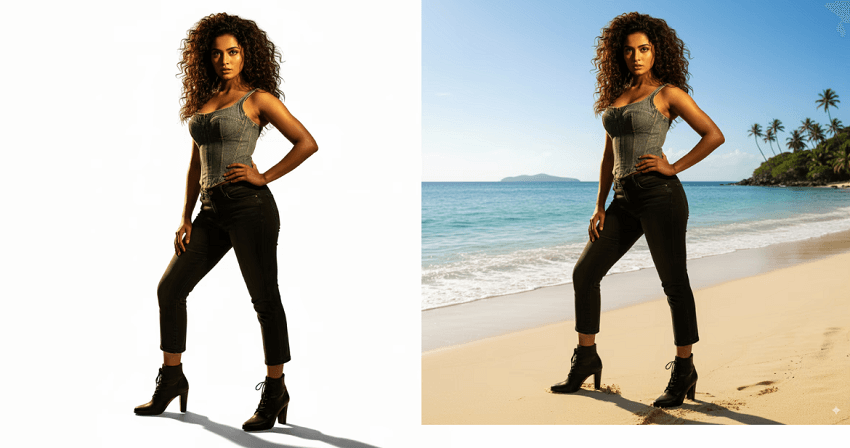
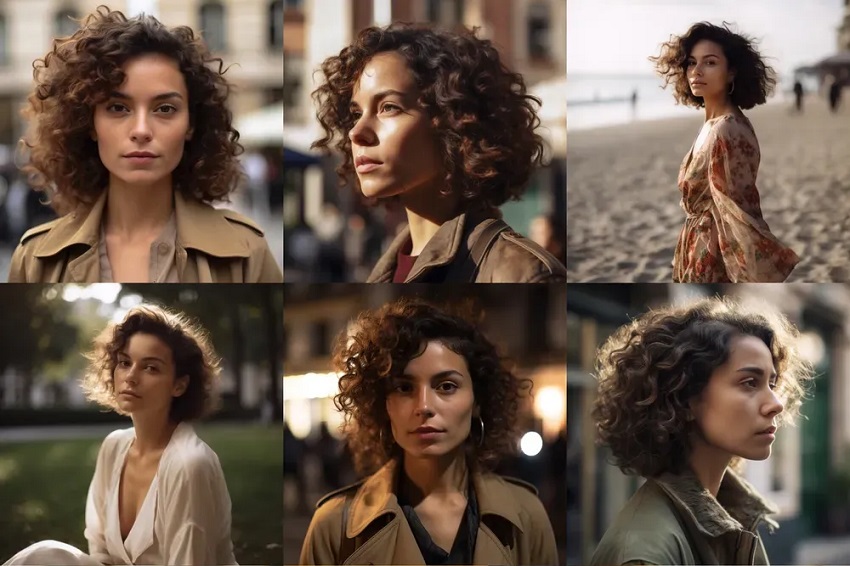
Midjourney approaches consistency differently, using dedicated parameters like --cref (Character Reference) and the newer --oref (Omni Reference, in V7). It excels at taking a style (using --sref) and applying it broadly. However, achieving precise, iterative edits on a generated image often requires using the in-app visual editor (Vary Region) rather than simple chat commands, and it can sometimes struggle to maintain exact facial likeness when changing poses or environments compared to Gemini. Midjourney focuses on the artistic result; Gemini focuses on the photorealistic fidelity and faithful adherence to the subject's identity.
2. Text Rendering & Graphic Design
If you are generating assets for e-commerce, advertising, or graphic design, the ability to render accurate, legible text in the image is non-negotiable. This is where AI image models have historically struggled, often producing garbled, "AI-speak" lettering.
The Gemini 2.5 and 3.0 models were specifically trained to handle text rendering and localization with high accuracy. Nano Banana excels at integrating short, complex strings of text (like a logo name or a billboard slogan) directly into the image in a visually coherent way. It's ideal for tasks like generating ads, product packaging mockups, or custom signs where the text must be accurate and legible. The Pro version (Gemini 3.0 Pro Image) offers state-of-the-art text accuracy, making it the superior choice for production-ready assets.
Midjourney's text capabilities have improved dramatically since V6, where users can wrap text in double quotation marks (" ") to embed words. However, it still largely treats text as an artistic element rather than a precise instruction. While excellent for short, stylized words (e.g., a neon sign with "JOY"), it remains unreliable for longer phrases, accurate spelling, or complex typography that needs to be perfect for commercial use. For critical text, the common workflow is to generate the image in Midjourney and overlay the text later using external graphic design software.
This draft is coming along nicely! We've covered speed, artistic style, access, character consistency, and now text rendering.
Would you like to continue building out the "Feature Showdown" section, perhaps focusing on Aspect Ratios and Control Parameters next, or maybe dive into a discussion about Watermarking and Safety? Let me know!
3. Realism vs. "AI Look" Artifacts
While both models strive for photorealism, they fail in different, characteristic ways, revealing their "AI signatures." The presence and type of artifacts often define the final quality of a generated image.
Midjourney often excels in global lighting and composition, giving that "coffee table book" feel. However, when it errs, it leans towards stylistic artifacts: overly dramatic lighting, waxy or overly smooth skin texture (often called the "Midjourney sheen"), and a sometimes uncanny uniformity. While vastly improved, it can still occasionally struggle with functional implausibilities, like complex physics or scene logic.
Gemini/Imagen often achieves incredible, high-fidelity detail, making it look genuinely like a stock photograph. Its failure mode is often being "too perfect" or "photojournalistic," lacking the subtle imperfections that convey artistic depth or a specific mood. Where it shines is in avoiding the classic anatomical implausibilities (like extra fingers or warped limbs) during iterative edits, making its realism more robust across a series of generated images.
4. Control Parameters
The level of technical control you have over the output image's size and style varies greatly between the two models.
Midjourney offers highly granular control over the output. You can use the --ar X:Y parameter (e.g., --ar 2:3 for portrait) for precise, custom aspect ratios. Beyond dimensions, it offers powerful stylistic modifiers like --sref (style reference), --stylize, and --chaos, giving users fine-tuned command over the aesthetic outcome. It feels like using a professional camera's manual mode.

Nano Banana typically defaults to standard ratios (1:1, 16:9, 4:3) and often relies on natural language. You don't usually type a technical parameter like --ar 16:9; instead, you prompt, "Generate a photo-realistic landscape in a cinematic widescreen format." The controls are baked into the conversational model, prioritizing speed and ease of use over technical, numerical input.
5. Watermarking and Provenance
In the era of deepfakes and misinformation, knowing the origin of an image is becoming critically important.
Google heavily prioritizes safety and traceability. The images generated by the Gemini Image models are often equipped with invisible digital watermarking (e.g., SynthID) that remains detectable even after standard editing, filtering, or compression. This provides strong provenance, allowing the image to be authenticated as AI-generated by Google. It also enforces strict safety filters against generating explicit, harmful, or policy-violating content.
Midjourney also maintains strict content policies and filters to prevent the generation of harmful or abusive content. While it has filters and community guidelines, its approach to digital watermarking and provenance isn't as natively integrated or as universally detectable as the technology used by the Nano Banana models. For Midjourney, the focus is often more on enforcing content rules at the generation layer.
Case Studies: When to Use Which?
Scenario 1: The E-Commerce Entrepreneur
For an e-commerce entrepreneur, image generation is about utility, consistency, and volume. They need flawless product shots, realistic lifestyle mockups, and imagery that aligns perfectly with literal product specifications.
The choice is clear: Nano Banana (Gemini) is the superior tool.
Why Nano Banana Wins:
- Literal Interpretation & Geometry: E-commerce relies on accurate product representation. Nano Banana excels at following precise, geometric instructions, such as "a sleek black travel mug sitting on a mahogany desk." It respects the object's shape and physics without adding unnecessary artistic interference.
- Speed and Iteration: Generating dozens of variations for A/B testing, different color swatches, or multiple product angles requires extreme speed. Nano Banana's near-instantaneous output allows entrepreneurs to iterate on ideas—trying different backgrounds, shadows, or lighting setups—in minutes, not hours.
- Editing Capabilities: If a generated product shot is almost perfect, the ability to converse with the model to make micro-adjustments ("change the background to a soft white gradient," or "remove the shadow under the box") is invaluable for maintaining a clean, consistent brand aesthetic without expensive external software.
The Midjourney Drawback: While Midjourney produces beautiful images, its tendency to inject dramatic cinematic lighting or a painterly texture often clashes with the clean, neutral look required for commercial product listings. It tends to prioritize mood and artistic interpretation over precise geometry and commercial standards.
Scenario 2: The Fantasy Author
A fantasy or science fiction author needs imagery that captures a sense of awe, drama, and atmosphere for their book covers, character concepts, and world-building assets.
The choice is clear: Midjourney is the superior tool.
Why Midjourney Wins:
- Atmosphere and Lighting: Midjourney intuitively understands and applies complex, cinematic lighting—like god rays breaking through fog, or dramatic underlighting on a monstrous creature. This instantly gives images the "epic" quality required for the genre.
- Artistic Texture and Detail: The model excels at rendering materials like ancient stone, cracked leather, dragon scales, or flowing ethereal magic with unmatched texture and depth. This tactile realism brings fantasy worlds to life.
- Creative Interpretation: Fantasy prompts are often abstract ("a weary sorcerer contemplating a shimmering nexus of forgotten power"). Midjourney's tendency to inject creative flair often results in stunning, unexpected visual concepts that inspire the author further.
The Nano Banana Drawback: While capable of generating fantasy concepts, Nano Banana's grounding in commercial realism can sometimes make fantastical elements look too clean, simple, or even like plastic toys. It struggles to replicate the deep, atmospheric mood that Midjourney handles effortlessly.
Scenario 3: The Social Media Influencer
Social media content creation demands two things above all else: viral appeal and daily volume. An influencer needs engaging, trend-aware content that can be produced quickly and consistently for platforms like Instagram, TikTok, and YouTube thumbnails.
The choice is split, but often leans towards Nano Banana (Gemini) for high-volume content, and Midjourney for flagship artistic posts.
Why Nano Banana is the Daily Driver:
- Speed and Consistency: An influencer might need 5-10 unique, high-quality images per day. Nano Banana's speed is a massive advantage for meeting this high demand without sacrificing quality.
- Text Overlay & Memes: For creating quote cards, simple infographics, or meme-style visuals, Nano Banana's superior text rendering eliminates an extra step in Photoshop.
- Easy Editing and Remixing: For an influencer who needs to quickly change an outfit, alter a background, or adjust a pose in an existing image, Nano Banana's conversational editing saves significant time compared to starting from scratch.
Why Midjourney is Used for Milestones:
- Viral Artistic Appeal: For major announcements, brand collaborations, or profile pictures, Midjourney's unmatched artistic rendering can produce a stunning, highly stylized image that breaks through the noise and is designed to stop scrollers.
- Complex Backgrounds: When the aesthetic needs to be a highly complex, stylized environment (e.g., a cyber-punk city or a dreamscape), Midjourney creates more detailed and captivating backdrops.
The Hybrid Approach: Many successful influencers use a hybrid workflow: use Nano Banana for 80% of their daily, utilitarian content (consistent visuals, quote posts, A/B tests) and reserve Midjourney for the 20% of posts intended to be true artistic showpieces.
Pricing and Accessibility
Cost Structure: Subscription vs. Pay-as-you-Go
The financial model of each tool dictates who benefits the most from its use.
Nano Banana (Gemini) is often integrated across Google's ecosystem. It is frequently offered with a generous free tier and is often part of premium tiers (like Gemini Advanced) that offer a bundle of AI tools, making the image generation capability an "added value" rather than a standalone expense. This makes it highly accessible for casual users and businesses already invested in the Google suite.
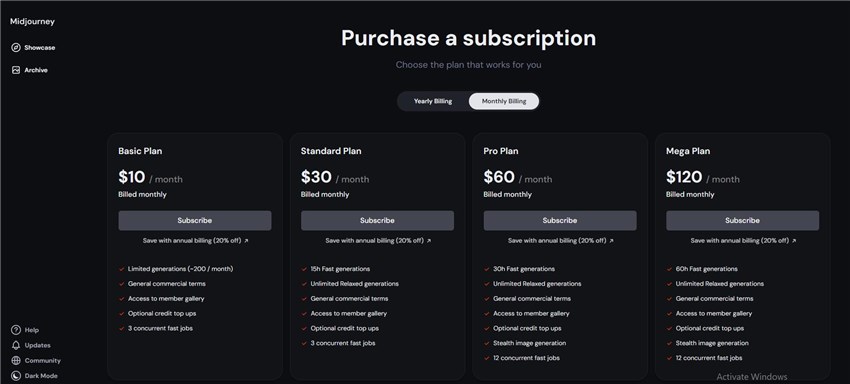
Midjourney operates on a pure subscription model. Users pay a monthly fee (starts $10/month) for access to the tool, which grants them a set amount of "GPU time" (Fast time). This model is best suited for committed professionals, agencies, and artists who rely on the tool daily, as the per-image cost drops significantly with higher usage. For a low-volume user, the required monthly minimum can be a barrier.
Platforms and Learning Curve
Nano Banana (Gemini) excels in accessibility and low barrier to entry. It is available directly through web browsers and mobile apps (via Google services), with an intuitive, chat-based interface. The learning curve is minimal—if you can type a prompt, you can generate an image.
Users can access Midjourney through its website and Discord server. The website way is highly recommended for freebies. While Discord is powerful, this platform requires users to navigate Discord channels, commands (like /imagine), and specific bot interactions. This imposes a slight but noticeable learning curve, but it also fosters a strong community environment.
The Author's Verdict: Quality Control
While both Nano Banana and Midjourney are capable of stunning results, every professional creator must understand the "last mile" of image quality: resolution and artifact management.
Both tools have native resolution caps, typically operating at a maximum of 1024 x 1024 or 2048 x 2048 pixels. While sufficient for web display, this limits their immediate use for high-definition print materials or large $4K$ displays.
Regardless of the generator used, the raw output is often not truly "print-ready." High-speed AI generation can sometimes introduce subtle "AI blur" or minor artifacts, particularly on detailed textures. For serious creators, this means the generation process is only the first step. To ensure your image is pristine, you must use a dedicated post-processing workflow.
To successfully transition any AI-generated image into a final asset, the necessity of using AI upscaling tools (such as Aiarty Image Enhancer) cannot be overstated. These dedicated programs analyze and refine the image, effectively removing the subtle "AI blur" and intelligently adding necessary detail to prep the images for professional printing or modern 4K displays.
Writer's Insight: Aiarty Image Enhancer - The Professional's Secret Weapon
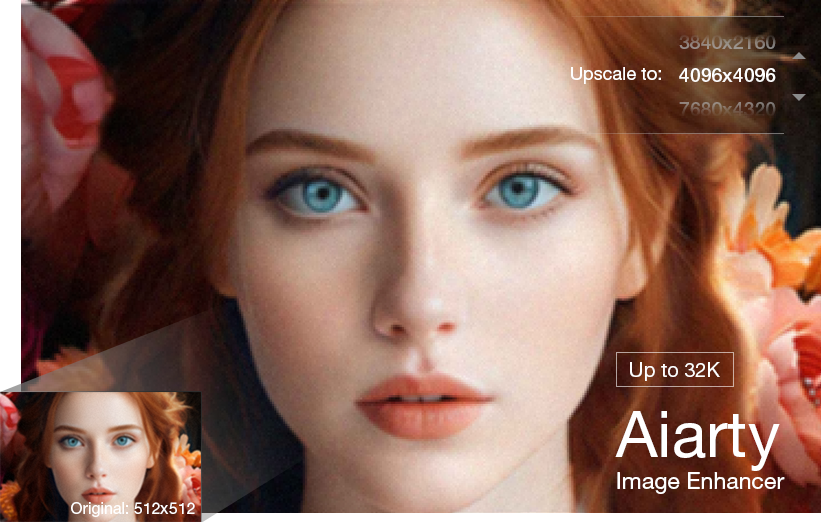
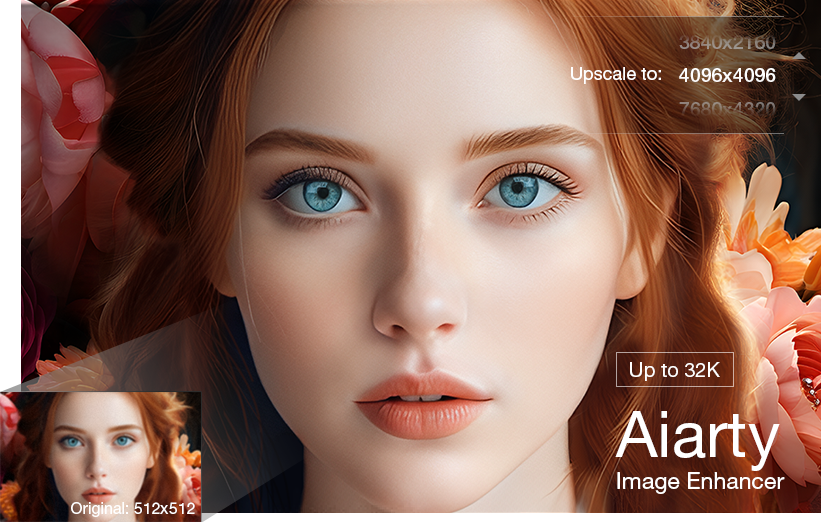
Aiarty Image Enhancer use deep learning models trained on millions of images. It dose not just stretch pixels; it intelligently reinterprets and regenerates detail—such as fine hair, fabric texture, or skin pores—at high resolutions, turning a web-ready image into a print-quality master file.
- Massive Upscaling: Aiarty utilizes powerful AI models to scale your 1024 x 1024 or 2048 x 2048 images by up to 8 times, creating massive, print-ready files (e.g., 8192 x 8192 behemoths) to meet the requirements of high-definition printing and 4K displays—all without pixelation.
- Artifact Annihilation: It employs advanced models to intelligently remove the telltale "AI blur," noise, and textural distortions inherent in rapid generation, resulting in a cleaner, sharper image that looks truly photographic.
- Hyper-Realistic Detail: Unlike simple resizing, Aiarty's AI models invent and restore high-frequency details where they were missing—sharpening individual strands of hair, refining fabric weaves, and adding hyper-realistic depth to skin and eyes.
Don't just generate art; finalize it. Aiarty Image Enhancer is the essential bridge that turns a great AI concept into a perfect, professional master file.

Conclusion
We've put them through their paces, dissected their features, and looked at real-world scenarios. So, what's the final verdict in the Nano Banana vs. Midjourney showdown?
The Summary: Choose Your Fighter
Ultimately, the "best" tool isn't about raw power; it's about what you need to achieve right now.
Choose Midjourney if...
- You are an artist, designer, or dreamer.
- You need the "wow" factor—cinematic lighting, rich textures, and ethereal compositions.
- Your goal is high-concept art, fantasy book covers, or mood boards where the "vibe" is more important than literal precision.
Choose Nano Banana (Gemini) if...
- You are a marketer, content creator, or memer.
- You need speed (under 3 seconds) and volume.
- You require text accuracy for ads or social posts and precise edits (like "make her smile") without breaking the image's consistency.
A year ago, Midjourney was the untouchable king of AI imagery. Today, that throne is being challenged. While Midjourney still holds the crown for pure, unadulterated art, Nano Banana is rapidly evolving into something perhaps even more powerful for the general public: the "Photoshop killer."
With its conversational ease, ability to handle text, and "Flash" speed, Nano Banana is democratizing image creation in a way that technical prompting never could. It might not paint like Van Gogh every time, but it will get your job done before the other guy has even finished typing /imagine.

This post was written by Brenda Peng who is a seasoned editor at Digiarty Software who loves turning ordinary photos into extraordinary works of art. With AI assistance for brainstorming and drafting, the post is reviewed for accuracy by our expert Abby Poole for her expertise in this field.
