 Aiarty Image Enhancer
Top 6 Best Stable Diffusion UI 2026

Updated on
Hello! I am new to Stable Diffusion. What is the best UI for Stable Diffusion?-- Reddit
Stable Diffusion has revolutionized the field of AI-driven image generation, allowing you to create stunning visuals from text prompts. As the popularity of Stable Diffusion grows, so does the need for Stable Diffusion UIs.
The Stable Diffusion UI is a graphical user interface designed to interact with the Stable Diffusion model. It provides tools and features to simplify the process of generating images, and thus make the technology more accessible. With the best Stable Diffusion UI, you can easily input text prompts, customize settings, and visualize the generated images in real-time.
In this article, we will introduce and compare some of the best Stable Diffusion UIs. We will explore their features, compatibility, user-friendliness, and other relevant aspects to help you make an informed decision.
Choosing the best Stable Diffusion UI for you can significantly enhance your image generation experience. But if you wish to further enhance your generated images, consider using an AI image enhancer. One common challenge with Stable Diffusion is achieving high-quality, high-resolution images directly from the generation process.
Aiarty Image Enhancer addresses these pain points by leveraging advanced AI technology to upscale, denoise, and sharpen your images. This software brings out the finest details, enhances textures, and ensures your artwork looks polished and professional. Transform your Stable Diffusion creations effortlessly and see the difference that professional-grade image enhancement can make.


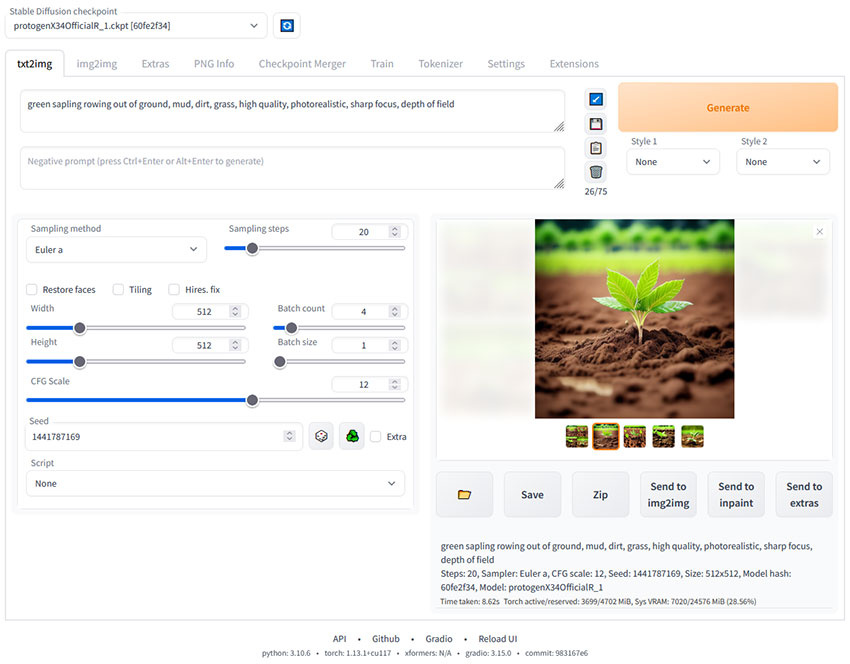
Automatic1111 (Stable Diffusion WebUI)
Automatic1111 remains the most iconic and widely-used Stable Diffusion UI in 2026, thanks to its unparalleled extension ecosystem. It acts as a "Swiss Army Knife" for AI art, supporting everything from basic text-to-image to complex ControlNet workflows and IP-Adapterintegration. While it has a steeper learning curve than simplified apps, its massive community support means you can find a tutorial or plugin for any creative challenge. For power users, its ability to handle multi-model pipelines and the latest Flux.1 or SD 3.5 checkpoints makes it a non-negotiable tool in a professional workflow.
Operating Systems: Windows, macOS (Apple Silicon optimized), Linux
Supported Models: SD 1.5, SDXL, SD 3.5, Flux.1, and latest Multi-Modal architectures.
Key Features:
- Extensive Plugin Library: Access to thousands of extensions like ControlNet, AnimateDiff, and LoRA managers.
- Advanced Prompting: Support for prompt weighting, X/Y/Z plots, and dynamic prompts.
- API Accessibility: Seamlessly integrates with third-party tools and custom scripts for automated workflows.
- Model Versatility: Native support for Safetensors, Diffusers, and specialized GGUF quantizations.
Pro Tip: Automatic1111 can be memory-intensive when generating high-resolution images. To avoid "Out of Memory" errors, many creators generate at 1024px and use Aiarty Image Enhancer to upscale to 4K/8K with superior detail recovery, ensuring a faster and more stable workflow.
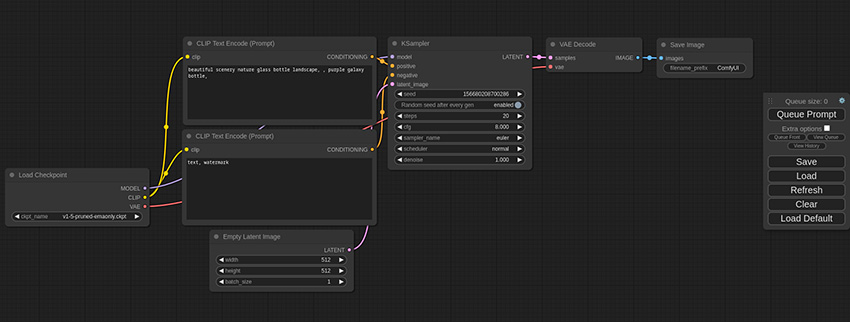
ComfyUI
ComfyUI is the most powerful node-based Stable Diffusion GUI, highly recommended on Reddit for professionals who seek modular workflow design and efficient VRAM usage. Unlike traditional interfaces, it utilizes a visual graph-based system that allows users to customize every step of the image and video generation pipeline. While it has a steeper learning curve, its ability to run large models like Flux.1 and SD 3.5 on lower-end hardware makes it an industry standard in 2026. Optimized for speed and stability, ComfyUI is the go-to choice for complex AI tasks including video-to-video, Inpainting, and advanced LoRA stacking.
Operating Systems: Windows, macOS (M1/M2/M3 optimized), Linux
Supported Stable Diffusion Versions: SD 1.5, SDXL, SD 3.5, Flux.1, and Generative Video Models
Features:
- Node-based interface for precise and reproducible workflow customization
- Superior performance with significantly lower VRAM requirements
- Instant support for the latest model architectures and custom nodes
- Powerful API for integration into professional production environments
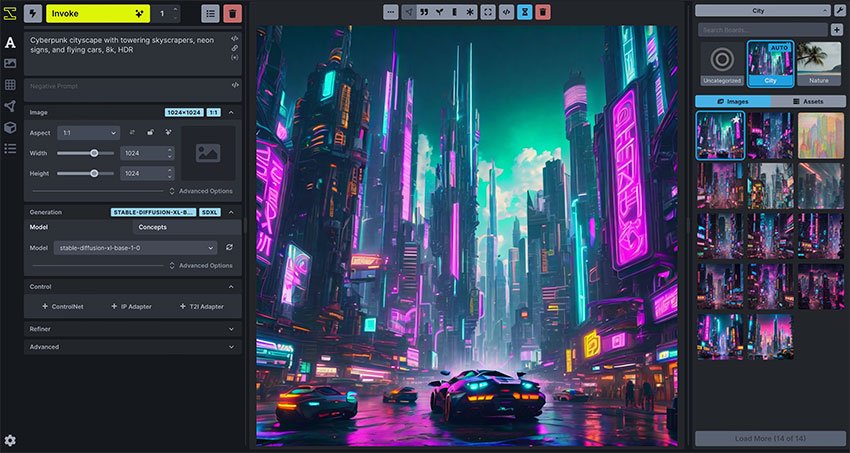
InvokeAI
InvokeAI is the premier creative engine for professional artists and studios in 2026, distinguished by its industry-leading "Unified Canvas." Unlike other UIs, InvokeAI focuses on a streamlined, professional-grade user experience that excels in outpainting, inpainting, and brush-based image manipulation. Its architecture is built for stability and precision, offering a clean, professional interface that bridges the gap between complex AI generation and traditional digital art workflows. For users who need a reliable, studio-ready environment for high-end content creation, InvokeAI provides the most polished and intuitive workspace available today.
Operating Systems: Windows, macOS (M-series optimized), Linux
Supported Models: SD 1.5, SDXL, SD 3.5, Flux.1, and ControlNet-enhanced workflows
Features:
- Unified Canvas for seamless outpainting, inpainting, and image composition
- Enterprise-grade workflow management with professional asset organization
- Node-based backend power with a simplified, elegant frontend interface
- Advanced Model Manager for effortless handling of checkpoints, LoRAs, and TI
DiffusionBee
DiffusionBee stands as the most accessible entry point for macOS users who want to explore generative AI without touching a single line of code. In 2026, it remains a favorite for beginners due to its "One-Click" installation process that bundles everything into a standard Mac app. Operating entirely offline, it ensures maximum privacy by processing all data locally on your machine. While it may offer fewer granular controls compared to advanced tools like Draw Things, its simplified interface and built-in model manager make it the ideal choice for Mac enthusiasts who value ease of use and local security above complex workflow customization.
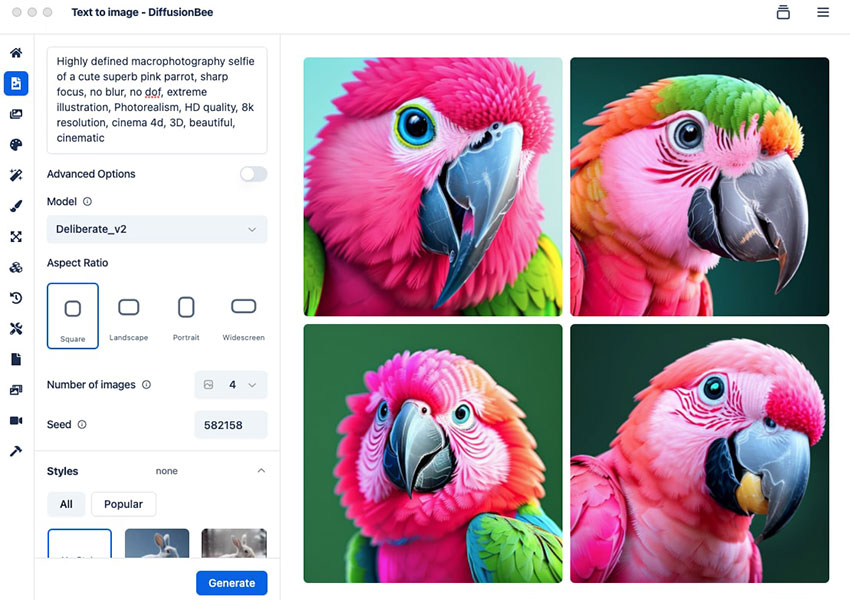
Operating Systems: macOS (Optimized for Apple Silicon M1/M2/M3/M4)
Supported Models: SD 1.5, SDXL, and Flux.1 (Schnell/Dev via recent updates)
Features:
- True "One-Click" setup with no technical dependencies or terminal usage
- Full offline functionality for private, local image generation
- Integrated tools for Inpainting, Outpainting, and Basic Upscaling
- Automatic model optimization for Apple Silicon's Neural Engine
Fooocus
Fooocus is the go-to Stable Diffusion UI for users who want a "Midjourney-like" experience on their local machine without the complexity of technical parameters. In 2026, it remains one of the most efficient tools, requiring only 4GB of VRAM to deliver professional-grade results. What sets Fooocus apart is its automated inner optimizations and an offline GPT-based prompt expansion engine, which allows you to generate stunning visuals from simple, short prompts. By handling all the complex settings under the hood, Fooocus lets you skip the tedious manual tweaking and focus entirely on your creative Stable Diffusion prompts.
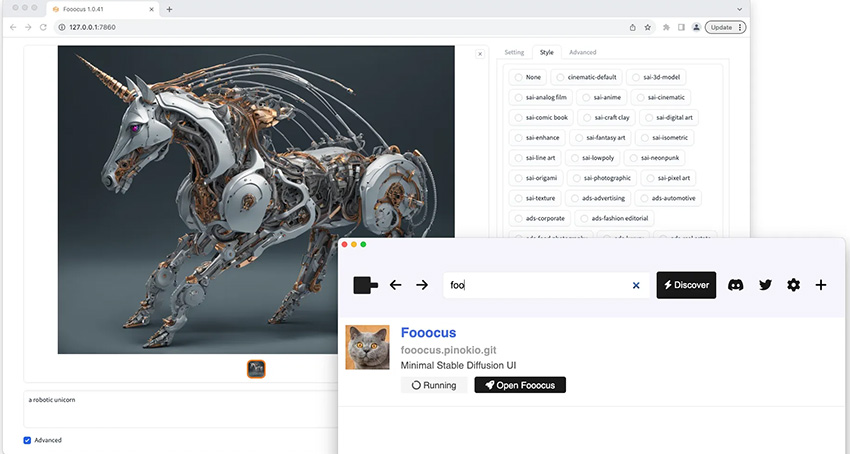
Operating Systems: Windows, macOS (M-series support), Linux
Supported Models: SDXL, SD 3.5, and Flux.1 (via specialized presets)
Features:
- Zero-configuration setup with high-end default styles (Realistic, Anime, etc.)
- Built-in GPT-based prompt engine for automatic detail enhancement
- Extremely low hardware requirements (works smoothly on 4GB NVIDIA cards)
- Native support for Inpainting, Outpainting, and advanced Image Prompting
Easy Diffusion
As the name suggests, Easy Diffusion remains the most user-friendly entry point for local AI generation in 2026. With the release of its v4 engine, it has successfully bridged the gap between simplicity and power. Unlike complex UIs that require manual dependency management, Easy Diffusion offers a self-contained environment that can be installed with a single click. It now leverages a high-performance backend (powered by the latest sdkit3) that brings native support for Flux.1 and SD 3.5 while maintaining its signature clutter-free interface. Whether you want to queue hundreds of tasks or experiment with multi-model variations, Easy Diffusion provides a rock-solid, stable experience for hobbyists and creative explorers alike.
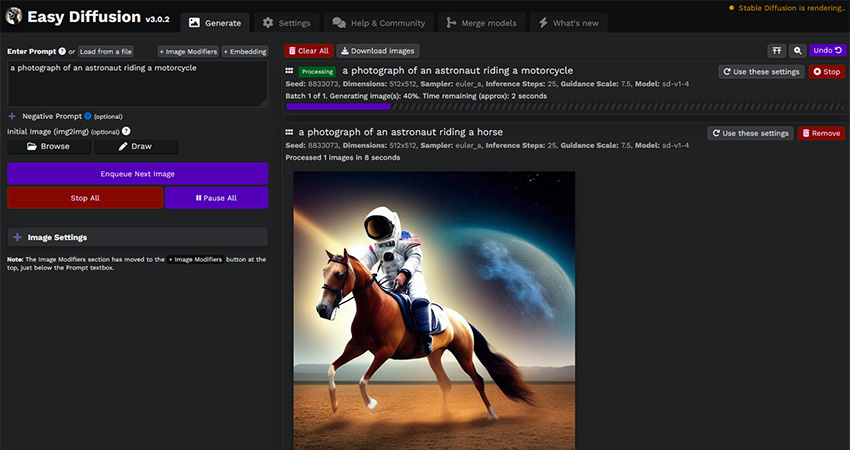
Operating Systems: Windows, macOS (M1/M2/M3/M4 optimized), Linux
Supported Models: SD 1.5, SDXL, SD 3.5, Flux.1, and Z-Image
Features:
- New v4/sdkit3 engine for lightweight, high-speed image generation
- Advanced Task Queue for efficient batch processing without interruptions
- Native Flux.1 support with intelligent model detection and auto-configuration
- One-click installer with built-in dependencies (no Python or Git knowledge required)
Comparison of the Best Stable Diffusion UIs 2026
| UI Name | Learning Curve | Hardware Optimization | Best For & Analysis |
|---|---|---|---|
| Automatic1111 | Moderate | Excellent (NVIDIA focus) | The "Legacy King" with the largest extension library (ControlNet, IP-Adapter). Best for users who want endless features and community-made plugins, though it can be heavy on VRAM. |
| ComfyUI | Steep | Best VRAM Efficiency | The industry standard for professionals. Its node-based system offers unparalleled control and speed, especially for high-res Flux.1 generation and complex video-to-video pipelines. |
| InvokeAI | Low to Moderate | Great (Unified Canvas) | The most polished workspace for artists. Its "Unified Canvas" is unbeatable for inpainting and outpainting, making it perfect for professional illustrators and concept artists. |
| DiffusionBee | Very Low | Apple Silicon Native | The ultimate "one-click" choice for Mac users. While it lacks advanced professional nodes, it offers the cleanest and most secure local experience for casual Apple fans. |
| Fooocus | Very Low | Low VRAM Friendly | Delivers a "Midjourney-like" experience locally. It automates prompt expansion and technical settings, making it the top pick for high-quality realistic photography with zero configuration. |
| Easy Diffusion | Very Low | Universal Compatibility | The simplest cross-platform installer. Its v4 engine now supports Flux.1 natively, providing a stress-free environment for hobbyists who want to avoid Python and Git complexities. |
Conclusion
Choosing the best Stable Diffusion UI for you will significantly enhance your experience with Stable Diffusion, allowing you to generate stunning images with ease. Evaluate your needs, explore the features of each UI, and select the one that aligns best with your workflow. Happy creating!
If you wish to further enhance your generated images, try Aiarty Image Enhancer. This simple yet versatile AI image enhancer uses CNN and deep learning to create new pixels that seamlessly blend in with the original image. Only in a few mouse clicks, you can dramatically increase image resolution with AI while keeping image quality.

- 4-in-1 AI image enhancer, denoiser, deblurer, and upscaler
- 3 AI models for any image type, incl. Stable Diffusion
- Generative AI enhancing up to 32K(Win)/16K(Mac) with better details
- Intuitive UI with no artifacts, limitations or quality loss
 FAQs
FAQs
The best Stable Diffusion AI UI depends on user needs. For beginners, Stable Diffusion Web UI (AUTOMATIC1111) is often considered the best choice due to its user-friendly interface and rich extensions. For advanced users, ComfyUI is regarded as one of the best stable diffusion AI tools for building complex workflows with a node-based system.
Stable Diffusion Web UI is better for quick setup, simple image generation, and plug-and-play features, making it ideal for beginners. ComfyUI, however, offers deeper flexibility, custom workflows, and higher control, which many professionals consider essential. Both are among the best Stable Diffusion AI solutions, but the choice depends on simplicity vs. customization.
To get Stable Diffusion Web UI, users can install it directly from the official GitHub repository (AUTOMATIC1111). It runs locally and is widely recommended as one of the best stable diffusion AI UIs for those who want an easy yet powerful setup.
You May Also Like


Rico Rodriguez is an experienced content writer with a deep-rooted interest in AI. He has been at the forefront of exploring generative AI tools like Stable Diffusion. His articles offer valuable insights into the world of AI, providing readers with practical tips and informative explanations.
