


AI landscape design has become surprisingly useful, but only if you pick the right kind of tool. Some apps are essentially visual idea generators: upload a photo of your backyard, choose "Modern" or "Japanese," and get a redesigned version a few seconds later. Others work more like actual landscape planners, giving you control over placement, dimensions, plants, paths, patios, and hardscape.
Those are very different jobs.
For this guide, I compared the current crop of AI landscape design apps by looking at the things that matter once the novelty wears off: how well they respect the existing property, how much control you get over the design, whether the plants and hardscape look believable, how easy it is to revise an idea, and whether the output is useful beyond a nice before-and-after image. Here are the seven worth looking at in 2026.
If your goal is to create scenery from scratch rather than redesign a real yard, see our guide to the best AI landscape generators. The apps below are evaluated primarily for real-property visualization, yard redesign, and landscape planning.
7 Best AI Landscape Design Apps Tested
1. DreamzAR - Best Overall AI Landscape Design App
Best for: Homeowners who want AI generation without giving up editing control
Platforms: Web, iOS, Android
Free access: Limited
Paid plan: $19.99/month or $199/year as of August 2026
DreamzAR gets one important thing right: an AI landscape design should not be the end of the conversation. The basic workflow is familiar. Take or upload a photo of your yard, choose a garden style, and let the AI produce a new design. DreamzAR currently offers more than 38 garden styles, covering the usual modern and traditional looks as well as more specific directions. But the useful part comes afterward: you can refine the result through chat instead of repeatedly regenerating the entire scene. That sounds like a small difference, but it solves one of the biggest annoyances with AI yard design. Say the first result has the right planting style but adds too much hardscape. Rather than starting again, you can ask for something closer to "keep the lawn, add more flowers along the fence, and remove the paved area." DreamzAR combines that AI workflow with 2D editing, a plant library and, on supported versions, 3D/AR tools. That makes it considerably more useful than an app that gives you a polished image but no practical way to move the design closer to what you actually want.

- Strong photo-to-landscape workflow
- 38+ garden styles
- Chat-based design refinement
- 2D editing rather than regeneration only
- Plant and garden-element library
- Available across web and mobile
- The subscription is harder to justify if you only need ideas for one small backyard project. Also, even with editing tools, a generated design is still a visualization. Plant spacing, mature size, drainage and site conditions need to be checked separately.
Verdict: If I had to recommend one AI landscape design app to someone who wants to explore ideas and keep refining them instead of accepting whatever the first generation produces, DreamzAR would be my starting point.
2. Neighborbrite - Best Free AI Landscape Design App for Quick Ideas
Best for: Fast backyard and front-yard concepts
Platform: Web, with an iOS app also available
Free access: Yes
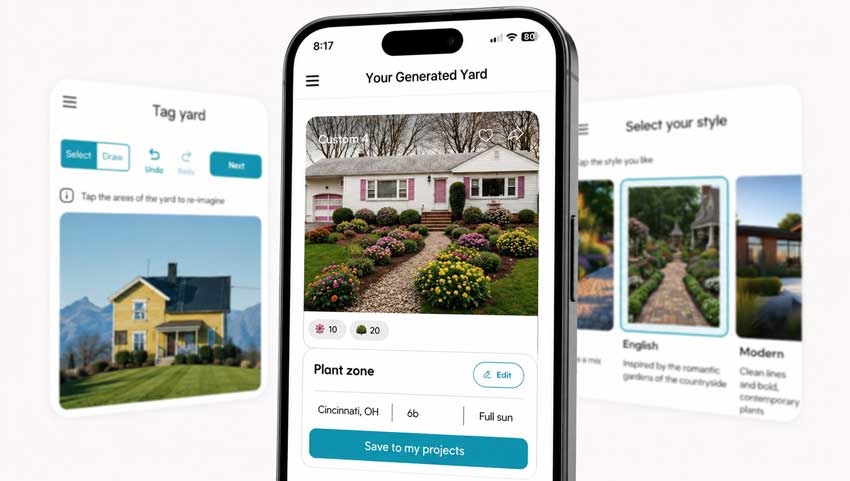
Neighborbrite is the one I would open when the question is simply: "What could this yard look like?"
There is very little friction. You upload a photo, choose a garden direction and generate alternatives. The web version can be used without installing an app, and Neighborbrite also incorporates location-aware plant suggestions into its landscape workflow. That simplicity is its strength. A lot of homeowners don’t need a 3D CAD-style environment when they are still deciding whether the front yard should lean cottage, modern, drought-tolerant or naturalistic. They need a believable visual direction first.
Neighborbrite is particularly good for that early stage. The trade-off is control. A fast AI landscaping app can tell you that a wider planting bed might look better beside the driveway, but that doesn’t mean the exact plant combination, spacing or dimensions in the picture should be copied literally. I would treat Neighborbrite as an idea tool before a planning tool.
- Very low learning curve
- Works directly in a browser
- Good for comparing several landscape styles quickly
- Useful for front-yard and backyard redesign ideas
- Free access makes experimentation easy
- It is less suited to projects where exact placement and measurements matter. If your next question is "how wide should this path actually be?", move to a proper planning tool.
Verdict: One of the easiest recommendations for homeowners who want AI yard design ideas without learning landscape software first.
3. Remodel AI - Best for Quick Mobile Landscape Edits
Best for: Redesigning a specific part of an existing yard
Platforms: iOS and Android
Free access: Trial renders available
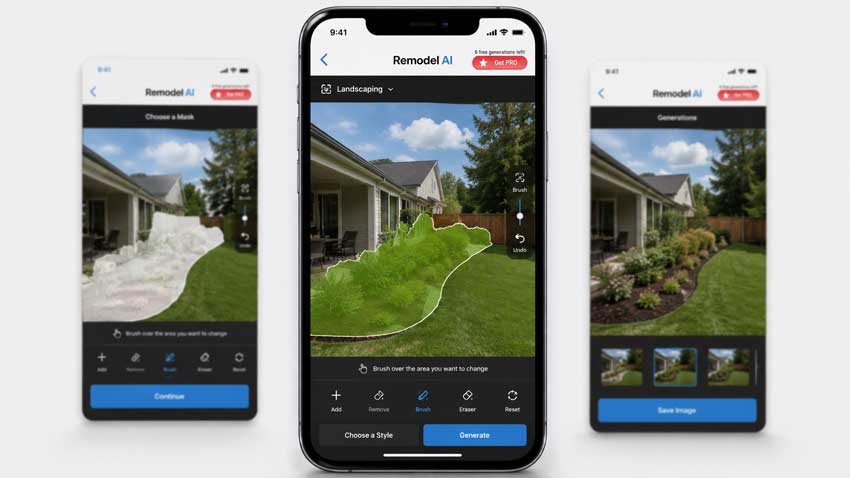
Remodel AI started from the broader home-remodeling side rather than landscape planning, and that still shows in how the app works. For landscaping, that is not necessarily a weakness. Its landscape editor lets you start with an existing photo and mask the area you actually want changed. You can paint over a lawn, planting bed or another section of the image and have the app redesign that area instead of treating the entire property as disposable.
For real houses, that matters. One of the fastest ways to spot a weak AI landscape result is to look at things that were never supposed to change. Windows move. Rooflines bend. A fence suddenly gets taller. A driveway shifts several feet to the left. Selective editing reduces that problem because you can tell the tool, in effect, "work here, not everywhere." Remodel AI also supports broader exterior and home-remodel visualization, so it makes sense if your project crosses over between landscaping and exterior renovation rather than stopping at plants and paving.
- Easy mobile workflow
- Mask-based landscape editing
- Useful when only one section of a yard needs changing
- Exterior remodeling tools can complement landscape work
- Fast for generating alternatives
- It is still more of a visual remodeler than a full landscape planner. You will not get the same level of dimensional control you would expect from dedicated planning software.
- Remodel AI offers a limited free trial, with current subscription pricing handled through the Apple App Store or Google Play.
Verdict: A strong choice when you already have a clear photo and want to redesign a specific part of it without rebuilding the entire yard inside a planning program.
4. Planner 5D - Best for Detailed Landscape Planning
Best for: Layouts, measurements and projects that need more structure
Platforms: Web, iOS, Android and desktop
Free access: Yes
Premium: From $19.99/month; annual Premium pricing is currently $59.99
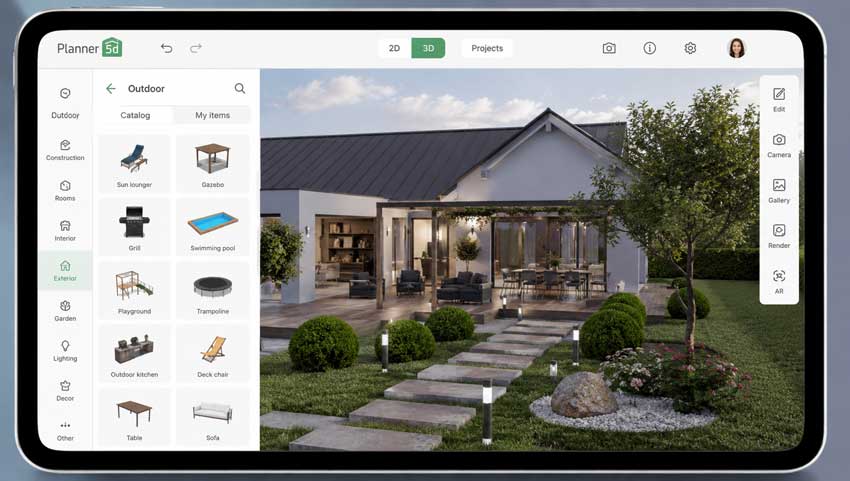
Planner 5D belongs in a different category from most of the apps on this list. If Neighborbrite answers: "What might this garden look like?"
Planner 5D is closer to: "How should this space actually be laid out?" Its AI landscape tools can generate design ideas from uploaded material, but the bigger advantage is the surrounding 2D and 3D planning environment. You can work with layouts, place objects, edit a project and view it spatially rather than relying entirely on a single generated photograph. Planner 5D currently offers a free tier, while its paid plans unlock larger libraries, additional AI allowances and higher-end rendering features. That makes it the better choice once dimensions start to matter. For example, an AI render might make a six-seat dining area look perfect beside your house. A planner helps expose whether there is actually enough room for the table, circulation around it and the planting bed you wanted behind it. The learning curve is naturally higher than with a one-click AI yard design app, but it is still far more approachable than professional CAD software.
- 2D and 3D planning
- Better suited to layouts and measurements
- Works across multiple platforms
- Free version available
- AI tools sit inside a larger design workflow
- Better for projects involving both house and outdoor space
- If all you want is a pretty backyard makeover from one photo, Planner 5D can feel like too much software for the job.
- Its landscaping capabilities also sit inside a broader home-design platform, rather than a tool built exclusively around plants and outdoor sites.
Verdict: Pick Planner 5D when the project has moved beyond inspiration and you need to think about how the pieces actually fit together.
5. iScape - Best for Hands-On Landscape Layout and AR Visualization
Best for: DIY homeowners, landscapers and people who want manual placement control
Platforms: iOS and Android
Free access: Limited free version
Pro: $29.99/month or $299.99/year as of August 2026
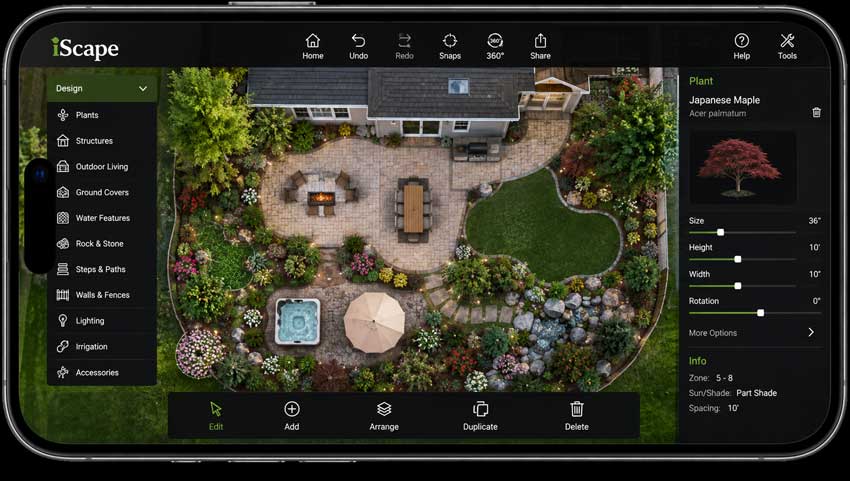
iScape has been around the landscape-design space much longer than most of the newer generative AI tools, and that experience shows in the workflow. Instead of asking AI to reinvent everything, iScape gives you more direct control over what goes where. Its design library includes plants, hardscape and outdoor objects that can be placed, resized and repositioned in a design. The platform also supports AR-oriented visualization and tools aimed at both homeowners and landscape professionals. That is valuable because landscaping is unusually sensitive to scale.
A shrub is not just a green shape. A patio is not just a texture. Once you start making purchasing decisions, being able to move and resize individual objects becomes much more useful than generating another attractive picture. iScape now also offers AI-assisted yard redesign options, but I would still choose it for its editable landscape workflow, not because it can generate the flashiest before-and-after.
- Strong manual control
- Landscape-specific object library
- Useful AR visualization
- Better connection between visualization and purchasing/planning
- Suitable for professionals as well as homeowners
- The free tier is limited, and Pro is significantly more expensive than many lightweight AI landscaping apps. Current standard pricing is $29.99 per month or $299.99 annually.
- It also asks for more hands-on work. That is either a benefit or a drawback depending on whether you want control or instant results.
Verdict: The better choice for someone who would rather place and adjust landscape elements deliberately than keep pressing Generate until the AI gets lucky.
6. REimagineHome - Best for Front Yards and Curb Appeal
Best for: Exterior presentation, front-yard redesign and property visualization
Platform: Web
Free access: 5 free designs for new users
Paid plans: Currently $14–$99/month
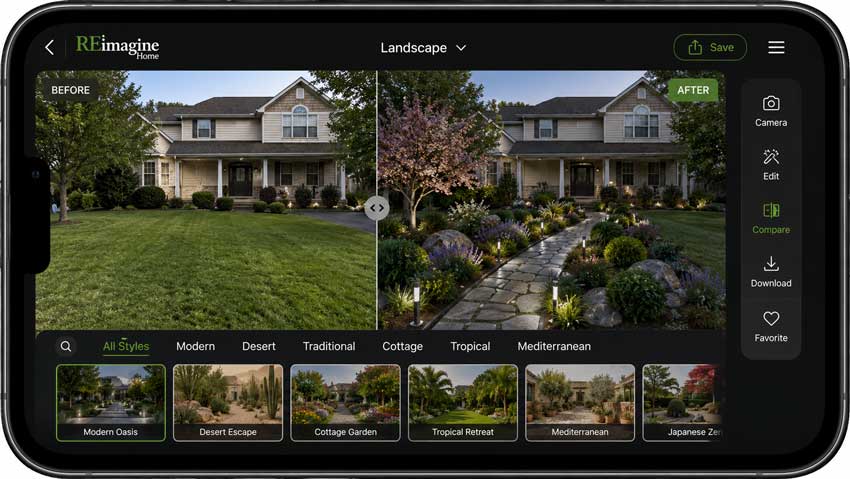
REimagineHome is particularly useful when the house needs to remain the anchor of the image. Its landscaping workflow starts with an exterior photo and is designed to keep major parts of the existing property-such as the house, primary hardscape and site boundaries-consistent while exploring changes to planting, paths, seating and outdoor details. That makes it a natural fit for front yards and curb-appeal work. The difference may sound subtle, but anyone who has spent time with AI exterior generators knows how quickly a redesign becomes useless when the model quietly invents a new facade. REimagineHome is also widely oriented toward visualization and presentation, so it makes sense for homeowners preparing a renovation as well as real-estate users who need to communicate the potential of an exterior space. Its current pricing starts at $14 per month, and new users receive five free designs.
- Good fit for front-yard and curb-appeal concepts
- Photo-based workflow
- Emphasis on preserving existing structures
- Quick to compare planting and hardscape directions
- Free designs available before paying
- This is still primarily a visualization workflow. It will help you decide whether a cleaner planting palette improves a facade; it will not replace a site plan.
Verdict: One of the better choices when the landscaping needs to look believable around an existing home rather than turning the whole property into an AI fantasy.
7. Hadaa - Best for Turning a Concept Into a Project Package
Best for: Users who want more than a single landscape render
Platform: Web
Pricing: Pay-per-render rather than a required subscription
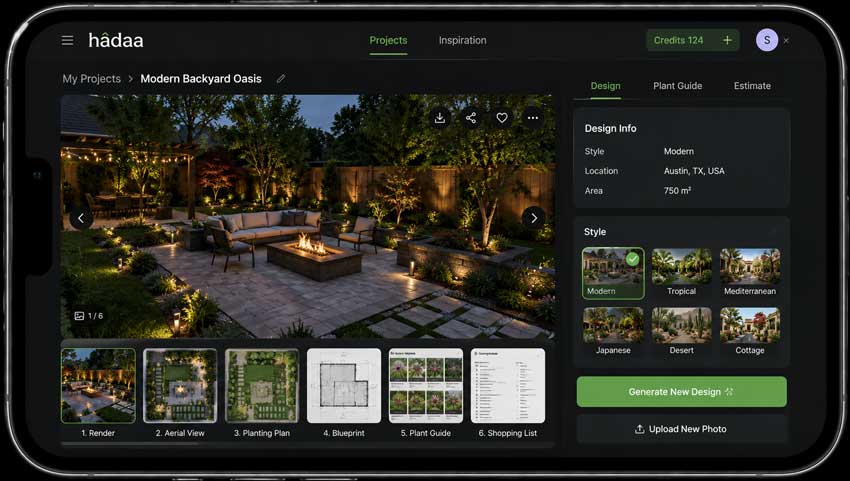
Hadaa is the outlier in this list because it tries to push past the "nice picture" stage. Its Garden Autopilot workflow can take a yard photo or sketch and build a larger package around the concept. Hadaa currently advertises multiple rendered views alongside a location-aware planting guide, aerial view, blueprint-style output and bill of quantities. Its pricing model is pay-per-render, with advertised rates starting from $9 per render depending on volume rather than requiring a monthly subscription. For homeowners who hate subscriptions, that alone may be appealing.
More importantly, it points toward where AI landscaping tools are heading: not just generating an image, but connecting the image to plant selection and project communication. There is one caveat I would put in bold, however.
Do not treat an AI-generated "blueprint" or planting guide as construction documentation without checking it. Local grading, drainage, utilities, soil, irrigation, building regulations, mature plant size and site measurements are all areas where an attractive AI result can still be wrong. Research into generative AI for landscape architecture makes essentially the same point: these systems can support design and visualization, but site conditions and professional judgment remain critical.
- Landscape-specific rather than a generic image generator
- Works from photos and sketches
- Produces multiple project-oriented outputs
- Plant recommendations consider location
- No mandatory subscription
- There is a danger that detailed-looking output feels more authoritative than it really is. Treat it as a strong concept package that still requires real-world verification.
Verdict: Interesting for larger projects where you want to move from "here is a pretty AI garden" toward something you can actually discuss with a contractor or landscaper.
Best AI Landscape Design App Comparison
There is no single best AI landscaping app for every project. The quickest way to choose is to decide whether you need inspiration, editing control or actual planning.
My quick picks
- Best AI landscape design app overall: DreamzAR It strikes the best balance between fast AI generation and the ability to refine the result afterward.
- Best free AI landscape design app: Neighborbrite Ideal when you are still exploring directions and do not need detailed planning yet.
- Best for AI backyard design: Remodel AI The masking workflow makes sense when you want to change the lawn, beds or patio area without asking AI to redesign everything in sight.
- Best AI garden design app for hands-on control: iScape Better when individual plants and landscape elements need to be deliberately placed and adjusted.
- Best for detailed planning: Planner 5D Choose it when layout and dimensions matter more than generating a dramatic before-and-after.
- Best for front-yard visualization: REimagineHome A good fit when the existing house needs to stay visually consistent.
- Best for project-oriented output: Hadaa Useful if you want several concept views and planning-related material rather than a single image.
How We Tested These AI Landscape Design Apps
A landscape design app should be judged differently from a general AI image generator. A gorgeous picture is not enough. For landscaping, I pay far more attention to whether the result respects the site. A design becomes much less useful when the AI creates a beautiful Japanese garden but quietly removes half the driveway or moves the front door. These are the criteria that matter most.
1. Landscape Realism
The first thing I look at is not sharpness. It is whether the space makes sense. Are the planting beds integrated into the yard, or do they look pasted on? Are paving transitions believable? Do plants have enough visual variation to resemble a real garden instead of a wall of identical AI shrubs?
A convincing landscape should have hierarchy: canopy plants, mid-level shrubs, ground cover, lawn or hardscape, and enough negative space to make the design readable. Overfilling every empty area with flowers is one of the easiest tells of a weak AI garden design.
2. Existing Structure Preservation
This is one of the most important tests for photo-based AI landscaping. I check:
- house shape
- windows and doors
- roofline
- fence position
- driveway
- steps
- retaining walls
- existing mature trees
- neighboring structures
If you asked the AI to redesign the planting bed and it redesigned the architecture as well, the result may be attractive, but it is not a useful preview of your property. Masking and selective-edit tools generally have an advantage here because you can limit where the model is allowed to work.
3. Design Control
Preset styles are useful, but they only get you so far. A good AI landscape design app should let you move from: "Make this a modern garden." to something closer to: "Keep the lawn smaller, add ornamental grasses around the patio, preserve the existing maple and use fewer flowering plants."
That is why conversational refinement and editable design elements score higher than endless one-click regeneration.
4. Yard and Garden Accuracy
This is where I separate visualization from horticulture. An AI can make a palm tree look perfectly convincing in a yard where that palm has no realistic chance of surviving.
Before using any plant suggestion, check:
- USDA or local hardiness zone
- sunlight
- soil
- water needs
- mature height and spread
- root behavior
- maintenance
- local invasive-species guidance
Use AI to find a design direction. Use real horticultural information to decide what goes into the ground.
5. Ease of Use
The best AI yard design app should not make a simple question unnecessarily difficult. For quick visualization, the ideal workflow is still: upload → select/edit → generate → refine
Planning software naturally needs more steps because you are getting more control in return. The important question is whether the extra complexity produces something useful.
6. Export Quality
This is an overlooked part of AI landscape design. Some tools look excellent inside the preview window but export relatively small or soft images. That may be fine for choosing between two backyard ideas. It becomes more noticeable if you need to crop the design, put it into a proposal, display it on a large monitor or print it. I would not regenerate a good landscape concept just because the final image is a little soft. Once the design itself is right, it often makes more sense to handle image quality separately.
Finishing AI Landscape Renders with Aiarty Image Enhancer
For example, Aiarty Image Enhancer works well as a finishing step for exported AI landscape renders. It can denoise, deblur and upscale an existing image by 2×, 4× or 8× while giving you control over enhancement strength. The important distinction is that it improves the finished render rather than redesigning the garden.
Get the landscape design right first → improve the presentation quality afterward. No upscaler can fix a badly planned yard.
 FAQs
FAQs
For most homeowners, DreamzAR is one of the strongest all-round options because it combines photo-based AI landscape generation with chat refinement and more traditional editing tools. If you only need quick ideas, Neighborbrite is simpler. If dimensions and layout matter, Planner 5D is the better fit.
Yes. Neighborbrite offers a free way to start generating landscape concepts, while Planner 5D and iScape also provide limited free access. REimagineHome currently gives new users five free designs. Free allowances change regularly, so check the current terms before starting a larger project.
AI can produce useful backyard design concepts from a photo, including ideas for planting beds, lawn changes, patios, seating areas and different garden styles. What it cannot reliably do from a photograph alone is verify drainage, structural requirements, underground utilities, exact measurements or whether every proposed plant is appropriate for your site. Use AI for visualization and early decision-making, then verify the practical details before construction.
Yes. This is now the standard workflow for many AI landscape design apps. Neighborbrite, DreamzAR, Remodel AI, REimagineHome and Hadaa all support landscape workflows that begin with an existing yard or exterior image. For the best results, use a clear photo taken in daylight with as much of the relevant yard visible as possible.
DreamzAR is a strong option if you want to experiment with different garden styles and then refine the result. iScape is better if you want to place and adjust individual landscape elements manually. If you mostly want a fast garden makeover image rather than detailed control, Neighborbrite is easier to start with.
Think about the job rather than the brand.
- For instant landscape ideas: Neighborbrite
- For overall AI design and refinement: DreamzAR
- For selective mobile edits: Remodel AI
- For detailed planning: Planner 5D
- For manual layout and AR: iScape
- For curb appeal: REimagineHome
- For broader project output: Hadaa
The best AI for landscape design is the one that matches the stage your project is currently in.
Not for a serious project. AI can shorten the early design process considerably. It is useful for comparing styles, communicating preferences and ruling out ideas before spending money. A professional still brings site knowledge that a generated image cannot provide: grading, drainage, irrigation, construction detailing, permits, soil conditions, local ecology, plant performance and accurate measurements. The most productive way to use these tools is not AI instead of a landscaper. It is AI before and alongside a landscaper. A homeowner who arrives with two or three clearly visualized directions can often have a much more productive conversation than someone trying to explain the entire project with a Pinterest board and hand gestures.

This post was written by Brenda Peng, a seasoned editor at Digiarty Software who loves turning ordinary photos into extraordinary works of art. With AI assistance for brainstorming and drafting, the post is reviewed for accuracy by our expert Abby Poole for her expertise in this field.
